Friday, 8 February 2019

17 top plugins and extensions for SEO

There are so many great plugins available, and it’s difficult to choose which are the best for you.

To help you decide which tools will make your work easier and more productive, I’ve asked SEO experts to share what they use.

Per the experts, I compiled this list of 17 of the best plugins and extensions for SEO — and they’re all free.

Here are the top plugins and extensions recommended by experienced SEOs

1. SEO TextOptimizer

Free extension

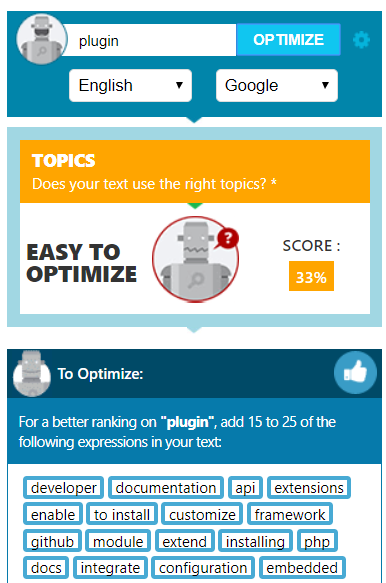
This plugin is perfect for those who deal with content. SEO TextOptimizer lets you measure the quality of texts you create for your website based on how search engines would evaluate it.

The tool shows you topics you should develop as well as those you’d better eliminate for search robots to understand the text is relevant to the specific queries. The plugin also suggests you a list of words you could add to improve your content. The best thing is that you don’t need great SEO expertise to use it.

2. SEOquake

Free extension

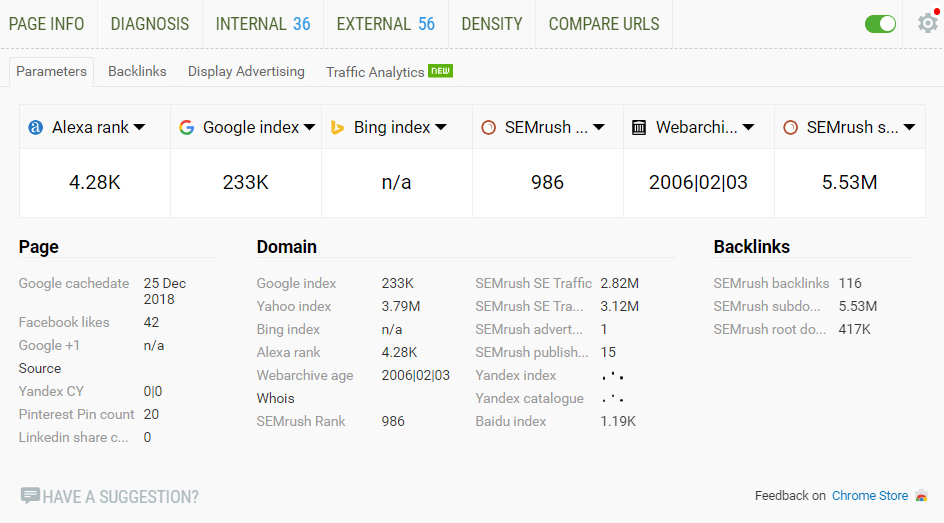
With SEOquake plugin, you can easily analyze your key SEO metrics. Moreover, the tool provides SEO audit, backlinks analysis, and other useful functions.

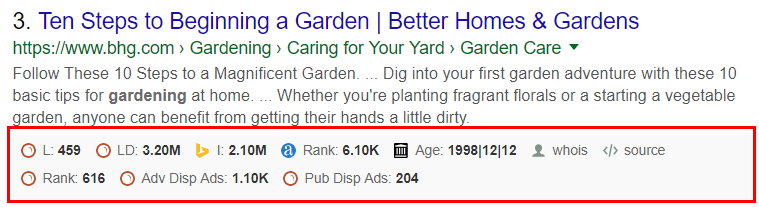
One of the factors why SEO professionals choose this tool is that you can get a comprehensive analysis of a SERP and even export its results. There’s a bar appearing below each search result which provides you with key metrics such as traffic, Alexa rank, social media shares, etc.

3. BuiltWith

Free extension

This extension lets you find what a website you are visiting at the moment is built with. It’s created to help developers, designers, and researchers to discover the technologies other pages are implementing and choose those they want to use for their sites.

The plugin tracks:

  • Widgets
  • Frameworks
  • Advertising
  • Publishing
  • Hosting
  • Analytics
  • Content Delivery Network
  • Document Standards

Experts also say it’s great you can easily get global trends on using specific technologies.

4. Serpstat Plugin

Free extension

It’s an extension which helps you conduct SEO analysis of a page. Serpstat Plugin provides the most critical information on keywords, traffic, and page visibility. You can also get the report on the top 10 keywords for which your page ranks at the top of search results.

Serpstat SEO & Website Analysis Plugin has now three tabs: Page Analysis, On-page SEO parameters, and Domain Analysis. Here are the most crucial parameters you’ll get with the plugin:

  • Domain’s traffic.
  • Domain’s visibility trend for a year.
  • The number of results on Google, Bing, and Baidu.
  • The number of images on Google Image Search.
  • Alexa Rank.
  • Page speed.
  • Site start date.
  • Meta tags.
  • The number of shares on social media networks (Facebook and Pinterest).

The plugin is free, but to use it, you need to create your Serpstat account, if you don’t have one yet.

5. WordPress SEO by Yoast

WordPress plugin

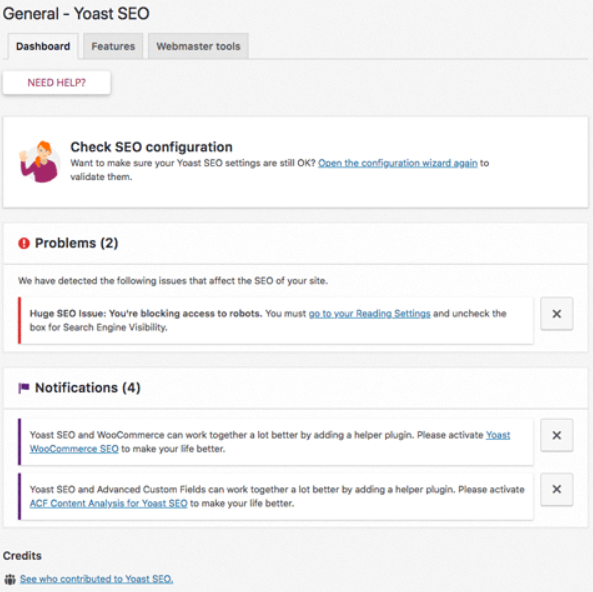
This incredibly popular plugin by Yoast helps experts with on-site SEO needs. The tool will let you:

  • Add meta keywords, title, and description to your posts.
  • Provide clear site navigation for crawlers and users.
  • Analyze your on-page SEO. You can check your content, descriptions, and keywords.
  • See what your snippets will look like.
  • Create SEO-friendly Facebook Open Graph.

This WordPress plugin has a very quick and easy-to-use interface.

6. WAVE Evaluation Tool

Free extension

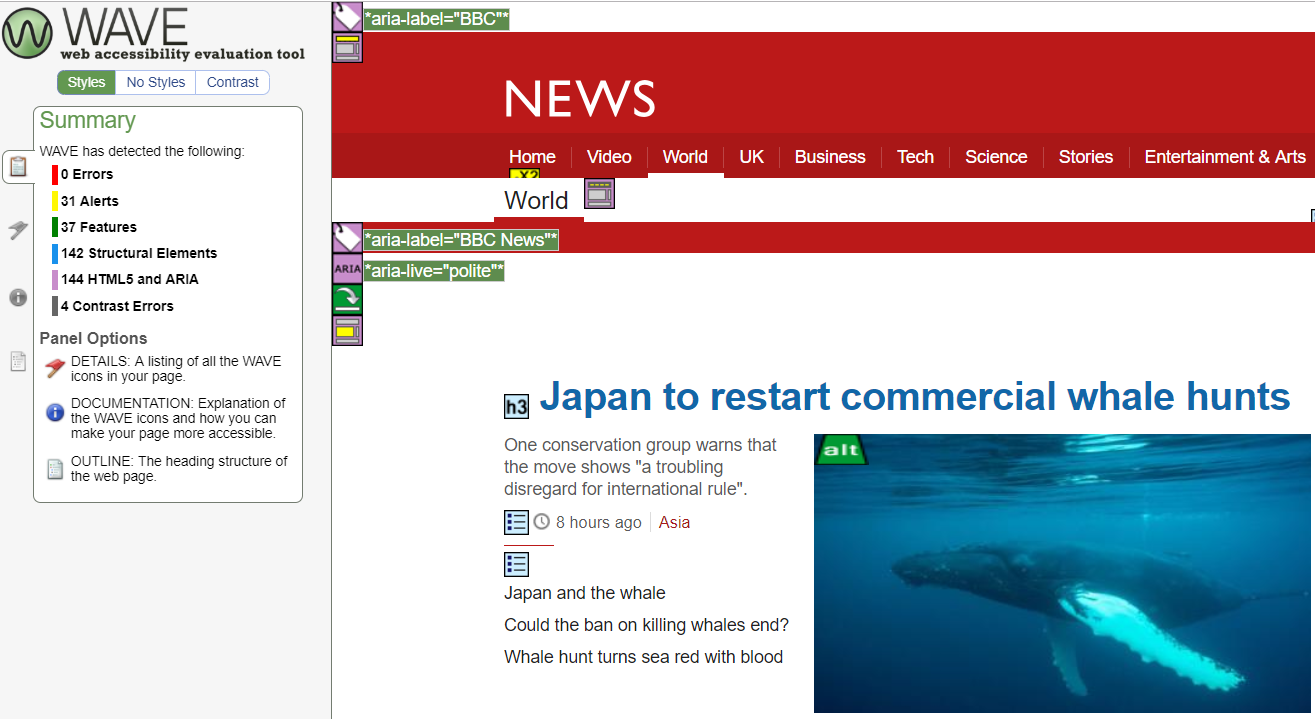
This tool evaluates web content accessibility within Chrome and Firefox browsers. WAVE provides 100% secure and private accessibility reporting. The plugin checks password-protected, intranet, sensitive or dynamically generated web pages.

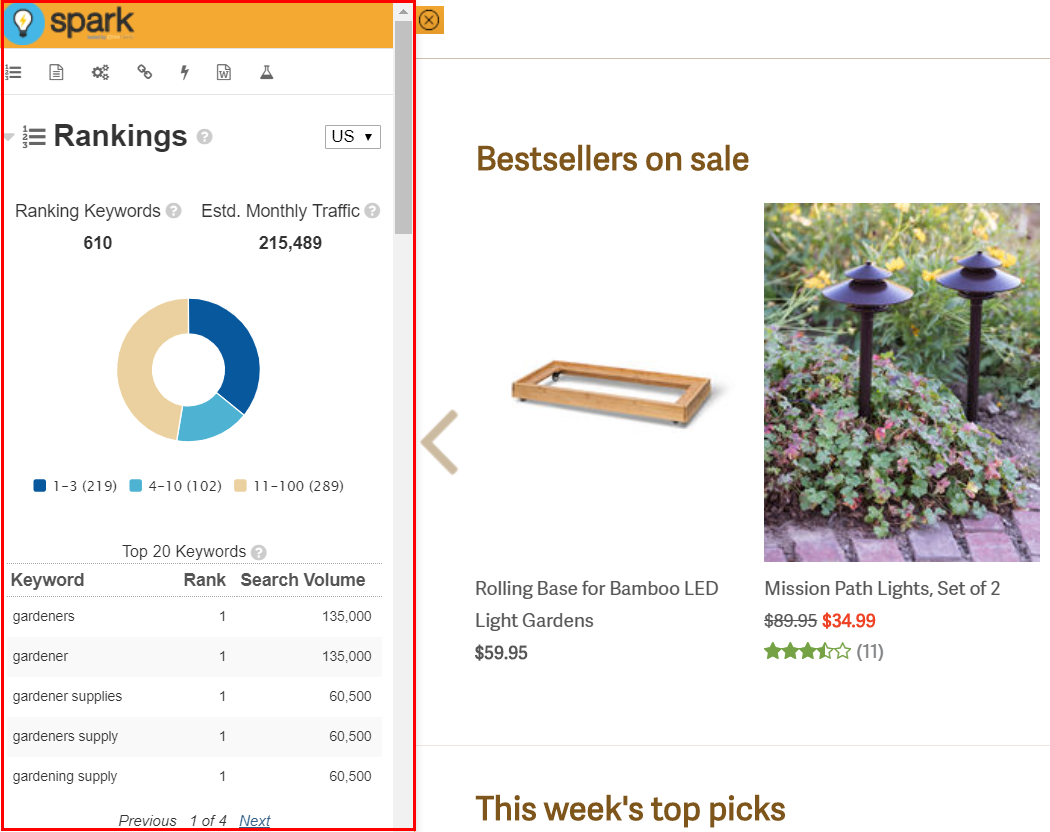
7. Spark Content Optimizer

Free extension

Spark Content Optimizer is a tool designed to help you develop your site’s search experience. The plugin provides you with easy access to such a crucial data as:

  • Monthly traffic.
  • The performance of your site for all the keywords.
  • The technical audit which analyzes more than 40 hard-to-find issues.
  • Information on backlink authority.

8. Link Redirect Trace

Free extension

It’s a great tool for tracking redirect path. The tool analyzes HTTP Headers, rel-canonicals, robots.txt, link power, etc. You can use Link Redirect Trace extension to analyze your competitors, your on-page and off-page SEO, and other critical factors.

Here are the main tasks this plugin can help you cope with:

  • Identify and fix problems in your on-page/off-page SEO.
  • Analyze your competitors’ links.
  • See the redirect chain and fix problems to make your load time faster.
  • After your site was redesigned or migrated, you can check your links.
  • Check links from affiliate and advertising networks.

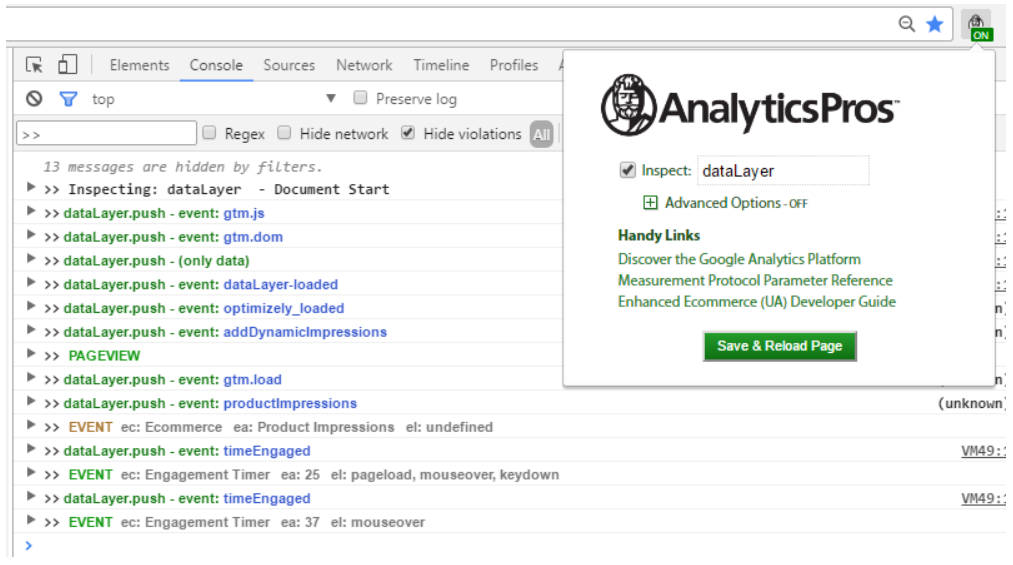
9. Ap – Data Layer Inspector+

Free extension

This plugin is a perfect toolkit for digital analysts. This add-on lets you monitor, debug, get detailed data not having to switch between the page, the code, and the developer console.

With this tool, you can inspect the dataLayer in real time, insert code into the page, analyze GA hits, ignore hits to individual properties, etc.

10. User-Agent Switcher

Free extension

The tool will help you switch quickly between user-agent strings. If you want to test how your page responds to different browsers, this plugin will let you do it. Due to User-Agent Switcher, you can browse with predefined user-agents or add your own ones.

11. Open SEO Stats

Free extension

This extension provides quick access to the most important SEO stats. The tool will show you:

  • Traffic stats. Graphs from Alexa Rank, Quantcast Rank, Compete Rank.
  • Information on your backlinks.
  • Cached pages.
  • Indexed pages. You’ll see the number of pages indexed in Google, Bing, Yahoo, Baidu, Yandex, etc.
  • Geolocation information, such as country, city, and IP address.
  • The shares on social websites.
  • Meta information, such as title, meta keywords, description, canonical tags, internal links, external links, and more.

12. Velvet Blues

Free WordPress plugin

This plugin will be handy for those who move their WordPress website to another domain and need to update internal links and references to pages. The plugin helps you fix the problem and change old links on your website. Experts say it’s great that you can find and replace any URL in your WordPress database without having to use phpMyAdmin directly.

With Velvet Blues Plugin, you can:

  • Update links which are embedded in excerpts, content, or custom fields.
  • Choose whether you want to update links for attachments or not.
  • View the number of items updated.

Install it only when you need to fix something and then uninstall it. The plugin treats everything it finds.

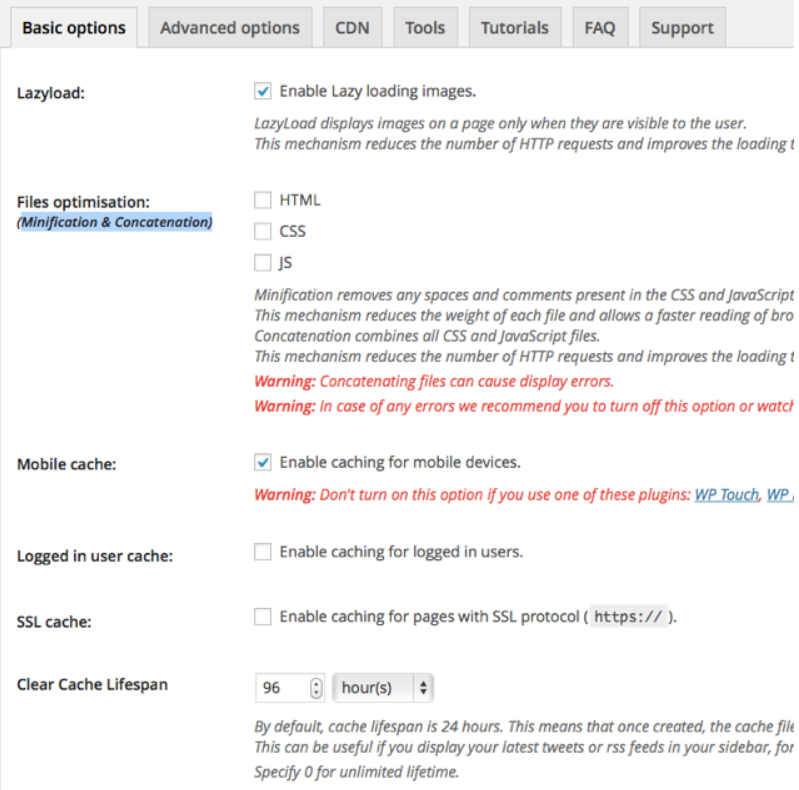
13. WP Rocket

Free WordPress plugin

Experts consider this plugin to be one of the best caching tools. Using WP Rocket to cache pages, your page load time decreases, and indexing improves. Moreover, the tool lets users reduce the weight of HTML, CSS, and JavaScript files.

With WP Rocket, you can optimize your images, so that they’ll get loaded only when visitors scroll down the page. Such an action contributes to improving page speed.

14. All In One Schema.org Rich Snippets

Free WordPress plugin

This tool will be useful for those who want to get rich snippets for their web pages. The plugin is created to help you make your page stand out in Google, Bing, and Yahoo search results.

All In One Schema.org Rich Snippets supports most content types released by Schema.org. Here are eight different content types for which you can add schema:

  • Review
  • Event
  • People
  • Product
  • Recipe
  • Software Application
  • Video
  • Articles

15. Cloudflare’s plugin for WordPress

Free WordPress plugin

This free plugin helps to accelerate page loading time, improve your SEO, and protect against DDoS attacks.

Cloudflare plugin adds value for SMEs/Medium sized businesses, making it very easy to setup CDNs, DDoS Protection, and allow them to utilize edge SEO technologies like service workers.

16. WhatRuns

Free extension

This extension lets you find out what runs any website. You, ll get all the technologies used on websites you visit:

  • CMS
  • WordPress plugins
  • Themes
  • Analytics tools
  • Frameworks

Moreover, you can even get notified when websites start using new tools and services if you follow them.

17. Grammarly

Free extension

There are both free and paid access available for this plugin. The tool underlines your grammar, spelling, or punctuation errors for you to correct them. It also suggests you synonyms for overused words and gives you tips on how you can improve your texts. To get the most out of this plugin, you’d better use a paid version, as it’ll get you access to the most critical issues.

Choose the best for you

Remember that the more extensions you download, the slower your browser becomes. That’s why it’s essential to know which ones exactly are perfect for you.

Free WordPress plugins and Chrome extensions will help you make your work easier, but you may spend quite a significant time looking for those which are really useful for you. So, this list should have helped you circle out the tools you’ll try to implement into your working process.

Want more SEO tools?

Check out these articles as well:

The post 17 top plugins and extensions for SEO appeared first on Search Engine Watch.


source https://searchenginewatch.com/2019/02/08/17-top-plugins-extensions-seo/

Thursday, 7 February 2019

Cybersecurity in SEO: How website security affects SEO performance

Website security — or lack thereof — can directly impact your SEO performance.

Search specialists can grow complacent. Marketers often get locked into a perception of what SEO is and begin to overlook what SEO should be.

The industry has long questioned the permanent impact a website hack can have on organic performance.

And many are beginning to question the role preventative security measures might play in Google’s evaluation of a given domain.

Thanks to the introduction of the GDPR and its accompanying regulations, questions of cybersecurity and data privacy have returned to the fray.

The debate rages on. What is the true cost of an attack? To what extent will site security affect my ranking?

The truth is, a lot of businesses have yet to grasp the importance of securing their digital assets. Until now, establishing on-site vulnerabilities has been considered a different skillset than SEO. But it shouldn’t be.

Being a leader – both in thought and search performance – is about being proactive and covering the bases your competition has not.

Website security is often neglected when discussing long-term digital marketing plans. But in reality, it could be the signal that sets you apart.

When was the last time cybersecurity was discussed during your SEO site audit or strategy meeting?

How does website security affect SEO?

HTTPS was named as a ranking factor and outwardly pushed in updates to the Chrome browser. Since then, HTTPS has, for the most part, become the ‘poster child’ of cybersecurity in SEO.

But as most of us know, security doesn’t stop at HTTPS. And HTTPS certainly does not mean you have a secure website.

Regardless of HTTPS certification, research shows that most websites will experience an average of 58 attacks per day. What’s more, as much as 61 percent of all internet traffic is automated — which means these attacks do not discriminate based on the size or popularity of the website in question.

No site is too small or too insignificant to attack. Unfortunately, these numbers are only rising. And attacks are becoming increasingly difficult to detect.

1. Blacklisting

If – or when – you’re targeted for an attack, direct financial loss is not the only cause for concern. A compromised website can distort SERPs and be subject to a range of manual penalties from Google.

That being said, search engines are blacklisting only a fraction of the total number of websites infected with malware.

GoDaddy’s recent report found that in 90 percent of cases, infected websites were not flagged at all.

This means the operator could be continually targeted without their knowledge – eventually increasing the severity of sanctions imposed.

Even without being blacklisted, a website’s rankings can still suffer from an attack. The addition of malware or spam to a website can only have a negative outcome.

It’s clear that those continuing to rely on outward-facing symptoms or warnings from Google might be overlooking malware that is affecting their visitors.

This creates a paradox. Being flagged or blacklisted for malware essentially terminates your website and obliterates your rankings, at least until the site is cleaned and the penalties are rescinded.

Not getting flagged when your site contains malware leads to greater susceptibility to hackers and stricter penalties.

Prevention is the only solution.

This is especially alarming considering that 9 percent, or as many as 1.7 million websites, have a major vulnerability that could allow for the deployment of malware.

If you’re invested in your long-term search visibility, operating in a highly competitive market, or heavily reliant on organic traffic, then vigilance in preventing a compromise is crucial.

2. Crawling errors

Bots will inevitably represent a significant portion of your website and application traffic.

But not all bots are benign. At least 19% of bots crawl websites for more nefarious purposes like content scraping, vulnerability identification, or data theft.

Even if their attempts are unsuccessful, constant attacks from automated software can prevent Googlebot from adequately crawling your site.

Malicious bots use the same bandwidth and server resources as a legitimate bot or normal visitor would.

However, if your server is subject to repetitive, automated tasks from multiple bots over a long period of time, it can begin to throttle your web traffic. In response, your server could potentially stop serving pages altogether.

If you notice strange 404 or 503 errors in Search Console for pages that aren’t missing at all, it’s possible Google tried crawling them but your server reported them as missing.

This kind of error can happen if your server is overextended

Though their activity is usually manageable, sometimes even legitimate bots can consume resources at an unsustainable rate. If you add lots of new content, aggressive crawling in an attempt to index it may strain your server.

Similarly, it’s possible that legitimate bots may encounter a fault in your website, triggering a resource intensive operation or an infinite loop.

To combat this, most sites use server-side caching to serve pre-built versions of their site rather than repeatedly generating the same page on every request, which is far more resource intensive. This has the added benefit of reducing load times for your real visitors, which Google will approve of.

Most major search engines also provide a way to control the rate at which their bots crawl your site, so as not to overwhelm your servers’ capabilities.

This does not control how often a bot will crawl your site, but the level of resources consumed when they do.

To optimize effectively, you must recognize the threat against you or your client’s specific business model.

Appreciate the need to build systems that can differentiate between bad bot traffic, good bot traffic, and human activity. Done poorly, you could reduce the effectiveness of your SEO, or even block valuable visitors from your services completely.

In the second section, we’ll cover more on identifying malicious bot traffic and how to best mitigate the problem.

3. SEO spam

Over 73% of hacked sites in GoDaddy’s study were attacked strictly for SEO spam purposes.

This could be an act of deliberate sabotage, or an indiscriminate attempt to scrape, deface, or capitalize upon an authoritative website.

Generally, malicious actors load sites with spam to discourage legitimate visits, turn them into link farms, and bait unsuspecting visitors with malware or phishing links.

In many cases, hackers take advantage of existing vulnerabilities and get administrative access using an SQL injection.

This type of targeted attack can be devastating. Your site will be overrun with spam and potentially blacklisted. Your customers will be manipulated. The reputation damages can be irreparable.

Other than blacklisting, there is no direct SEO penalty for website defacements. However, the way your website appears in the SERP changes. The final damages depend on the alterations made.

But it’s likely your website won’t be relevant for the queries it used to be, at least for a while.

Say an attacker gets access and implants a rogue process on your server that operates outside of the hosting directory.

They could potentially have unfettered backdoor access to the server and all of the content hosted therein, even after a file clean-up.

Using this, they could run and store thousands of files – including pirated content – on your server.

If this became popular, your server resources would be used mainly for delivering this content. This will massively reduce your site speed, not only losing the attention of your visitors, but potentially demoting your rankings.

Other SEO spam techniques include the use of scraper bots to steal and duplicate content, email addresses, and personal information. Whether you’re aware of this activity or not, your website could eventually be hit by penalties for duplicate content.

How to mitigate SEO risks by improving website security

Though the prospect of these attacks can be alarming, there are steps that website owners and agencies can take to protect themselves and their clients. Here, proactivity and training are key in protecting sites from successful attacks and safeguarding organic performance in the long-run.

1. Malicious bots 

Unfortunately, most malicious bots do not follow standard protocols when it comes to web crawlers. This obviously makes them harder to deter. Ultimately, the solution is dependent on the type of bot you’re dealing with.

If you’re concerned about content scrapers, you can manually look at your backlinks or trackbacks to see what sites are using your links. If you find that your content has been posted without your permission on a spam site, file a DMCA-complaint with Google.

In general, your best defense is to identify the source of your malicious traffic and block access from these sources.

The traditional way of doing this is to routinely analyze your log files through a tool like AWStats. This produces a report listing every bot that has crawled your website, the bandwidth consumed, total number of hits, and more.

Normal bot bandwidth usage should not surpass a few megabytes per month.

If this doesn’t give you the data you need, you can always go through your site or server log files. Using this, specifically the ‘Source IP address’ and ‘User Agent’ data, you can easily distinguish bots from normal users.

Malicious bots might be more difficult to identify as they often mimic legitimate crawlers by using the same or similar User Agent.

If you’re suspicious, you can do a reverse DNS lookup on the source IP address to get the hostname of the bot in question.

The IP addresses of major search engine bots should resolve to recognizable host names like ‘*.googlebot.com’ or ‘*.search.msn.com’ for Bing.

Additionally, malicious bots tend to ignore the robots exclusion standard. If you have bots visiting pages that are supposed to be excluded, this indicates the bot might be malicious.

2. WordPress plugins and extensions 

A huge number of compromised sites involve outdated software on the most commonly used platform and tools – WordPress and its CMS.

WordPress security is a mixed bag. The bad news is, hackers look specifically for sites using outdated plugins in order to exploit known vulnerabilities. What’s more, they’re constantly looking for new vulnerabilities to exploit.

This can lead to a multitude of problems. If you are hacked and your site directories have not been closed from listing their content, the index pages of theme and plugin related directories can get into Google’s index. Even if these pages are set to 404 and the remaining site is cleaned up, they can make your site an easy target for further bulk platform or plugin-based hacking.

It’s been known for hackers to exploit this method to take control of a site’s SMTP services and send spam emails. This can lead to your domain getting blacklisted with email spam databases.

If your website’s core function has any legitimate need for bulk emails – whether it’s newsletters, outreach, or event participants – this can be disastrous.

How to prevent this

Closing these pages from indexing via robots.txt would still leave a telling footprint. Many sites are left removing them from Google’s index manually via the URL removal request form. Along with removal from email spam databases, this can take multiple attempts and long correspondences, leaving lasting damages.

On the bright side, there are plenty of security plugins which, if kept updated, can help you in your efforts to monitor and protect your site.

Popular examples include All in One and Sucuri Security. These can monitor and scan for potential hacking events and have firewall features that block suspicious visitors on a permanent basis.

Review, research, and update each plugin and script that you use. It’s better to invest the time in keeping your plugins updated than make yourself an easy target.

3. System monitoring and identifying hacks 

Many practitioners don’t try to actively determine whether a site has been hacked when accepting prospective clients. Aside from Google’s notifications and the client being transparent about their history, it can be difficult to determine.

This process should play a key role in your appraisal of existing and future business. Your findings here – both in terms of historic and current security – should factor into the strategy you choose to apply.

With 16 months of Search Console data, it can be possible to identify past attacks like spam injection by tracking historical impression data.

That being said, not all attacks take this form. And certain verticals naturally experience extreme traffic variations due to seasonality. Ask your client directly and be thorough in your research.

How to prevent this

To stand your best chance of identifying current hacks early, you’ll need dedicated tools to help diagnose things like crypto-mining software, phishing, and malware.

There are paid services like WebsitePulse or SiteLock that provide a single platform solution for monitoring your site, servers, and applications. Thus, if a plugin goes rogue, adds links to existing pages, or creates new pages altogether, the monitoring software will alert you within minutes.

You can also use a source code analysis tool to detect if a site has been compromised.

These inspect your PHP and other source code for signatures and patterns that match known malware code. Advanced versions of this software compare your code against ‘correct’ versions of the same files rather than scanning for external signatures. This helps catch new malware for which a detection signature may not exist.

Most good monitoring services include the ability to do so from multiple locations. Hacked sites often don’t serve malware to every user.

Instead, they include code that only displays it to certain users based on location, time of day, traffic source, and other criteria. By using a remote scanner that monitors multiple locations, you avoid the risk of missing an infection.

4. Local network security

It’s equally as important to manage your local security as it is that of the website you’re working on. Incorporating an array of layered security software is no use if access control is vulnerable elsewhere.

Tightening your network security is paramount, whether you’re working independently, remotely, or in a large office. The larger your network, the higher the risk of human error, while the risks of public networks cannot be understated.

Ensure you’re adhering to standard security procedures like limiting the number of login attempts possible in a specific time-frame, automatically ending expired sessions, and eliminating form auto-fills.

Wherever you’re working, encrypt your connection with a reliable VPN.

It’s also wise to filter your traffic with a Web Application Firewall (WAF). This will filter, monitor, and block traffic to and from an application to protect against attempts at compromise or data exfiltration.

In the same way as VPN software, this can come in the form of an appliance, software, or as-a-service, and contains policies customized to specific applications. These custom policies will need to be maintained and updated as you modify your applications.

Conclusion

Web security affects everyone. If the correct preventative measures aren’t taken and the worst should happen, it will have clear, lasting consequences for the site from a search perspective and beyond.

When working intimately with a website, client, or strategy, you need to be able to contribute to the security discussion or initiate it if it hasn’t begun.

If you’re invested in a site’s SEO success, part of your responsibility is to ensure a proactive and preventative strategy is in place, and that this strategy is kept current.

The problem isn’t going away any time soon. In the future, the best SEO talent – agency, independent, or in-house – will have a working understanding of cybersecurity.

As an industry, it’s vital we help educate clients about the potential risks – not only to their SEO, but to their business as a whole.

The post Cybersecurity in SEO: How website security affects SEO performance appeared first on Search Engine Watch.


source https://searchenginewatch.com/2019/02/07/how-website-security-affects-seo/

Wednesday, 6 February 2019

The state (or statelessness) of technical SEO in 2019

What do we need to know about technical SEO in 2019? Here’s an overview to keep in mind.

Technical SEO is different from what we know as standard SEO. It dives deeper into the analysis of content and it can help you draw very interesting conclusions.

Mike King from iPullRank delivered a highly informative presentation in Catalyst’s TechSEO Boost and it can give us a better idea of the state, or actually, the statelessness of technical SEO.

Whether you’re an SEO expert or you’re just getting started, here are some key points to consider from Mike’s session.

Defining technical SEO

The first challenge that comes with technical SEO has to do with its actual definition. It’s not always easy to explain it.

In fact, it’s even hard for SEO professionals to define it.

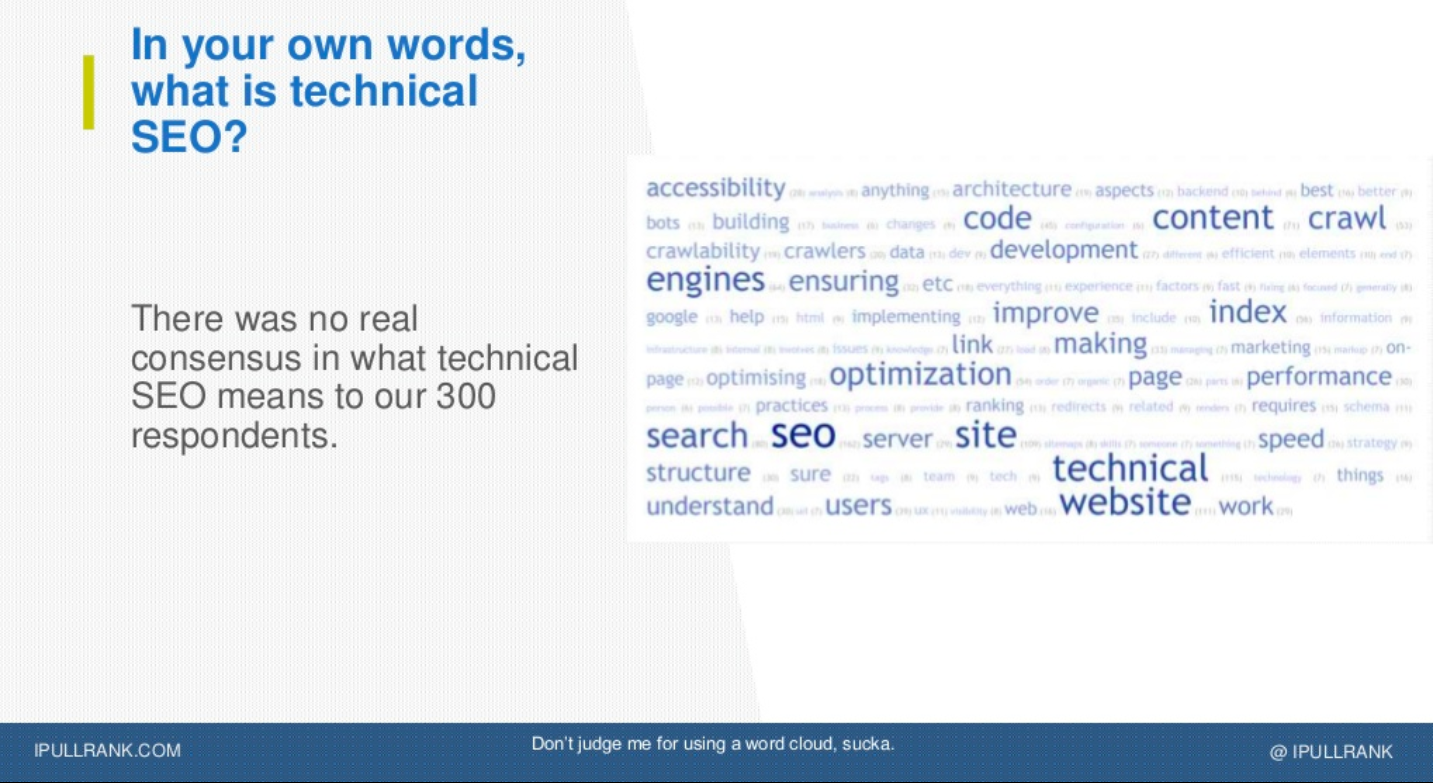
Mike King asked 300 people to provide their own definition to what technical SEO really is. Unsurprisingly, there was no consistency in its definition. Many respondents indicated that web performance and information architecture are parts of what technical SEO does. However, these are tasks that other roles typically perform.

As Mike King said, “everything we do is someone else’s job.”

The best way to define technical SEO as a profession then is to think of it as the state of being curious. Technical SEO experts are curious enough to play with things that they can change.

What we need to remember is that there is no technical SEO as a definitive discipline. It can be the job of putting things together to make things scale and solve problems that affect SEO.

Thus, if we want to explain the difference between technical and standard SEO, we need to remember that technical SEO is about scalability, depth, detail, advanced cross-functional understanding, and also execution.

wordcloud about "what is technical SEO?"

The challenge of metrics

Another challenge that we’re seeing in technical SEO — and SEO in general sometimes — is that the metrics are too opaque.

There are many tools to measure our own definition of success but we still don’t have peer-reviewed and transparent definitions of any proprietary link metrics.

How can we tell which metrics matter most of all? How do we define success and how can we all agree to it?

These bring out the need to standardize SEO.

We need to standardize three things:

  • Open PageRank Computation
  • Crawl Data Portability
  • Open Rankings

These can help us improve our SEO expertise by sharing a common understanding with everyone in the industry.

Technical SEO in 2019

If you want to improve your technical SEO skills in 2019, here are some key things to consider.

  • Natural language generation can be a great ally in the future. We can take care of the good content and it can perfectly optimize it for the SERPs.
  • Semantic keyword research can also be helpful and it’s important to spend more time on it. It can even help you pull the right SEO metrics to draw better conclusions.

There are three types of tests that are most relevant to technical SEO:

  • Unit tests (testing an individual function to ensure that it works)
  • Integration tests (using your logic to build a bigger system)
  • UI tests (testing frontend interface on your website, which is the slowest version of testing)

Headless browsers can be very useful in the process of test-driven development. We tend to use them for Javascript-rendered content but they are actually made for automated testing.

From this perspective, we can think of technical SEO professionals as product managers. They are focusing on a test-driven development to run tests and experiment with different scenarios.

types of tests that are relevant to technical SEO

Here are some additional tips that have to do with technical SEO:

  • There will always be technical expectations for content that ranks well. We can deal these with the right text analysis, the perfect optimization and the content review that will lead to exactly what Google wants to see.
  • It’s useful to spend more time on automated testing, unit testing and also headless browsers. You can perform tests to see if they are how you expect them to be. It’s the idea of test-driven development that can help you check every single component.
  • Log file analysis is crucial. If you’re not doing it, then you’re just guessing.
  • PageRank is still our measurement. Even if we don’t have complete visibility, it’s still important to understand it.
  • We need to be proactive to understand Google. Don’t be afraid to dig into data to understand how Google works
  • Don’t underestimate the power of internal link building. The larger the page, the higher the success.

Tools to use in technical SEO

If you want to start using the right tools for technical SEO, here is the list that Mike provided in his presentation.

You can also find out more about free technical SEO tools in our own list.

Overview

What we need to remember when it comes to technical SEO is that it’s all about being curious. You don’t need to have a clear definition of your role and your tasks. These may depend on the company that you’re working for.

But you still need to be comfortable with figuring out how things work. You need to have the inquisitive mind to investigate why one thing succeeded over another.

And this is probably the best way to dive into it with the right mindset.

The post The state (or statelessness) of technical SEO in 2019 appeared first on Search Engine Watch.


source https://searchenginewatch.com/2019/02/06/technical-seo-2019-statelessness/

Tuesday, 5 February 2019

7 social media monitoring tools to check out in 2019

The beginning of a new year is as good a reason as any other to try something new: a different lifestyle, a new hobby, a brand new marketing strategy.

And, of course, a new tool, since it’s both exciting and rewarding to discover awesome software that helps you deal with work and, sometimes, with life as well.

This is a list of social media monitoring/listening tools you should check out next year.

Some of them have existed for a while, some are new and fresh on the market.

But all of them are worth trying out and using in your marketing tool set (if social monitoring is in your marketing strategy at all, as it should be). So let’s start:

Which social media monitoring tools should you check out this year?

1. Awario

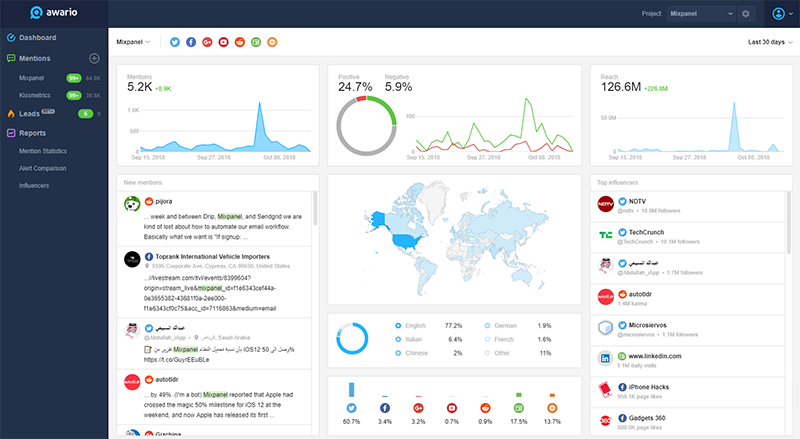
awario dashboard, a social media monitoring tool

Awario collects mentions of your keywords from a large range of sources (that keeps getting larger).

It monitors all major social media platforms, Reddit and other forums, news sites and blogs, and the Web.

It works in real-time: whenever your keyword is mentioned, it will immediately appear in your mention feed, and you’ll be able to check it at any point and reply to the mention straight from the dashboard. All reviews, complaints, questions and comments can be dealt with as quickly as you like.

Awario also does its fair deal of analysis. It analyses the growth of mentions, their Reach (how many people do mentions reach), its sentiment (a percentage of positive, negative, and neutral mentions), mentions’ locations, languages, and sources.

You can also generate reports on mentions’ statistics, compare analytics with your competitors, and see your industry influencers.

One of the features that makes Awario stand out is Awario Leads – a recent addition made specifically for finding hot leads online. It brings surprisingly good results and can properly transform the way you sell!

Price: Starts with $29/mo. You can also sign up for a free 14-day trial.

2. Mention

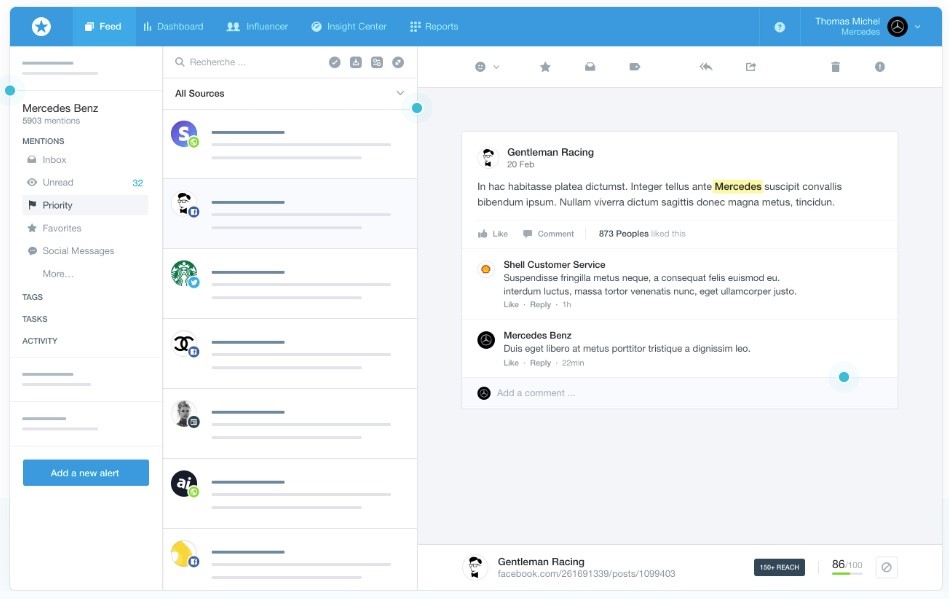
mention dashboard, a social media monitoring tool

Mention is one of the oldest and tried out social media monitoring tools. The French company had the time to mature, discover what the users need, and make sure it delivers the best possible results.

Its main goal is real-time search: you get the results from the past 24 hours after setting up an alert. Historical data is only available on request.

Mention is a good choice for large companies: it monitors all main sources, lets you tag and organize mentions, build your own custom reports and export them in PDF and CSV.

There’s even an automated reports feature: they update you on what’s happening with your alerts on a regular basis. The tool also finds influencers in your industry, reveals their interests, locations, and follower count, and makes it easy to jump into influencer marketing.

Mention is integrated with Slack and Zapier which makes marketing workflow smooth and simple.

Price: Starts with $29/mo. You can sign up for a free 14-day trial.

3. Brand24

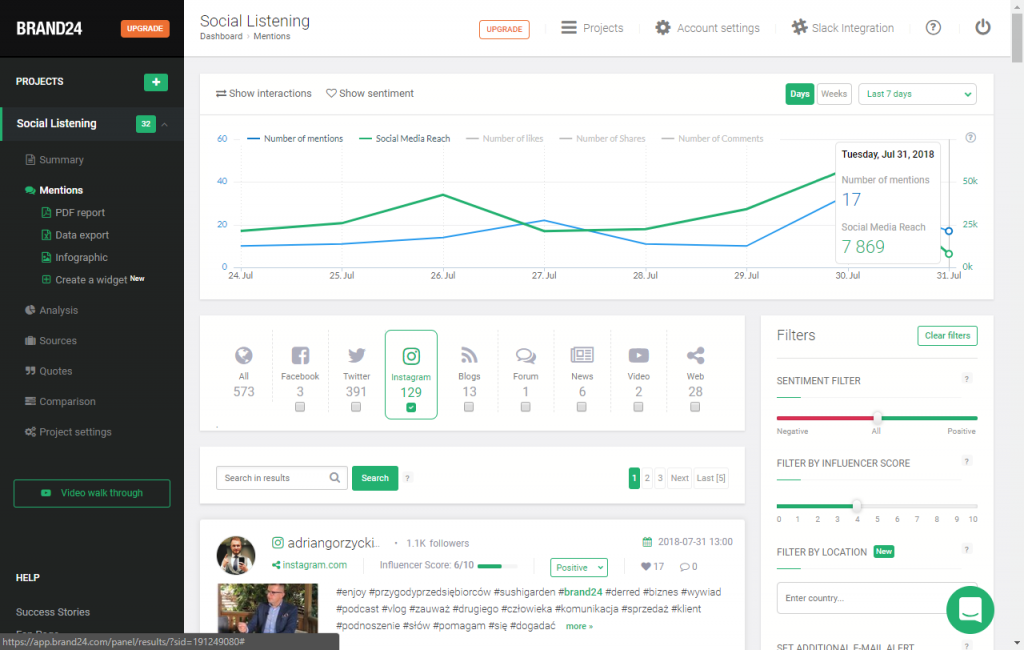
brand24, a social media monitoring tool

Brand24 is a solid social media monitoring tool for small and medium-sized businesses.

It has existed for a while on the Polish market, but focused on the English-speaking part of the world fairly recently. It monitors Facebook, Twitter, Google+, Reddit, YouTube, Instagram, the web and saves historical data for up to 12 months.

Similarly to Awario and Mention, Brand24 filters by countries and languages, provides mentions’ statistics, and Influencer reports. However, reports aren’t white-label and data export is only allowed in the Premium plan.

Brand24 allows multi-user access for up to 99 users, which is great for large social media marketing teams.

Moreover, they have Slack integration and a mobile app, making social media monitoring a process that anyone from the team can do at any point of their day.

Price: Starts with $49/mo. You can sign up for a free 14-day trial.

4. TweetDeck

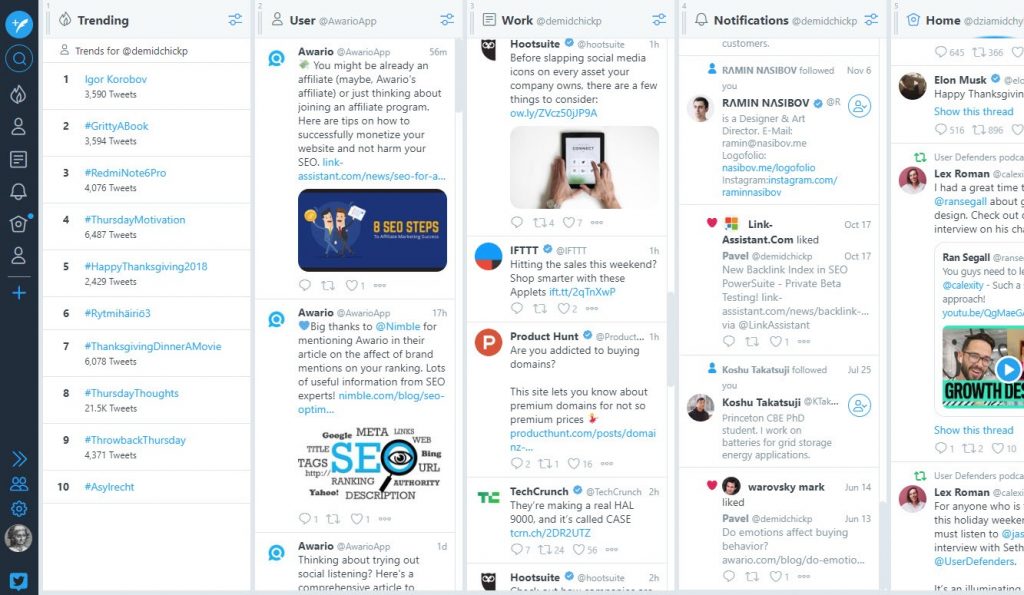
tweetdeck dashboard, a social media monitoring tool

TweetDeck isn’t quite on the same level as the tools mentioned before, as it only just monitors Twitter.

But that’s fair, since it’s a tool By Twitter for Twitter. The tool doesn’t stop at monitoring: you can also schedule posts for Twitter and look at Twitter analytics.

Basically, it’s a handy tool if Twitter is your preferred marketing channel and the one you want to keep an eye on. After all, it often makes sense: most social media crises happen there, and most brands interact with customers on exactly this social media platform.

Price: Free. Sign up with your Twitter account.

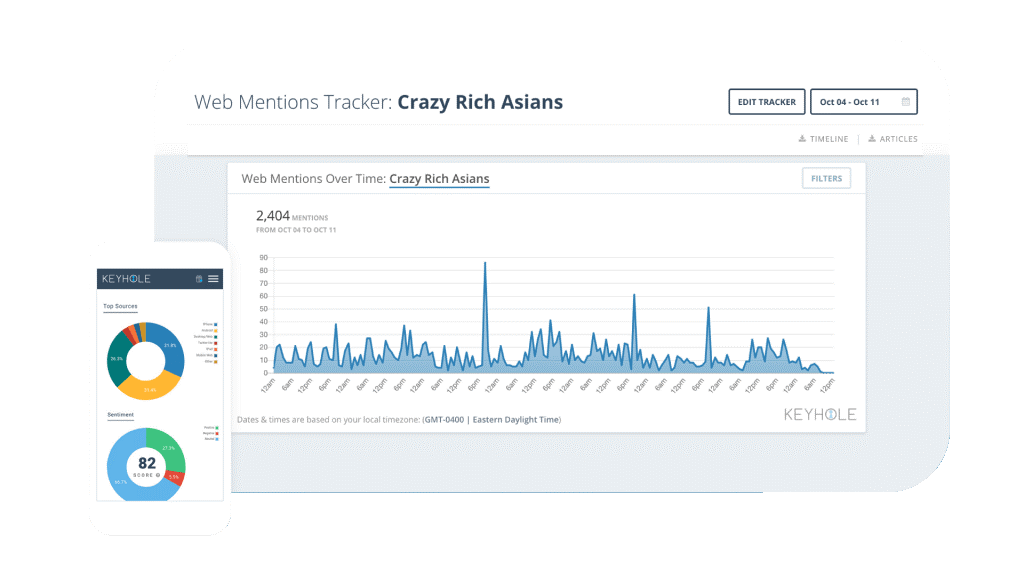
5. Keyhole

keyhole dashboard, a social media monitoring tool

Keyhole is a tool that combines a real TweetDeck and a hypothetical TweetDeck for Instagram.

Keyhole does social listening for these two platforms and analyzes the mentions found. It also does automated posting on Twitter and Instagram. Besides these two platforms, Keyhole monitors blogs and news sites.

What Keyhole does especially well is reports. Clear, customizable, and embeddable reports include growth rates, engagement metrics, historical data, social media influencers, and sentiment analysis. You’ve got access to all kinds of presentation forms: clouds, graphs, charts, maps, and so on. It’s a delight for both users and clients.

Price: Starts with $199/mo. Sign up for a free 7-day trial.

6. Brandwatch

brandwatch dashboard, a social media monitoring tool

Brandwatch is a tool made for marketing departments and social media marketing teams that you might find in big corporations. It does social listening across all platforms, blogs, forums, and the web.

It mostly stands out due to its social media analytics and reporting features. Brandwatch collects not only its own social listening data, but also other kinds of data from Hootsuite, Buzzsumo, and Google Analytics.

As a result, you get demographic and psychographic data about your audience, their location and languages, trending topics in your niche, robust sentiment analysis, and all other information you might need to do comprehensive market research.

You also get dashboards that can be exported into customizable PowerPoint presentations.

Price: Starts with $500/mo. There’s no free trial, but you can book a demo here.

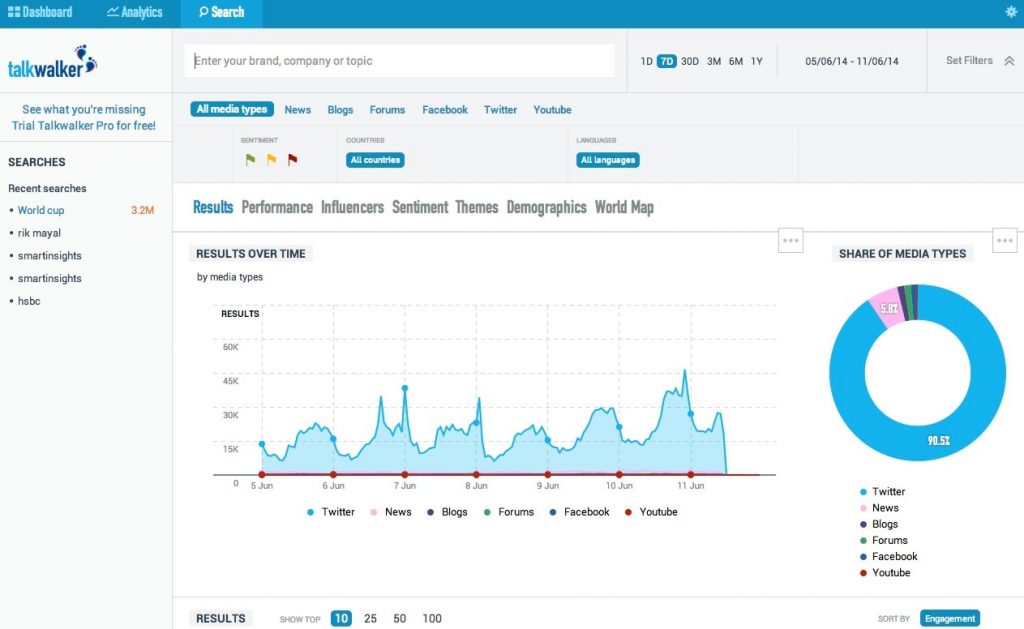
7. Talkwalker

talkwalker dashboard, a social media monitoring tool

Talkwalker is another social media monitoring tool that’s made mostly for agencies.

It monitors even niche social media platforms, such as Flickr, Pinterest, Foursquare, SoundCloud, Twitch, and so on, in addition, of course, to all the main ones, such as blogs, forums, news sites, Twitter, Facebook, Instagram, and YouTube. It stands out for the ability to analyze images (e.g., find all photos with your logo).

Talkwalker is integrated with Google Analytics and analyses age, gender, occupation, location, languages; identifies main content themes and mentions’ sentiment.

Just as Brandwatch, Talkwalker is meant to work with great amounts of data rather than with specific mentions, and its main uses are market research and reputation management.

Price: Freemium, paid plans start with $700/mo. Start for free here.

Conclusion

So here you go: you’ve got a sample of the best social media monitoring tools for every kind of budget and every kind of social listening goals: from customer service to lead generation and extensive market research. Go ahead and start the year with a new tool that is best for you and your business!

Read next:

The post 7 social media monitoring tools to check out in 2019 appeared first on Search Engine Watch.


source https://searchenginewatch.com/2019/02/04/social-media-monitoring-tools-2019117809/

Monday, 4 February 2019

YouTube Optimization: Complete Guide

When you think SEO, naturally you think Google. Some of you might even think Bing, Yahoo, Yandex, or Baidu depending on your target location.

But the often-forgotten search engine when it comes to prioritizing your optimization efforts is YouTube.

According to Alexa’s global traffic rankings, YouTube is the second most visited website in the world.

It’s also arguably the second biggest search engine in the world that you haven’t yet properly optimized for — despite this very topic featuring at Mozcon over four years ago!

Why YouTube?

“YouTube viewers watch a lot of video — over 4 billion hours a month at last count. But the average household also watches several hours of video per day on their TVs. So for YouTube to become the most important media in more people’s lives, we’ve got a lot of growing to do.”

Source: YouTube Creators

Unlocking the potential within YouTube means you can access millions of viewers every day. This gives you a new channel for your promotional videos along with your more generally helpful content. In return, you can boost your overall online presence.

Ok, so a lot of YouTube is soppy cat videos and watching people inadvertently hurt themselves. But the platform does offer quite a bit for businesses to take advantage of, presenting those who embrace it with ample opportunity to:

  • Capture more attention
  • Garner better integration with social media content
  • Nurture a highly-engaged, loyal audience
  • Take advantage of the inherent benefit from better search engine rankings

That last one is the kicker.

Below, we will see how TOP can help you optimize your videos to increase your YouTube rankings, create engagement and why should you promote and embed your branded videos in your website’s

  • Targeting your videos – Understanding searcher intent, keyword research and video creation.
  • Optimizing your videos – Creating a branded presence, optimizing titles, tags and descriptions.
  • Promoting your videos – Getting real, engaged views on your videos, building links and embeds to your videos.

Easy as the Alphabet: Google and YouTube

Google shows more than just articles in their SERPs. They also rank videos, images, books and more.

The more content you create, in more varieties, the more you are increasing your chances of being picked up and ranked in Google SERPs for related search terms.

Considering that Google owns YouTube, it does not come as a surprise that you can increase your organic visibility by spending some time optimizing your video content on YouTube and embedding videos on your website.

It is important to know that embedding videos won’t directly improve your rankings in Google SERPs, according to Google’s John Mueller.

However, having useful videos within your content can help you keep a visitor on the page longer. That should eventually help you increase your niche authority, which should see you increasing your organic rankings.

Google’s John Mueller responds on a comment saying that embedding videos won’t directly improve your rankings

In short, once your visitors see that your site is sharing informative and helpful content they are most likely to return. Thus, over time making your site authoritative and engaging source rewarded by Google.

Based on your keyword research (explained further in this guide) you will be able to create video content useful for your targeted audience, that will result in your viewers seeing you as a trusted resource of information.

Before we dive into more detailed steps on how to optimize your videos, let’s take a look at the main YouTube ranking factors.

YouTube ranking factors

YouTube has cited Audience Retention as one of its main ranking factors. In short, this is how long people watch your videos before exiting.

The Audience Retention report analyses :

  • Average view duration for all videos on your channel
  • Top videos or channels listed by watch time
  • Audience retention data for a specific video for different time frames
  • Relative audience retention for a video compared to the YouTube average for similar videos

Other YouTube ranking factors surrounding engagement:

  • Video comments
  • Subscribers – after watching a video
  • Video shares
  • Click-through rate
  • Thumbs up/Thumbs down

Also, according to the YouTube SEO Ranking Factor Study, published on Briggsby, the most important aspects of ranking well on YouTube are:

  • Watch time
  • Channel authority
  • Positive sentiment & engagement
  • Broad match keyword targeting across title, description, and keyword tags

Now that we know what are some of the key ranking factors on YouTube let’s dive in and see how can you discover topics and how to optimize your videos to increase its chances to rank better on YouTube.

(T) Keyword research

The YouTube SEO process starts just like any content creation process, with a keyword, search query and topic research. If you are new to keyword research, check out Moz’s great guide on the topic or watch our very own ‘Wolfgang Bites’ and learn how can you ‘Read Your Customers’ Minds’.

The goal you are trying to achieve here is to understand searcher intent, what kind of information users are looking for and which search terms are relevant to your business and your audience.

An additional bonus would be to discover trending search terms or keywords related to your industry.

Find relevant topics with high volume keywords and low competition.

As highlighted in MOZ’s keyword research, you should ask yourself…

  • Is the keyword relevant to your website’s content?
  • Will searchers find what they are looking for on your site when they search using these keywords?
  • Will they be happy with what they find?
  • And, will this traffic result in financial rewards or other organizational goals?

Now that you know how to do a keyword research, let’s see how can you discover your potential keywords using YouTube.

YouTube’s Search Suggest

To start discovering industry related search topics, you can use YouTube’s search suggest feature. Just type something into YouTube search and you’ll see a list of suggested topics appear. If you have the Keywords Everywhere Extension plugged in too, you’ll even get some additional competition and volume information too.

Keywords Everywhere – Mozilla Firefox

Keywords Everywhere – Google Chrome

It doesn’t matter if you use MS Office Excel or Google Sheets, as long you create a database with search volume for your targeted keywords. Once you have at least 50 different keywords, you are ready to make your analysis. Based on your analysis, you should be able to discover which keywords are more valuable to you.
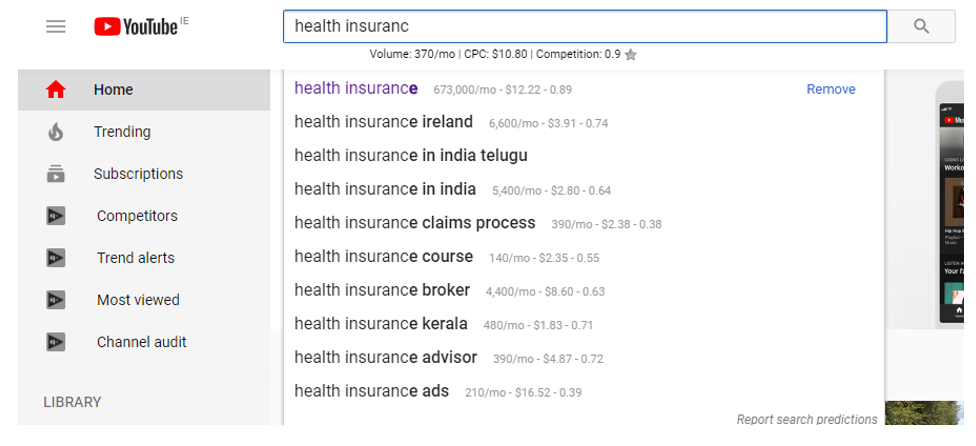
Using Keywords Everywhere Chrome Extension to discover topics related to ‘health insurance’ with search volume shown for each suggestion.

Bear in mind that by using YouTube’s search suggest you would have to type the data in your sheets manually for each targeted keyword.

Considering that this process can be time-consuming, we would suggest creating a database of targeted search terms (topics and keywords related to your services). Using tools such are SEMrush or Google Keyword Planner you will be able to discover the most valuable keywords.

As an alternative to Google Keyword Planner you can use KeywordTool.io. This tool allows you to find keywords and you will be able to compare keyword search volume in YouTube, as opposed to search volume from Google.

Unfortunately, the free version is fairly limited and you need a pro version in order to unlock the following awesome features:

  • Keyword suggestions (variants stemming from your entry)
  • Related keywords (not keyword variants, but related, e.g. same semantic area)
  • Questions (similar to Answer The Public and the likes, great for Featured Snippet opportunities. etc)
  • Prepositions (again, similar to Answer The Public and the likes, great for increasing your site’s chances of appearing in Featured Snippets and ‘People Also Ask’ query suggestions)
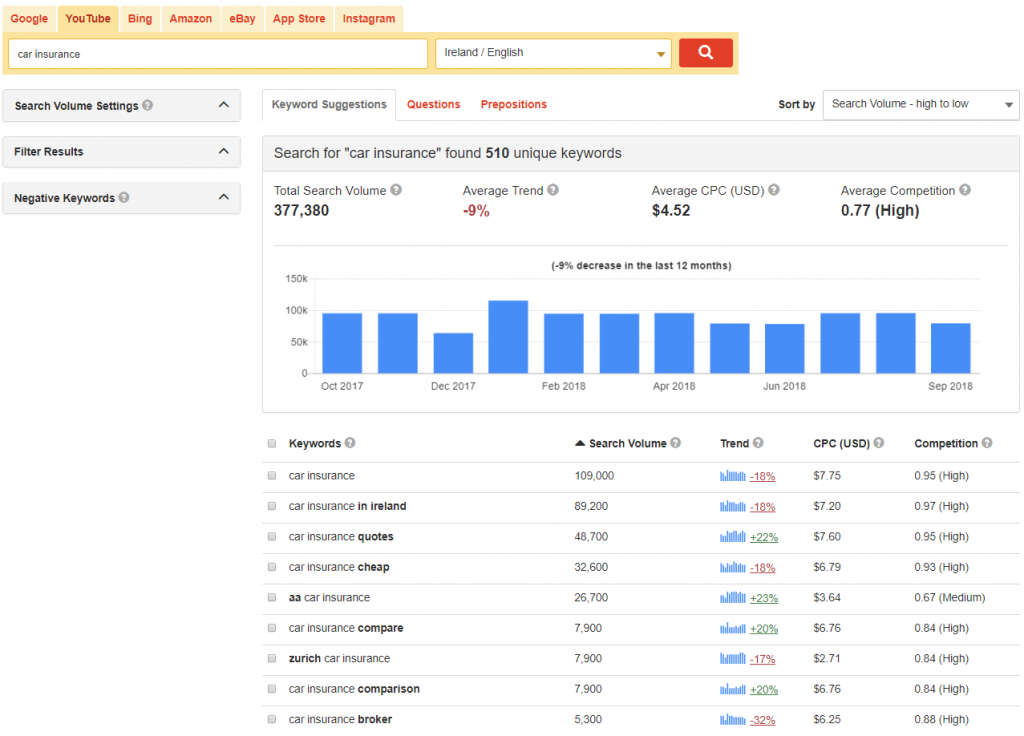
KeywordTool.io can be used as an alternative to Google Keyword Planner

Industry related topics and videos

Another way of finding the industry related topics and keywords is to analyze your competitor’s videos. Analyzing their videos, you can discover topics, gather ideas and aim to create a better and more engaging video. Your ultimate goal here: ‘Steal’ their viewers.

The process here is rather straightforward. Visit your competitor’s branded YouTube profile and see which videos have the most views and comments. Analyze the keywords and topics they’ve used for their best performing videos and 10x it! Make it better!

Vid IQ and TubeBuddy are freemium browser plugins that allow you to spy on competitor tags, while providing additional performance data about selected YouTube video. Using one of these tools should help you discover what tags and keywords are your competitors use when uploading their videos.

Branded YouTube profile report

Using your business’ YouTube search report, you can discover how viewers are engaging with your content, a total watch time, average view duration, a total number of views, etc.

To view your YouTube analytics, navigate to Creator Studio Dashboard from your profile image (top right) or click here, once you’re logged into your YouTube account.
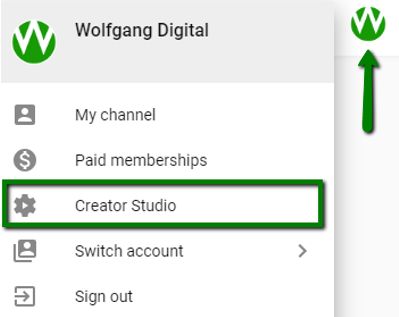
Navigating to YouTube Creator Studio Dashboard

Within YouTube Analytics, navigate to ‘Traffic Sources’ -> ‘YouTube Search.’

You will be able to see which search terms were used by viewers on YouTube to discover your content. Based on your previous keyword research, you should be able to notice if you’ve missed any important keywords.

Additionally, with knowing how users are discovering your videos, you will have a clear picture of what your most important keywords are for targeting purposes.
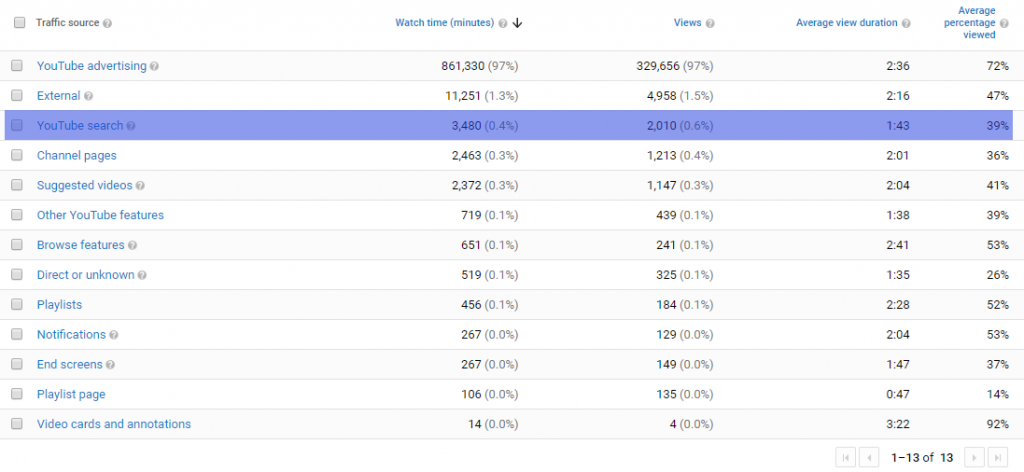
YouTube Analytics Traffic Sources

List of targeted keywords

When you compile a group of targeted keywords for your video, it’s time to see the amount of search volume for each keyword. It’s good practice to ensure that target keywords generate at least 100-1k searches per month in Google.

While it is a good practice to discover keywords with high search volume (at least 100-1k searches per month), it is important to know that some topics or industries don’t generate high search volume.

So, knowing your own industry this should not come as a surprise. You can prioritize your keywords even if the search volume is below 100-1k searches per month.

Using Google Keyword Planner or KeywordTool.io you will be able to pull search volume for your targeted keywords.

Once you have a set of 50 – 100 targeted keywords, you can set up a campaign to track your YouTube rankings.

One of the tools that allow you to track your rankings on YouTube is Rank Tracker from Link Assistant. Similar to Google SERPs rankings campaign in Moz, Rank Tracker will show you performance and rankings for your YouTube videos.
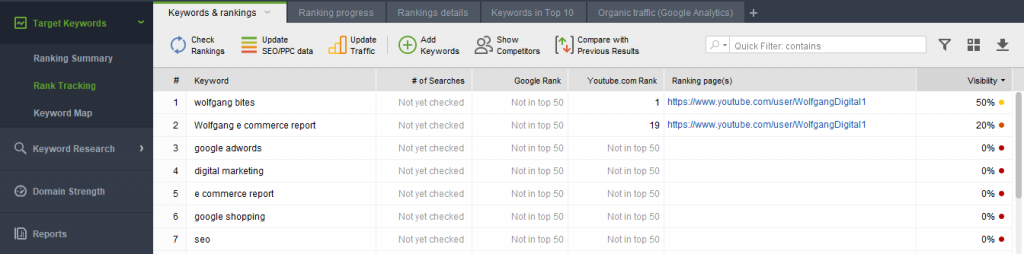
Rank Tracker from Link Assistant YouTube rankings campaign

Creating a Video that Retains Attention

At Wolfgang, we often say attention is the modern digital commodity so you want your video to retain a viewer’s attention for as long as possible.

This means your video content needs to be high quality and engaging. In short, if your video keeps viewers on YouTube, the chances are increased that YouTube will rank your video higher in the platform’s search results.

Additionally, responding to people’s questions or comments on your videos can create conversations that help your audience learn more about your company and the topic of your video.

Knowing how your viewers think can be used to create in-depth and topically related videos or content for your blog.

Using Google Trends can help you determine when is the best time to share your videos with your audience.

In the example below, we can see that January is the best month to share and create videos related to health insurance topics:
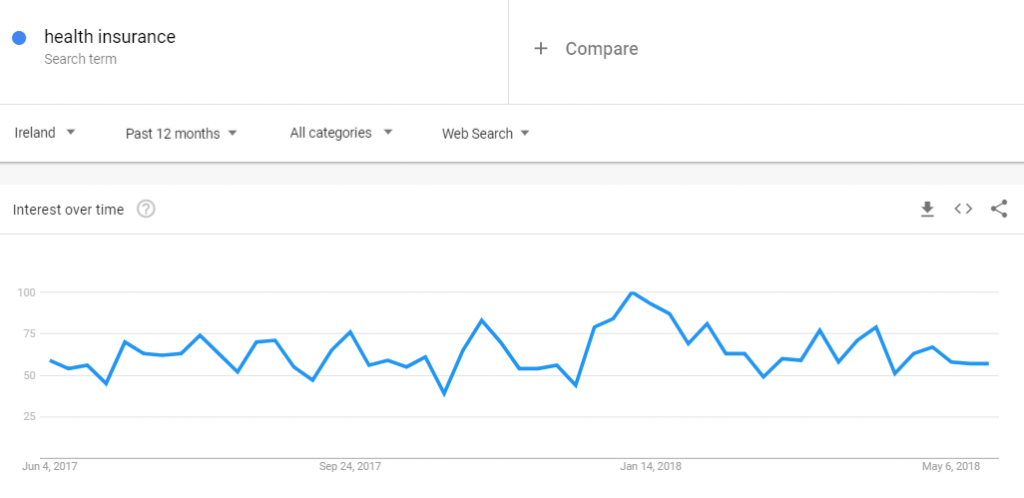
Using Google Trends to discover when is the best time to share your video on desired topic - 1

While car insurance topics are mostly researched between June and August:
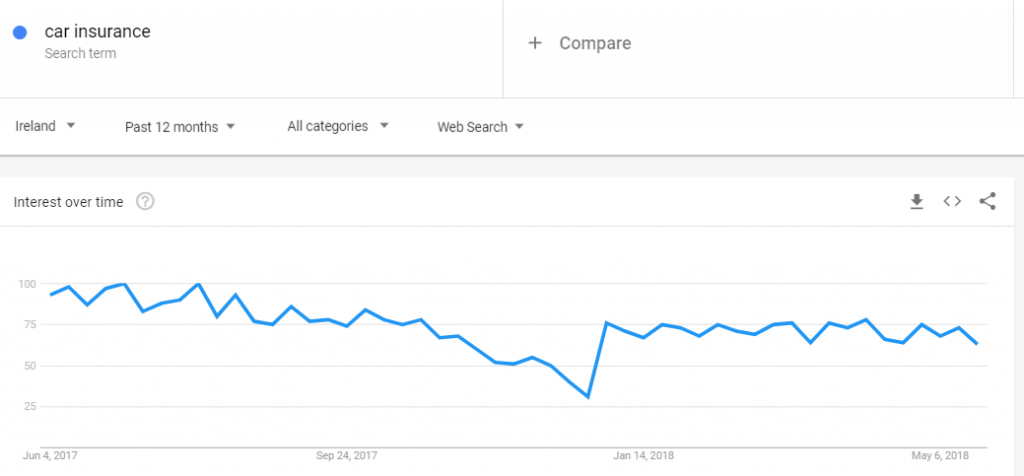
Using Google Trends to discover when is the best time to share your video on desired topic - 2

Optimize like it’s… 2009

Sometimes, optimizing your YouTube videos might even feel like you’re going back in time and optimizing for Google Search a decade ago, roundabout when Susan Boyle was setting YouTube alight with her mind-blowing Britain’s Got Talent performance (the most watched clip of the year, amazingly!).

To increase your video’s chances of striking the high notes and being picked up by search engines, every YouTube video should have relevant title name and description along with the ever-critical relevant tags.

It’s important you don’t simply create video content for the sake of it. Always stop to consider whether or not the content will be helpful for your audience. Also, check if there is a similar content out there and ask yourself how can you create something like this, but better. Try to apply 10X content strategy on your videos.

(O) YouTube video optimization

Keywords and search queries are just as important to YouTube as they are to Google.

As touched upon earlier, once the targeted keyword has been selected and a relevant video has been created, including metadata in your videos is important. Considering that YouTube cannot fully index the content within your video, it needs to rely on the content you provide.

The following parts will cover:

  • Video title
  • Video description
  • Tags
  • Video thumbnails

The title, description and tags will help influence where and when your video appears in YouTube search results, as well as within the actual vocal copy of your suggested videos.

Video title

We’d highly recommended that the video title is at least 5 words long and up to 70 characters in length. Having a catchy, relevant and descriptive video title will enable you to include targeted keywords.

If possible, placing the targeted keywords closer to the beginning of the title is recommended. However, keep in mind that your video title should entice viewer to watch your video.

YouTube’s very own, awesome Creator Academy features some effective tips that can help you create a title that should entice a viewer to click through:

  • Keep titles concise (between 60 and 70 characters) with the most important information up front.
  • Save episode numbers and branding towards the end.
  • Check that your titles don’t get cut-off in suggested videos, search results, and mobile

We also suggest including additional items that they haven’t flagged:

  • Use your targeted keyword in the video title
  • Include intent modifier (e.g. best, compare, free, local (Irish, American etc.), top, review etc.)

Video description

While video descriptions can be up to 5,000 characters in length, you should ensure that the key message is at the beginning of your description. In his YouTube study, Justin found out that the optimal word count is between 300 – 350 characters long.
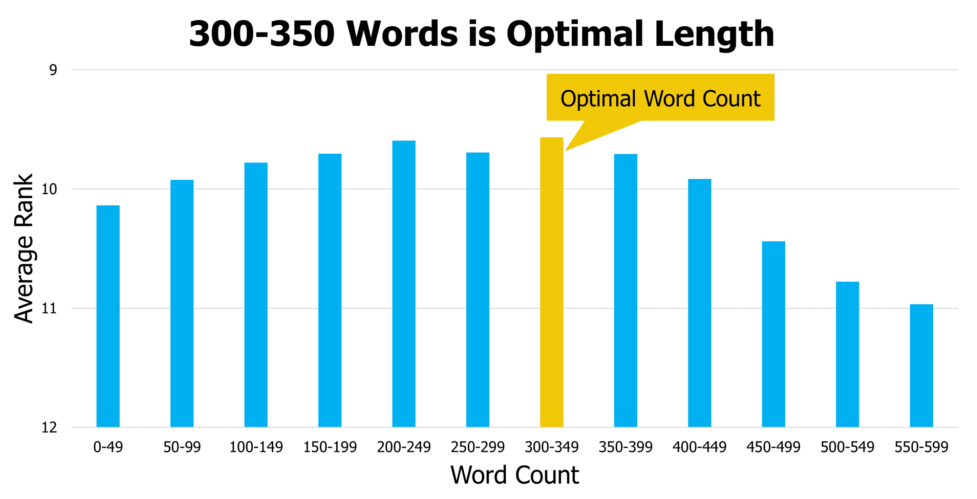
Optimal number of words to use in YouTube descriptions.

A tailored video description can even attract some views coming from Google results. Using search terms in your video description that are searched on Google, not just on YouTube.

The description can also help drive relevant traffic to your website. Including a link to your domain within your video description can bring additional traffic to your site.

Video tags

A tag is pretty much just a keyword that you add to your video and it can help you grow your YouTube audience. You need to ensure that your tags precisely describe the topic and content of your video. Including relevant and related keywords should help you gather more views. Create tags that are based on your topic and are relevant to your targeted keyword.

In order to find tags for your videos, you can start with the YouTube search bar and type in your targeted search term, as in the example below:
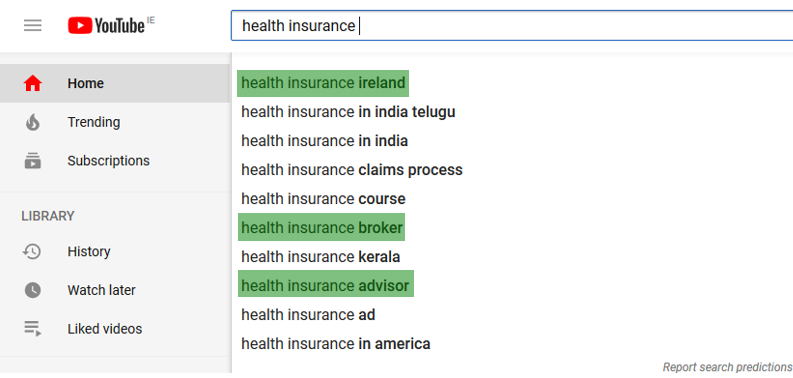
Using YouTube search bar to discover potential video tags.

If we take these four keywords and if you look at the search volume, it becomes quite clear which keywords you can and should utilize within your tagging logic.

Health insurance – High search volume

Volume: 673,000/mo | CPC: $12.22 | Competition: 0.89

Health insurance ireland – Medium search volume

Volume: 6,600/mo | CPC: $3.91 | Competition: 0.74

Health insurance broker – – Medium search volume

Volume: 4,400/mo | CPC: $8.60 | Competition: 0.63

Health insurance advisor – Low search volume

Volume: 390/mo | CPC: $8.63 | Competition: 0.66

If you don’t have access to any paid keyword volume tools and perhaps find Keyword Planner a little cumbersome for this task, you can use Keywords Everywhere to find out the search volume for each keyword, free n’ easy within the SERPs.

Use the data discovered in keyword and tag research and use it when creating video titles and video descriptions.

Video thumbnails

When you have a verified YouTube account you are able to upload your own image for your thumbnail video. Which means that you can edit your image to make it stand out from other videos in your niche.

It is recommended to use high resolution image for your video thumbnail – width: 1280p and height: 720p.

However, it is important to know that there’s a limit of of 2MB and the supported thumbnail image formats are .JPG, .GIF, .BMP, or .PNG.

Once you upload your video you will see an option to choose a Custom thumbnail under the “Video thumbnails” section. You can also upload thumbnail image for any of your previously published videos.
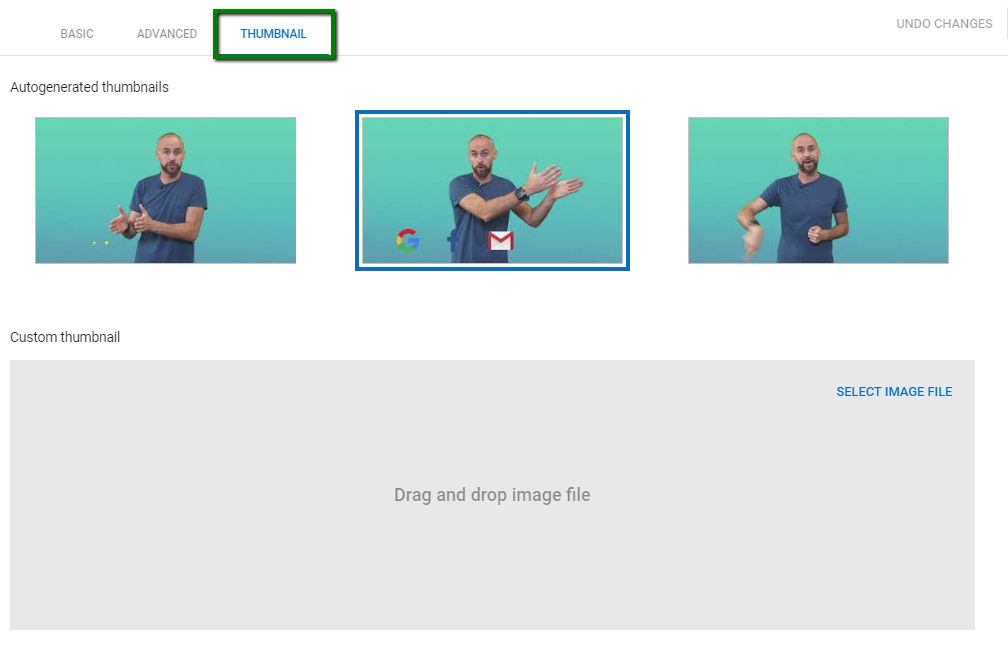
Using YouTube Studio Beta to upload video thumbnail.

Using YouTube SEO Checklist can help you track your video optimization steps and help you optimize your video to give it a better chance to rank higher. Unfortunately, this extension is only available for Google Chrome.

(P) Promoting your videos to increase your overall brand awareness

In the opening section we’ve mentioned YouTube’s ranking signals, where we listed video subscribers, video shares, comments and Click Through Rate as important ranking signals (engagement).

To increase the number of users that will watch, subscribe and share your videos, you need to promote the video content also. You have to reach the audience.

By incorporating YouTube content into your ongoing marketing strategy for your business, you are increasing the chances to draw more visits and views to your branded YouTube channel. The more views and engagements you have on your videos, the more authoritative and relevant your videos are in Google’s eyes.

Linking to your video in your email signature

A simple link to your video in your email signature can be an effective driver of traffic. As mentioned earlier, comments, shares and likes (thumbs up) are important ranking signals. Considering that your email recipients are most likely your service users, they are the audience most likely to be interested in video content related to the news and services that your business provides. Furthermore, a satisfied customer will more likely share the video if they find it useful.

Embedding videos in blog posts

Creating some written content on your website gives you the opportunity to embed the YouTube video or recommend that readers watch your video to find more information. This creates another link between your site and the video for Googlebot to consider.

Embedding videos in blog posts or landing pages is the most direct and advantageous way to integrate your content and YouTube videos.

When you include videos in your articles, your posts become more dynamic and engaging. Writing new articles, related to your video topic, can help you reuse the same video content multiple times. Presenting older videos to a new audience will help you gather more views, subscribers and engagements in general.

You can follow Google’s own guidelines on embedding YouTube videos.

Take advantage of Playlist functionality

Perhaps one of the simplest high-value feature inclusions you should embrace on your YouTube page; the utilization of playlists as part of your optimization strategy.

Playlists can be excellent for garnering that ‘snowball effect’ and to help keep users clicking and rolling through your semantically related videos with ease. They help ramp up the view count and generally tend to rank higher than standalone videos in the search results, making them a no-brainer for inclusion in your YouTube optimization arsenal.

Engagement matters

It’s no secret that video content is a popular way to grab attention and drive home a key message, but it seems many brands are just creating video for the sake of it.

As covered in-depth within this guide, ranking well on YouTube search requires some smart thinking to increase your likelihood of winning some vital engagement. That means obsessing over important metrics like:

  1. “Dwell time” (how long people are watching your videos for)
  2. Share rate (social)
  3. Links and embeds on other sites
  4. Channel subscriber count (real ones)

Therefore, assuming your video quality is of a high standard of course, spending some time to optimize your videos for your potential YouTube in terms of quality and searchability should see your videos attract more views and dominate that vital second search engine that we as SEOs are often quite guilty of neglecting — never more if you follow these steps to a tee!

Measuring ongoing performance

Last, but by no means least, we’d highly recommend that you analyze your current video performance using Google Data Studio and YouTube analytics.

These tools allow you to discover how your content is performing up to date (average number of views, comments, watch time, thumbs up, etc) and to generate reports after you optimize your videos with custom thumbnails, video tags, tailored video title and description.

Mastering the art of calculating your overall watched time on YouTube is important, especially if you’re comparing stats versus other social video ad platforms.

While a number of great rank tracking tools can help you track your YouTube rankings for your targeted search terms, you can use integrate their API feeds with Data Studio to create daily, weekly or monthly performance reports. It shouldn’t be hard, but you need to know your way around Google Data Studio to configure this report.

Using the information provided above, you should be able to start creating video content that will be informative and useful to your targeted audience.

For more about YouTube SEO, check out:

Ivan Crnomaric is SEO Executive at Wolfgang Digital.

The post YouTube Optimization: Complete Guide appeared first on Search Engine Watch.


source https://searchenginewatch.com/2019/02/04/youtube-optimization-guide/
Friday, 1 February 2019

Five growth hack ideas for SEO

By definition, growth hacking is a process of rapid experimentation, a continuous journey of trial and error to find the best path of growth.

For a company, these experiments can be across marketing funnel, product development, sales segments, and so on.

While traditional marketing is costly, growth hacking is a low cost alternative.

Entrepreneur Sean Ellis coined the term “Growth Hacking” in 2010, although the approach is not something brand new. In various periods of human history, thoughtful persons used insights from psychology, social science, and other disciplines for the betterment of humanity or for their personal profit.

These “Nudges” can be considered as a kind of growth hack.


In any digital marketing funnel, content marketing, together with SEO, play a vital role. You can apply thoughtful, data-driven insights in keyword analysis and link building to improve your SEO rankings.

Here are five useful growth hack ideas for SEO that you can do for free

1. Leveraging dead competitors

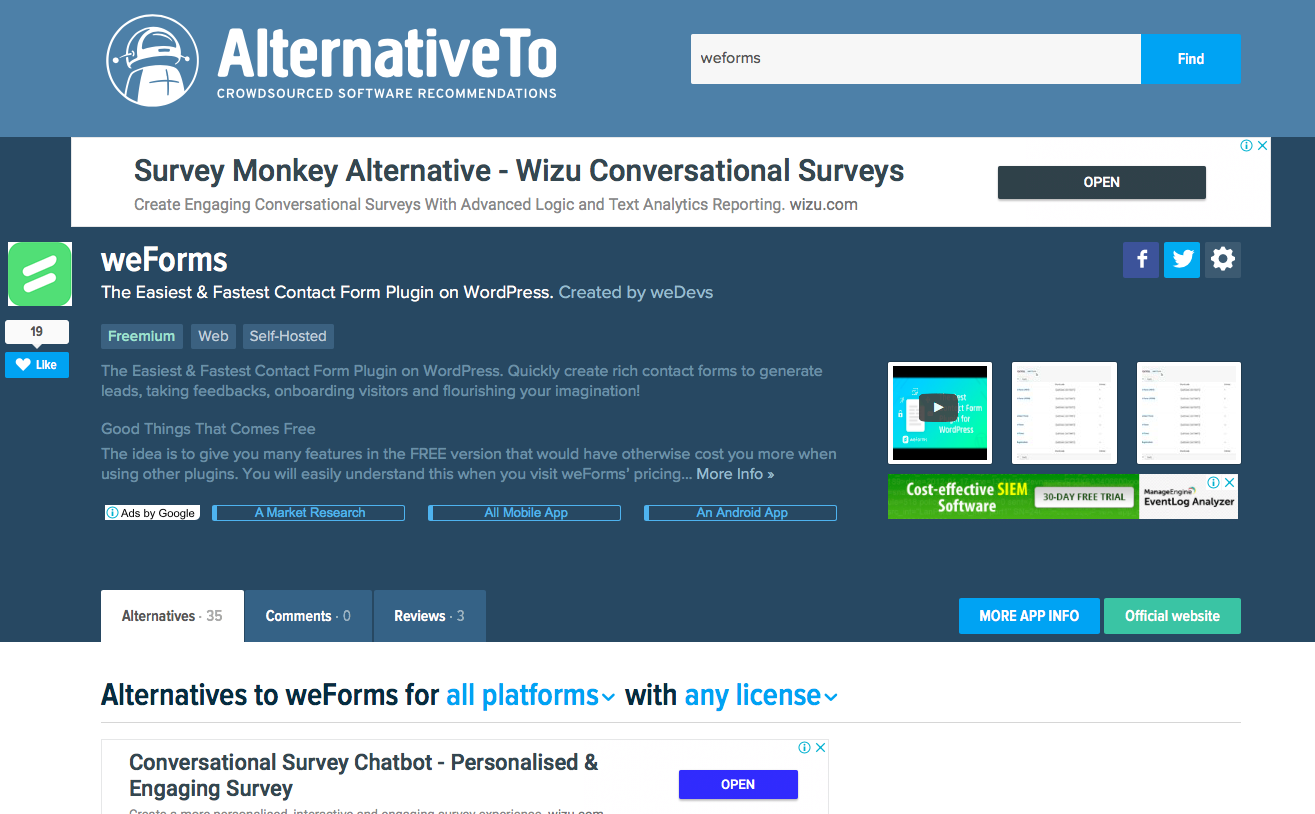
Go to AlternativeTo.net to find a list of your competitors.

Check dead links using browser plugins (Check My Links, Domain Hunter, Link Analyzer etc) to find dead competitors.

Go to Google.com and Google “link: deadcompetitor.com” replacing “deadcompetitor.com” with the website you’re looking to replace.

You will find a bunch of sites which are linking to your dead competitors.

Contact the website owners and let them know about the broken link. Offer your relevant link to replace it.

2. “Alternative to” method

Link building through comments is not a bad idea if you can do it properly. Of course there are lots of spammy and black hat techniques out there for comment link building, but some are really pure and very effective.

Such as this one.

Go to Google.com and search “Alternative to” about your products.

You will find a list of result where people wrote about your competitors.

Just go to those posts and if there is any comment section, write a great informative comment.

Your comment should not be a promotional one, instead a creative blend of KLTE marketing approach.

What is this KLTE approach? 

I have recently came across this model. Structure your comment based on this:

  • Know: Things you do for people to know you
  • Like: Things you should do for people to like you
  • Trust: Things you should do for people to trust you
  • Engage: Things you should do for people to stay with you

“Know” is your company or product name. Put your homepage or desired landing page url under your name. Describe in one or two line about what your product or service do for people.

For the “like” part, give some valuable information about what you bring to the table.

To build “trust,” show some robust proof (that can be image/screenshot link of positive customer review) that your service, support or product is good.

And lastly, keep a call to action asking people to do something, so you engage with them.

3. Get quality organic links (for free)

Do you know that the probability of selling to an existing customer is roughly 12 times greater than the probability of selling to a new prospect?

“Businesses have a 60-70% chance of selling to an existing customer while the probability of selling to a new prospect is only 5% to 20%,” according to the calculation of Marketing Metrics.

This same principle can work on link building. Those who already link you, will most likely to link you again.

How to find out who already link you?

Go to your webmaster tools page.

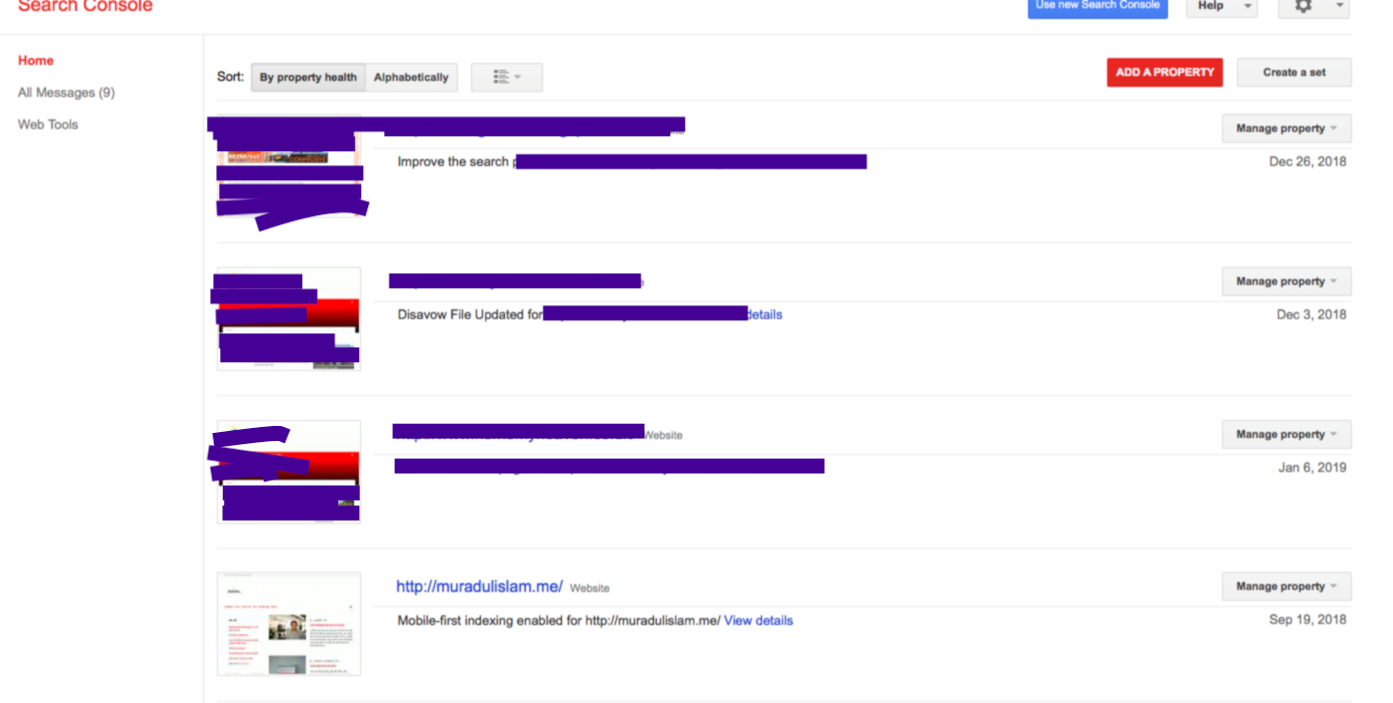
You will see a list of your sites (properties) on the Google webmaster tool.

See mine:

webmaster tools page in google search console

Choose your website from the list.

Click on “Search Traffic” — then “Links To Your Site.”

Look at “Top Linking sites” where they list “Links from outside your property to your property.”

This is the list of the websites already linking to your website. You can download the entire list of links.

Send them a genuine “Thank you” email and tell them about your new useful article or offers.

4. Just one word in a title can give a 59% increase in organic traffic

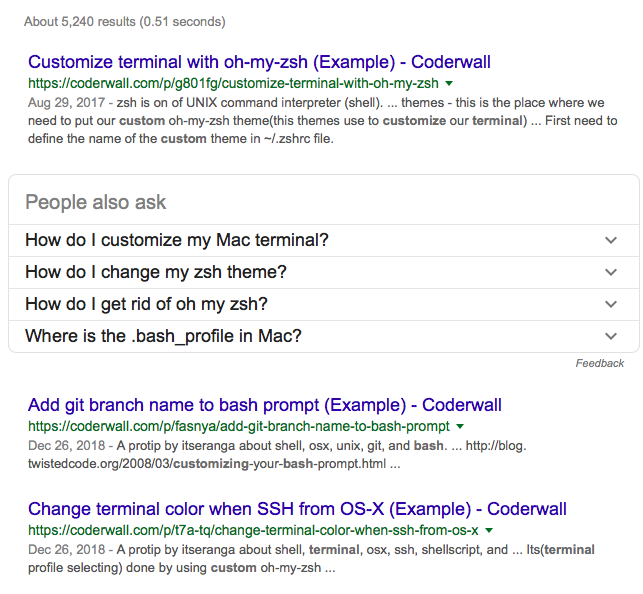
Coderwall did this wonderful experiment.

They had 20,000 pages with user-generated tips for developers.

To increase the organic traffic, they analyzed the analytics data and found out that most visited pages were pro tips with examples.

So they decided to split 20,000 pages into two groups:

#1. Original title.

#2. Original title + one word.

The one word that they added?

“(Example)”

That’s it. Just “Normal title of how to do X (Example)”

"words are loaded pistols"

Result after 13 weeks?

They saw a 59% increase in organic traffic from Google.

coderwall SERP with (example) at end of each title

Now, you can not just blindly follow this and add ‘example’ in your titles. That would be foolish.

Instead, analyze your most visited posts from Google Analytics.

Look for the most popular articles on the web about your niche. Analyze them and find out which one word can trigger targeted readers. This will work.

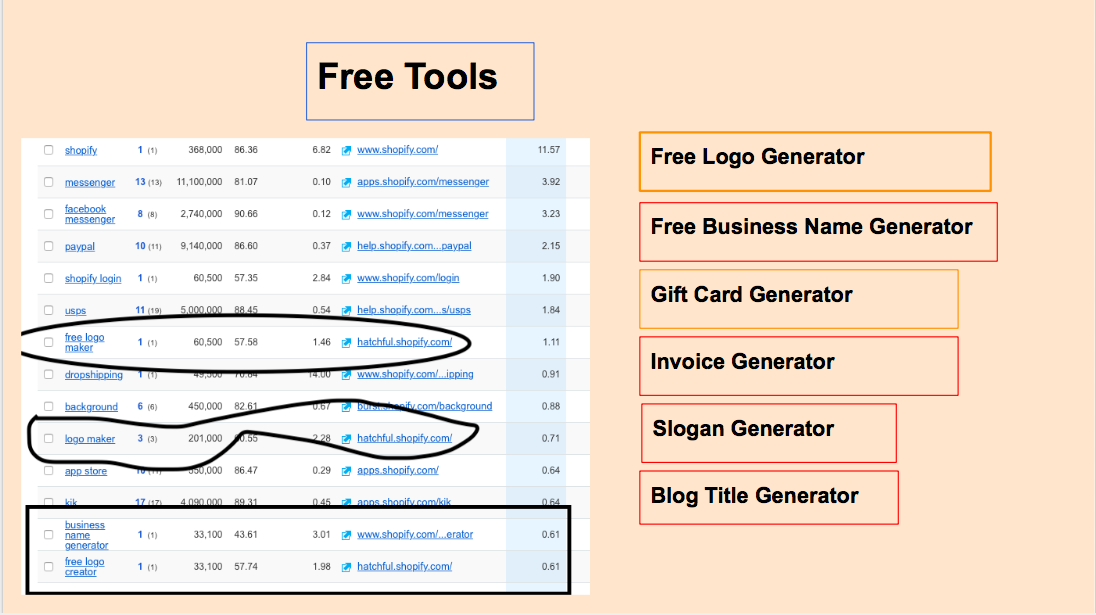
5. Tool Marketing – clearly ahead!

Everyone is familiar with content marketing. But not much about tool marketing. While content marketing is competitive, tool marketing has less competition.

free tool list

Tool Marketing is creating a useful tool for your targeted audiences. If the tool is very useful, you will get tons of backlinks.

Free logo makers, Free url shortener, Free slogan maker – you can come up with many creative and useful ideas. But trust me, generating a good idea is the hardest part.

Bonus: 

Update your old content. Add more story telling, new fresh images. You will see a remarkable organic traffic increase.

Muradul Islam is a Business Analyst at WeDevs.

The post Five growth hack ideas for SEO appeared first on Search Engine Watch.


source https://searchenginewatch.com/2019/02/01/five-growth-hack-ideas-seo/