Tuesday, 18 July 2017

The 2-step guide to driving sales with Pinterest

There are millions of people on Pinterest, searching, pinning, and sharing – so it’s important to recognize its potential for building awareness and filling the top of the funnel, particularly for ecommerce companies.

This blog will discuss a couple of recommended targeting types within Pinterest to help fill the top of the funnel and essentially build up your audience. From there, once your audience is built out, we’ll run through how to actually capitalize on these new users to drive sales.

Let’s jump in.

Use Pinterest to fill the funnel

Pinterest has some specific features that are highly effective for building your audience. These include:

Keyword targeting

You can leverage user intent by targeting specific keywords that users are searching within Pinterest.

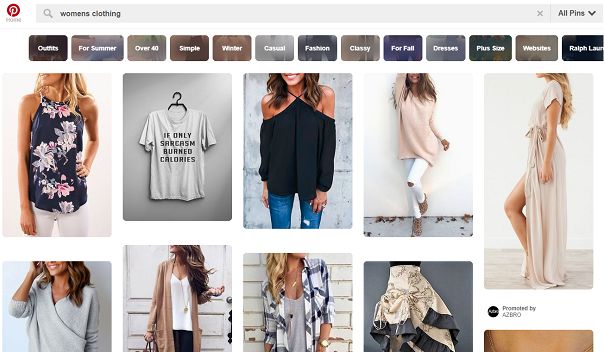
For example, if you are a trendy clothing brand that sells sweaters, you may want to target “trendy sweaters” and have your ad (in Pinterest lingo, your promoted pin) show up in the search results and related pins.

Interest targeting

Pinterest will determine a user’s interest based on the pins they have engaged with and saved. Your ad (promoted pin) will show up in the user’s home feed or relevant topics feed.

A Promoted Pin on Pinterest

“Actalike” targeting

This is similar to Facebook’s lookalike targeting; you can upload a customer list and Pinterest will target audiences similar in behaviors, traits, and characteristics as that customer list. Our recommendation is to start off with your top customers – for example, your highest-LTV or AOV audiences.

I would initially recommend prioritizing the Actalike and keyword targeting as they tend to be more effective at getting in front of highly relevant audiences. But by leveraging any or all of the targeting options, you’re discovering and engaging with new, relevant audiences and driving them to your site.

That said, make sure your expectations are aligned. You should not expect to see Pinterest as a lever for immediate purchases, but more as a longer-term play where you’re developing an awareness and building your audience to hit later via a few different methods below to actually drive the sale.

That said, let’s talk about how to…

Convert Pinterest engagement into sales

Now that you’ve engaged with your audiences via Pinterest, you should be capturing those audiences for remarketing purposes.

First, to be smart with your remarketing efforts and truly understand the value of Pinterest, you should make sure every link on your Pinterest ads include a tag that labels it as Pinterest. You can use UTM parameters or anything else, but essentially you want to make sure that you can identify these audiences that have come through from Pinterest and segment them out.

You can then create specific audiences within both Google and Facebook (for example) that have come in through Pinterest. (E.g. url contains ‘utm_source=pinterest). Now you can separate out these audiences, and as you use them in your retargeting strategies, you can understand if the Pinterest audiences you have built are actually converting into sales.

Speaking of converting, I’d recommend the following methods:

RLSA (remarketing for search ads)

Layer your Pinterest audiences onto existing search campaigns and add a higher bid modifier. These audiences have already visited your site and developed a familiarity with your brand. If they end up searching for your product, you want to make sure your ad appears high in the search results to remind them of your brand, pull them to your site, and entice them to convert.

One RLSA strategy I’d recommend is to create a separate “broad” RLSA campaign where you can bid on head terms, and broader but still relevant terms that you normally wouldn’t be able to afford.

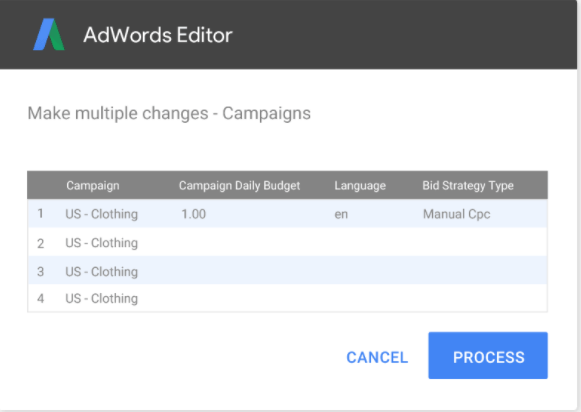
For example, you typically may not bid on a term like “womens clothing” because it is so generic and has heavy competition, but given the user has already visited your site, you can create an RLSA campaign, layer your Pinterest audiences, and bid on the term.

The thought behind this is that by serving your ad on this more generic keyword, you are reminding them that you sell women’s clothing. Since the users have been to your site, they’ll have a sense of if it’s worth visiting. Essentially, this is way of getting in front of relevant eyes without doing significant harm to overall efficiency.

Dynamic remarketing

You can do this on both Facebook and GDN where ads include the product the user has visited on the site (as well as other relevant products). The usual segmentation caveats apply; you want to make sure you’re segmenting by time lapsed since the visit and depth of site pages reached and bid accordingly.

Remarketing for shopping

Make use of your audience list by layering it onto your shopping campaigns. Again, the goal here is to bid more aggressively so you can ensure your ad shows up for the audiences who have engaged with your Pinterest ad, visited the site, and developed familiarity with the brand. You’ll typically see higher CVRs for these types of audiences.

The main takeaway here: if you’re not investing in Pinterest, you’re missing out on engaging a robust, potentially high-ROI audience. The platform itself has come a long way in adding marketing-friendly features and reporting capabilities to position itself as a long-term player. Get on board now; the traffic’s not getting any cheaper.

Good luck!


For more on how to integrate Pinterest into your sales strategy, check out our visual guide to Pinterest advertising.


source https://searchenginewatch.com/2017/07/18/the-2-step-guide-to-driving-sales-with-pinterest/

Monday, 17 July 2017

Semantic Search: What it Means for SEO in 2017

The combination of semantics (the science of meaning in language) with search engines that process billions of queries seems a very natural one.

Semantic search has been effective, too; by understanding the intent of a query and the context of the user, the accuracy of results on search engines like Google and Bing has increased significantly.

Search engine results pages today look markedly different to their earlier iterations and, with improvements in local search, voice recognition, and machine learning, they will continue to change over the next few years too.

There is a lot of fascinating theory behind all of this, but we can sometimes focus on this to the detriment of our work today.

Significant algorithm updates like Hummingbird, or the more recent launch of RankBrain, have a big impact on users. As marketers, we need to know exactly what this means for our strategy, our expectations, and our campaign measurement.

As such, this article will focus on some real-world examples of semantic search and provide a practical framework to help marketers avail of the opportunities it brings.

Semantic search in action

Let’s start with a simple example to shed light on how semantic search works. We’ll use a common, everyday search query like [will smith]. This screenshot is what I see above the fold on desktop:

When Google processes this query, it recognizes instantaneously that I am searching for the actor and all-round entertainer Will Smith, but also that the intent of my search is unclear. Therefore, it serves a varied array of options for me to click on. I may want to read news about the Fresh Prince, I may want to see his filmography, I may want to see if he has any new albums in the pipeline. Perhaps I want to see all three.

As is highlighted on the right-hand side in the knowledge panel, Google can retrieve all of this information from its index of 808,000,000 Will Smith-related results, but also from its own vast database of information about noteworthy people and institutions.

I can help Google out here by refining my search. Next, I ask [who is he married to]:

As we can see, results are pulled to the top of the results to highlight his current and former spouse.

This is a demonstration of conversational search in action.

Just like a person would in a conversation, Google knows the ‘he’ in my question refers to Will Smith. I don’t need to state this again. Google also needs to know what the connection is between ‘he’ and both Jada Pinkett Smith and Sheree Zampino.

These may seem like minor changes, but they hint at a fundamental shift in how Google works. Factor in voice search and it is easy to see how important this conversational element is.

If we extend this out to ask about Will Smith’s music, we can start to conceptualize just how complex Google’s network of interconnected entities is:

Asking what an artist’s best song is strays into the realm of subjectivity, so Google pulls the track listing from Will Smith’s greatest hits. Or at least, I hope that’s what’s happening here. If Google genuinely thinks ‘Girls Ain’t Nothing But Trouble’ is Will Smith’s best song, I’ll lose faith in them.

In terms of natural language processing, however, this search query is now quite convoluted. In this last instance, Google has had to keep track of who we’re asking about, having deviated once already to ask who his spouse is; then pull an indirect, best-fit answer to my question about Will Smith’s best song.

Let’s try one more, then we’ll give Google a break:
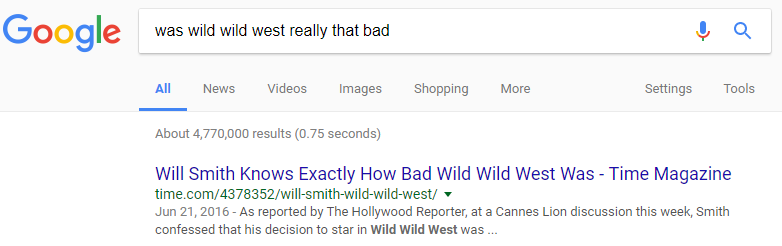
You get the idea.

We’ve come an awfully long way from the exact keyword matching of just a few years ago.

Furthermore, all of this serves an important illustrative purpose and it’s one that matters for anyone that wants to rank via SEO in 2017.

Why does it matter for brands?

The technology that underpins the above answers is utilized for all queries, so it is very significant for brands. Just launching a page on a website and ‘optimizing it for SEO’ clearly isn’t going to cut it any more.

Let’s say, for argument’s sake, that I run a peanut butter e-commerce site. Logic dictates that I will want to rank first in organic search for [peanut butter]. The results from my location look like this:

We can see the same principle applied to the earlier Will Smith query, but with very different results – both in their format and their content.

I may want to rank for [peanut butter] with my e-commerce site, but unless I have a physical store I can use to rank via local listings, the chances look slim. There are a few organic results above the fold (an anomaly these days), but only one brand that actually produces the product. There is a recipe with an accompanying image, however, and a link to more images, so perhaps these formats would be a more appropriate, achievable way to get onto page one.

At the bottom of this search results page, Google actually provides some strong clues about what people are really looking for when they search for peanut butter:
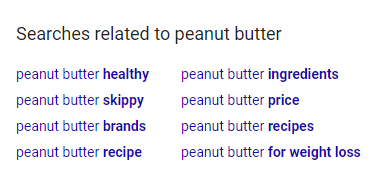
These related searches are more specific and give us a good idea of which topics we should cover on our site. There is a nice variety of different topics here, all of which are worthy of more investigation.

To pick one, we’ll go with the ‘peanut butter ingredients’ route. If I search for [what is in peanut butter?], Google serves the following results:
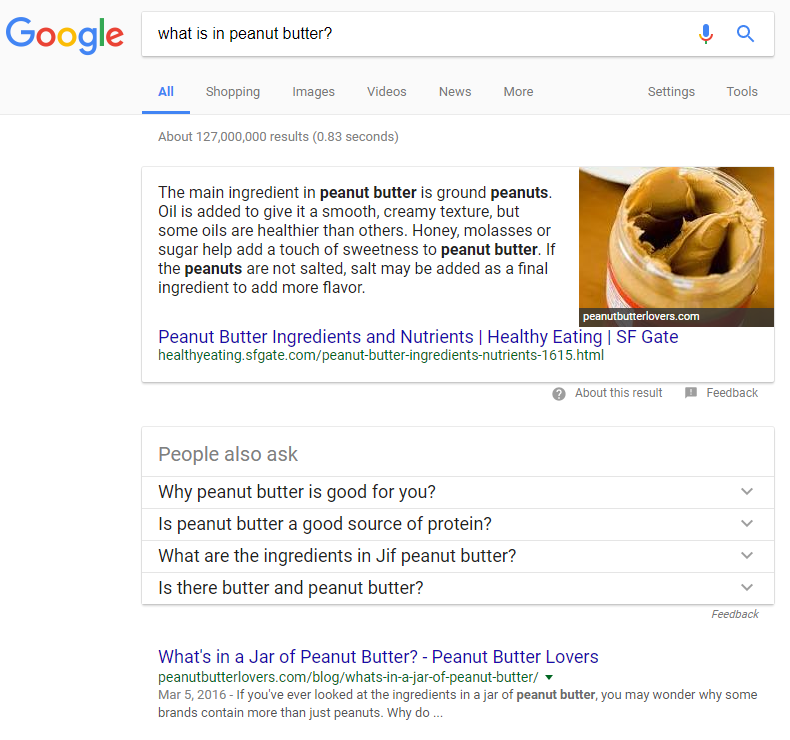
We can already sense some opportunities for an e-commerce site either to branch out is content strategy to answer questions, or potentially to partner with a site that already ranks well for these queries.

The ‘People also ask’ list is a fantastic resource for users and SEO marketers, but we should be aware of just how dynamic that list is. It take on a concertina effect and expands based on our interactions with it.

Once more, the need to approach SEO in 2017 with an open mind is evident. We can’t control how this list will function at scale; all we can do is put ourselves in the best possible position to answer common questions.

In the screenshot below, there are two examples of how the list changes based on the questions a user clicks on. On the left-hand side, I have clicked on a protein-related question and, therefore, Google provides more protein-based questions below the original list of four. On the right-hand side, I have initially clicked on ‘Is eating peanut butter good for you?’
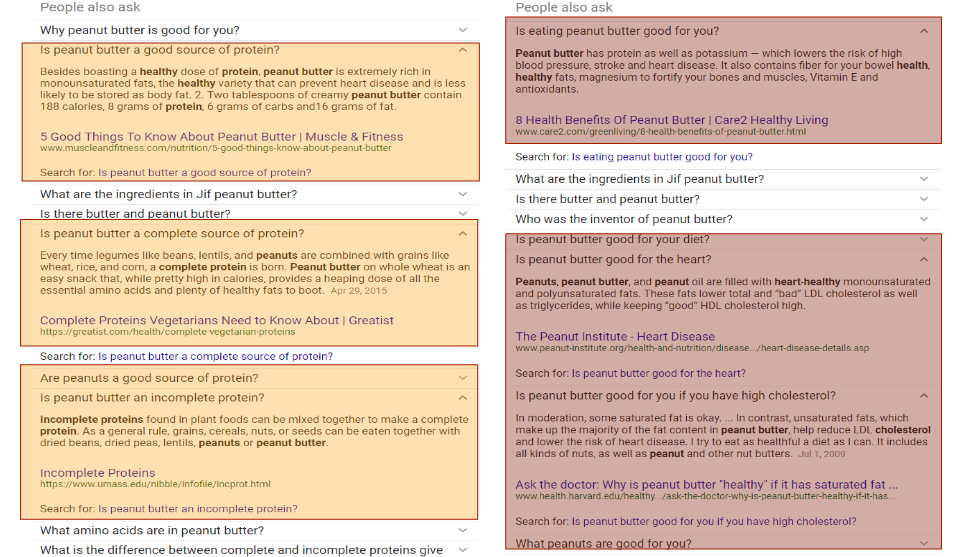
The ‘People also ask’ box ends up looking completely different in these two instances, which both began with the exact same query.

Note that a lot of similar questions are phrased slightly differently, but Google knows that the underlying meaning is essentially the same. As such, we don’t need to slavishly devote ourselves to answering the exact questions that receive the most searches in order to rank.

This brings with it opportunities and challenges, outlined in the four-step process below.

Four steps to rank via semantic search

We can’t control exactly which queries we will rank for, but we can certainly increase the probability that we will improve our organic visibility if we work through these four stages.

Research

Google provides a lot of useful information via suggested search, ‘People Also Ask’, and related searches. You could use these to collect a list of direct questions that you can be certain people are asking, as a starting point.

Although keyword-level search volumes are impossible to obtain with any serious degree of accuracy now, there are still some useful tools that provide insight into search trends. Google’s own keyword planner is quite limited for SEO nowadays, but you can use PPC-based insights to help shape your content strategy.

There are also tools like Moz’s keyword planner, which are very helpful for shaping broader SEO strategies while still keeping an eye on where the search volume is.

Personally, I find Answer the Public to be a useful guide when trying to figure out all the interrelated questions and pain points consumers have when thinking about a product or service.

Collate a list of all the navigational, informational, and commercial queries related to your site, then sub-categorize them by their semantic links to each other.

From here, you can start thinking about how to structure this to ensure maximum SEO visibility.

Structure

Site structure is a fundamental aspect of semantic search performance.

You should think of your products or services as entities that each contain a multitude of connotations and associations. Build those connotations in vertically to cover a range of user needs, and link them to other entities horizontally in the site taxonomy. By mapping keyword groups or common questions to landing pages, you can ensure that each URL on your domain has a defined purpose.

Changes to site structure normally require buy-in from multiple stakeholders, so I would advise visualizing your proposed site taxonomy as early as possible.

How you present this will depend on your intended audience and how they think. For more logical thinkers, Writemaps is a great way to produce simple but effective site structure visualizations.

If you require a more conceptual approach to emphasize semantic relationships, or even the amount of internal link value you want to send to each area of the site, you can use word cluster software like Smartdraw to get your point across.

Implement

The next step is to populate your site structure with content that meets user needs. This is an effective way to think about this, because consumer needs and desires remain relatively constant, and the ideal functioning of a search engine will always seek to satiate those underlying motivations. So if you can create content to cover every aspect of the typical consumer journey, you will be rewarded.

Bear in mind what we have seen from the example above, too. Multimedia results are hugely significant, so try to include a range of assets that fit users’ (and Google’s) expectations. Most rank tracking software providers now contain products that allow us to see which types are most prevalent for different types of queries, so use these to guide your efforts.

Measure

Measurement has become a significant challenge, viewed through the lens of our old performance indicators like ranking positions, for example. It is very difficult to track individual ranking positions, as they are never static. Search results pages act like living organisms now, so we need to take a broader perspective on measurement.

Track the metrics that matter most to your business, rather than just looking at rankings. The aim should always be to use SEO to affect those metrics anyway, so incorporate them within your campaign tracking.

Moreover, the bigger ranking software companies have created their own metrics to measure SEO visibility which, when combined with what you see in your analytics dashboard, will provide a lot of insight into whether your strategy is working.

We can’t approach measurement like we used to, but we can still tell when SEO is making a positive contribution.


For more on semantic search and its ever-changing impact on the SERP, check out our round-up of five important updates to Google semantic search you might have missed.


source https://searchenginewatch.com/2017/07/17/semantic-search-what-it-means-for-seo-in-2017/

Friday, 14 July 2017

Five important updates to Google Semantic Search you might have missed

What is semantic search? Broadly speaking, it’s a term that refers to a movement towards more accurate search results by using various methods to better understand the intent and context behind a search.

Or as Alexis Sanders very eloquently explained it on the Moz Blog,

“The word “semantic” refers to the meaning or essence of something. Applied to search, “semantics” essentially relates to the study of words and their logic. Semantic search seeks to improve search accuracy by understanding a searcher’s intent through contextual meaning. […] Semantic search brings about an enhanced understanding of searcher intent, the ability to extract answers, and delivers more personalized results.”

Google is constantly making tweaks and changes to its documentation and features linked to semantic search. Many of these involve things like structured data and Schema.org, rich results, Knowledge Graph and so on, and the vast majority go unannounced and unnoticed.

But there are some eagle-eyed members of the search community who keep tabs on changes to semantic search, and let the rest of us know what’s up. To aid in those efforts, I’m rounding up five recent important changes to semantic search on Google that you might not have noticed.

100% of the credit for these observations goes to the Semantic Search Marketing Google+ group (and specifically its founder Aaron Bradley), which is my source for all the latest news and updates on semantic search. If you want to keep in the loop, I highly recommend joining.

Videos and recipes are now accessible via image search

Earlier this week, Google made a telling addition to its documentation for videos, specifying that video rich results will now display in image search on mobile devices, “providing users with useful information about your video.”

A mobile image search for a phrase like “Daily Show Youtube” (okay, that one’s probably not going to happen organically, but I wanted to make the feature work) will fetch video thumbnails in among the grid of regular image results, which when selected, unfold into something like this:

You then need to select “Watch” or the title of the video to be taken to the video itself. (Selecting the image will only bring up the image in fullscreen and won’t redirect you to the video). So far, video rich results from YouTube and Wistia have been spotted in image search.

Google’s documentation for recipes also now features a similar addition: “Rich results can also appear in image search on mobile devices, providing users with useful information about your recipe.” So now you can do more than just stare at a mouthwatering picture of a lasagna in image search – you might be able to find out how it’s made.

Google’s documentation gives instructions on how to mark up your videos and recipes correctly, so that you can make sure your content gets pulled through into image search.

Rich cards are no more

RIP, rich cards. The term introduced by Google in May 2016 to describe the, well, card-style rich results that appear for specific searches have now been removed from Google Developers.

As identified by Aaron Bradley, Google has made changes to its ‘Mark Up Your Content Items’ on Google Developers to remove reference to “rich cards”. In most places, these have been changed to refer to “rich results”, the family of results which includes things like rich cards, rich snippets and featured snippets.

There’s no information as to why Google decided to retire the term; I think it’s usefully descriptive, but maybe Google decided there was no point making an arbitrary distinction between a “card” and a “non-card” rich result.

It may also have been aiming to slim down the number of similar-sounding terms it uses to describe search results with the addition of “enriched search results” to the mix – more on that later.

Google launches structured data-powered job postings in search results

Google has added another item to the list of things that will trigger a rich result in search: job postings.

This change was prefigured by the addition of a Jobs tab to Google’s ‘Early Access and partner-only features’ page, which is another good place to keep an eye out for upcoming developments in search.

Google also hinted at the addition during this year’s Google I/O, when it announced the launch of a new initiative called ‘Google for Jobs’. In a lengthy blog post published on the first day of the conference, Google CEO Sundar Pichai explained the advent of Google for Jobs as forming part of Google’s overall efforts towards “democratizing access to information and surfacing new opportunities”, tying it in with Google’s advances in AI and machine learning.

“For example, almost half of U.S. employers say they still have issues filling open positions. Meanwhile, job seekers often don’t know there’s a job opening just around the corner from them, because the nature of job posts—high turnover, low traffic, inconsistency in job titles—have made them hard for search engines to classify. Through a new initiative, Google for Jobs, we hope to connect companies with potential employees, and help job seekers find new opportunities.”

The new feature, which is U.S.-only for the time being, is being presented as an “enriched search experience”, which is another one of Google’s interesting new additions to semantic search that I’ve explored in full below.

And in a neat tie-in, reviews of employers are now due to be added in schema.org 3.3, including both individual text reviews and aggregate ratings of organizations in their role as employer.

Google introduces new “enriched search results”

Move over rich results – Google’s got an even better experience now. Introducing “enriched search results”, a “more interactive and enhanced class of rich results” being made available across Google.

How long have enriched search results been around? SEO By the Sea blogged about a Google patent for enriched search results as far back as 2014, and followed up with a post in 2015 exploring ‘enriched resources’ in more detail.

However, in the 2014 post Bill Slawski specifically identifies things like airline flights, weather inquiries and sports scores as triggering an enriched result, whereas in its Search Console Help topic on enriched search results, Google specifies that this experience is linked to job postings, recipes and events only.

According to Google:

“Enriched search results often include an immersive popup experience or other advanced interaction feature.”

Google also specifies that “Enriched search enables the user to search across the various properties of a structured data item; for instance, a user might search for chicken soup recipes under 200 calories, or recipes that take less than 1 hour of preparation time.”

Judging by this quote, enriched search results are a continuation of Google’s overall strategy to achieve two things: interpret and respond to more in-depth search queries, and make the SERP more of a one-stop-shop for anything that a searcher could need.

We’ve seen Google increasingly add interactive features to the SERP like new types of rich result, and Google Posts, while also improving its ability to interpret user intent and search context. (Which, as we established earlier, is the goal of semantic search). So in the recipe example given above, a user would be able to search for chicken soup recipes with under 200 calories, then view and follow the recipe in a pop-up, all without needing to click through to a recipe website.

Needless to say, this could be bad news for website traffic and click-throughs – even more than featured snippets, answer boxes, the knowledge graph, quick answers and other rich results already are.

Google makes a whole host of changes to its structured data developer guides

Finally, Google has made a wide-ranging set of changes to its structured data developer guides. I recommend reading Aaron Bradley’s post to Semantic Search Marketing for full details, but here are some highlights:

  • Guides are now classified as covering the following topics: structured data, AMP, mobile friendly design
  • Structured data has a new definition: it is now defined by Google as “a standardized format for providing information about a page and classifying the page content.” The old definition called it “a text-based organization of data that is included in a file and served from the web.” This one definitely seems a little clearer.
  • Twice as many items now listed under “Technical guidelines”, including an explanation of what to do about duplicate content
  • There is now less emphasis on the Structured Data Testing Tool, and more on post-publication analysis and testing – perhaps Google is trying to get users to do more of their own work on structured data markup, rather than relying on Google’s tool?
  • All content types are now eligible to appear in a carousel.


source https://searchenginewatch.com/2017/07/14/five-important-updates-to-google-semantic-search-you-might-have-missed/

Thursday, 13 July 2017

PPC 102: Seven tips to improve your paid search campaigns

Once you’ve got the basics of PPC down, how can you improve on those efforts further? Here are seven tips to take your campaign to the next level.

We recently gave eight tips to help beginner search marketers get their first campaigns off the ground, with our article ‘PPC 101: Eight tips to get started‘. This is the sequel to that course, PPC 102, with seven more tips to help you improve on what you’re already doing.

You don’t have to be a PPC expert to create a successful campaign with strong ROI. All you need is the time to understand how PPC works and to improve your efforts in a series of small but effective steps.

Set up conversion tracking

It’s really important to be able to measure your PPC efforts and this can be achieved by setting up the tracking pixels on your pages. Right before you start with PPC ads, you can add a conversion code to your site to be more prepared for the analysis of your campaigns.

This will allow you to understand which ads work better for your audience, bringing you closer to conversions. It can be extremely useful for PPC beginners to learn what counts as an effective PPC ad and whether their first attempts can bring them closer to ROI.

Conversion pixels make analysis of your campaigns more specific by offering the right insights on the ads that make leads and sales easier.

Focus on quality keywords

Keyword research is among the first steps to take when planning a PPC campaign. The end result of this can be a long list of keywords to explore, but do you really need to test them all? It’s tempting to try all of them until you find the most successful ones for your business, but it’s usually more effective to focus on the most important ones for your goals.

Quality keywords are not the same for every business or even every campaign, and this depends on what you want to achieve. These may not even be the most popular, but they will probably have more chances of converting than the rest.

Focus on what you define as quality keywords, even this is quite a limited pool. This will save you both time and budget.

Learn more about your audience

As we mentioned in PPC 101, it’s important to find your audience before you set up a PPC campaign. This tip is helping you take the understanding to the next level. Once you do find the ideal audience for your ads, it’s good to spend the right time to learn as many things as possible about them.

It might be useful to develop personas that help you understand your audience’s habits to be able to create more effective ads that lead to higher conversion rates.

Once you understand your audience, it’s time to analyse how they function in all the stages of your funnel. Where does your target audience sit as part of your sales cycle? How does that affect your ads and your set goals?

For example, it’s different targeting new prospect leads comparing to past customers you want to retarget and this can be reflected in your planning for your next PPC ads.

Set a landing page that matches your ads

Every PPC ad should lead to a relevant landing page to ensure that the audience is exposed to the right details after clicking on an ad. This may include more information about the product, answering questions, offering options for the next steps and most of all, speaking the same language as the ad.

It’s not just about creating effective PPC copy for your ad – it’s equally important to maintain consistency between the ad and the landing page your audience visits. This increases the chances for more conversions, as users can feel that the message resonates throughout all the pages.

Focus on the image of your ad

A successful PPC ad consists of compelling copy, but also an appealing and relevant image. As the internet becomes more visual year by year and people become accustomed to visual content, an image can significantly aid the effectiveness of your search ads.

Pick carefully the image you’ll use in every ad, aiming for:

  • visual appeal
  • relevance
  • high quality

It would be ideal if an image could create an association with a product or a company, as this could increase the chances for a long-term experience.

Be careful though, as the image still has to be relevant to the ad. Visual appeal on its own cannot increase conversions if the image is irrelevant to the ad.

Optimize your ads for mobile

As more and more users increase the time they spend on mobile devices, they are exposed to more advertising on mobile. We often talk and think of mobile optimization in terms of optimizing mobile websites, but optimizing your mobile ads is just as important.

According to Mary Meeker’s Internet Trends Report 2017, internet advertising saw a growth of 22% the last year, with mobile advertising contributing significantly to this increase.

This serves as a good reminder of why all PPC campaigns should be mobile-optimized to target a growing audience.

The process of mobile optimization for a PPC ad includes paying special attention to:

  • ad copy
  • ad image
  • habits of mobile users
  • landing page

Once your campaign is underway, an analysis of the conversions can tell whether mobile users found the ad interesting enough to click on it. 

Explore PPC ads holistically

PPC advertising can be very useful by itself, but it’s still more effective to consider as a component part of your entire digital marketing strategy.

It’s not just about launching a successful PPC campaign to reach the desired results, as these will still be aligned with your broader marketing and sales goals.

For example, a PPC campaign can lead to more improved results when it’s aligned with SEO strategy, social media marketing and email marketing.

A multi-channel approach is more popular among marketers these days, as it is more reflective the way people consume content and sees ads through multiple channels and devices.

The acquired data from a holistic approach to your marketing allows you to see how other channels interact with your PPC ads. It also helps you to understand your audience and create even more effective PPC ads in the next campaign.

Overview

Here are some tips to keep in mind when improving your PPC campaign:

  • Install a conversion pixel before you start your campaign
  • Only focus on quality keywords
  • Learn as much as possible about your audience
  • Make sure your landing page matches the expectations that your PPC ad sets
  • Pick the right visual for your ad
  • Create mobile optimized PPC ads
  • Think of PPC holistically.


source https://searchenginewatch.com/2017/07/13/ppc-102-seven-tips-to-improve-your-paid-search-campaigns/

Wednesday, 12 July 2017

7 subtle on-site issues no SEO should miss

Your on-site SEO could be broken without you realizing it.

We all know some of the basics. Content is king. Users come first. Avoid thin content, keyword stuffing, above-the-fold advertising, etc.

But not all on-site SEO issues are so obvious.

Here are seven on-site issues that are very easy to miss.

1. Excessive listing (Not, not this kind)

You are currently reading a “list post.” List posts grab attention. Survey research by Conductor suggests that headlines with list numbers are preferred over others. Likewise, CoSchedule analyzed 1 million headlines and found that list posts were by far the most likely to get shared.

So don’t stop making list posts.

But there’s a particular kind of listing that can just trash your site’s rankings.

In 2013, Matt Cutts from Google had this to say on how listing can be interpreted as keyword stuffing:

“Keyword stuffing is almost like a grab bag term to describe a lot of different things…You can be repeating…You can use different words. You know: so you’re talking about ‘free credit cards,’ ‘credit cards,’ ‘weight loss pill,’ you know, all sorts of stuff…it can even be almost gibberish-like…”

So while a list of facts, statements, or opinions draws shareability, simply listing a series of short phrases in succession can be harmful. Avoid long lists of phrases, whether separated by commas or in a numbered list. Search engines expect some degree of elaboration.

As with almost any rule, there are exceptions. Just be aware of the pitfalls, put UX first, and use discretion.

2. Accidental cloaking (even if users can see it)

Cloaking is bad, bad, bad.

Harry Potter may use an invisibility cloak for good, but as far as search engines are concerned, cloaking is inherently evil.

Google explicitly forbids cloaking, defining it as follows:

“…the practice of presenting different content or URLs to human users and search engines…”

It should be obvious why. If a search engine is suggesting a URL based on content that the user can’t see, the user is bound to be disappointed.

But cloaking doesn’t always happen on purpose.

Here are a few ways cloaking can happen by accident:

  • Poorly formatted CSS places content off-screen, where users can’t see it
  • Text foreground and background colors are identical, or nearly so
  • Content is hidden or covered up by JavaScript.

I always recommend against giving search engines the benefit of the doubt. For example, avoid matching foreground and background colors, even if the text is visible to the user due to other formatting elements. Google can misinterpret it, or rightly consider it cloaking on devices that can’t handle the additional formatting.

Also, avoid this related issue: “sneaky redirects”. Google defines them as:

“It’s a violation of Google Webmaster Guidelines to redirect a user to a different page with the intent to display content other than what was made available to the search engine crawler.”

I’ve seen way too many sites unintentionally cloak content in this way. There are only two ways you should redirect a URL: with a 301 or, if it’s legitimately temporary, with a 302. Anything else runs the risk of being dependent on the device or the user-agent, which runs the risk of being seen as cloaking.

Don’t do it.

3. Links with no anchors

This is just another form of accidental cloaking, but it’s so common and so easy to miss that I’m placing it in its own section.

This is an easy mistake to make. You type an “href” link in html and you forget to include the anchor text. Or maybe you intend to update the anchor text, delete it, and forget to add the new anchor text.

Unfortunately, an innocent mistake like this will result in a link to a URL that is invisible to the user, but visible to the search engines.

You know what that means…it’s cloaked.

Keep an eye out for this one.

4. Excessive bolding and other formatting

Shoving your keywords into “bold” or “strong” tags doesn’t exactly happen by accident, but it’s the kind of thing that is encouraged often enough that otherwise innocent webmasters might do it, thinking that it’s just standard or even best practice.

It’s not.

You can find plenty of correlative studies showing an association between bolded keywords and rankings, but you need to keep something else in mind.

Bolding is often used as a feature of content structure.

If your content is structured around specific ideas, it’s only natural that you will have bolded subheadings that feature keywords related to that idea, in much the same way that it will show up naturally in h2 or h3 tags.

This does not mean that you should parse your content and bold your keywords.

Bolding and italicizing certainly play a role within primary content, but it is for emphasis (see?) or to make the content easier to skim. It should not be used to simply bold your keywords wherever they appear.

Need evidence?

Brian Chang tried putting his keywords inside “strong” tags. The result? His rankings tanked a few pages. Want to take a stab at what happened when he removed them? That’s right. His rankings recovered.

Inspired by this, Sycosure ran an experiment and saw similar results. Their rankings plummeted, although they did recover before removing the formatting.

In short, while results are unpredictable, bolding your keywords is unlikely to improve your rankings by any significant amount, but it is likely to hurt your website in a way that makes it not worth the risk.

5. Frames

Frames and iframes display content from other URLs on a single page, with one URL for each frame. This breaks the entire conceptual framework of the web: one page for each URL, one URL for each page.

Google warns webmasters not to use frames and iframes:

“Google supports frames and iframes to the extent that it can. Frames can cause problems for search…Google tries to associate framed content with the page containing the frames, but we don’t guarantee that we will.”

Google’s support subdomain goes on to recommend that if you must use frames, you should place alternate content within the NoFrames tag, but I would strongly recommend avoiding them altogether. Frames break web standards and are likely to cause problems that extend even beyond SEO.

6. Links to penalized sites

Matt Cutts has stated quite explicitly that “Google trusts sites less when they link to spammy sites or bad neighborhoods.”

Unfortunately, it’s not at all obvious when you’ve linked to a bad neighborhood or a penalized site.

You may have linked to a site that appears authoritative but that uses a lot of spammy SEO tactics. You might have linked to a site that used to be trustworthy but was since acquired by nefarious people, or that otherwise went downhill. Or you may have simply been careless and used the first source you could find to support an argument, without realizing that the site was spam nirvana.

Whatever the reason, innocent webmasters end up linking to bad neighborhoods more often than they realize.

Google can be forgiving here but, as I keep saying, don’t give them the benefit of the doubt. They won’t always do the same for you.

This tool can help you catch links to bad neighborhoods on your site.

I also recommend taking these very important steps:

  • Except for your own social media profiles, the standard of quality for site-wide links in your navigation should be extremely high
  • Don’t allow trackbacks on your blog
  • Your on-site content guidelines should be very concrete about the standards needed for citation. Specifically, only cite authoritative or primary sources
  • Review your site’s external links periodically.

That said, do not remove all outbound links on your site. This is a very bad idea. A case study by Reboot Online makes it very clear that authoritative outbound links are good for your site. Your site should not be a dead end for links.

7. Nofollow

Don’t confuse the nofollow and noindex tags!

I see this one a lot.

Most sites will need to hide some pages from the search engines for one reason or another: to prevent duplicate content issues, to hide paywall content, to hide back-end content, for split tests, and for any number of other case by case issues where content needs to be there for users but where it will be problematic for search engines.

Always, always, always use this if you have to block your own content from search engines:

<meta name="robots" content="noindex, follow">

Never, never, never use this on your own content:

<meta name="robots" content="noindex, nofollow">

Remember how I said earlier that almost all rules have exceptions? This one doesn’t.

The “nofollow” tag tells search engines not to pass PageRank through the links. It does not prevent PageRank from being divided by the number of links on the page, and you cannot stop the PageRank damping factor.

When you use “noindex, nofollow” you are telling Google to throw away all the PageRank that flows into the noindexed page. When you “noindex, follow” you are telling Google not to index the page, but to pass the PageRank forward so that the links back to your site inherit that PageRank.

Likewise if you “nofollow” a link to one of your own pages instead of using “noindex.” Don’t do it!

So there you have it. Have your own on-site issues to share? Let’s hear them in the comments.


source https://searchenginewatch.com/2017/07/12/7-subtle-on-site-issues-no-seo-should-miss/

Tuesday, 11 July 2017

AdWords Editor 12: Everything you need to know

Google has launched AdWords Editor 12, the latest upgrade to its essential software for sophisticated PPC practitioners.

Complete with a new look and a raft of useful features, it is a welcome upgrade and marks the biggest improvement to the platform since version 11.0 launched in 2014.

Below, we have summarized everything you need to know about AdWords Editor 12 and also delved into what this update tells us about Google’s current and future strategy.

What is AdWords Editor?

AdWords editor is a free, downloadable application that allows users to edit campaigns in minute detail outside of the AdWords platform. This has the advantage of providing more control over edits, but also the very significant ability to work on campaigns even when a user is offline.

Originally released in 2006, the pace of improvement has relented a little of late. AdWords Editor 11.0 was released way back in 2014, bringing with a raft of much-requested changes like the ability to make bulk updates to multiple ad groups or campaigns at once.

We have seen helpful improvements since then all they way up to version 11.8, particularly the ability to connect up to five AdWords accounts to one email address, added late last year.

Nonetheless, we have been kept waiting until now for an update worthy of the version 12 moniker.

So, what’s new in AdWords Editor 12?

First impressions are, as is so often the case, guided by aesthetics. Editor has a new look that aligns it with the rest of Google’s product suite, which is a surprisingly late alteration for a company so committed to consistent cosmetics.

The importance of this contemporary mien is confirmed by Google’s own announcement, which led with: “AdWords Editor 12 offers a fresh look and new features.”

But let’s dig deeper and get to those “new features”, as there is a lot below the surface that is worthy of examination too.

Maximize conversions bidding support:

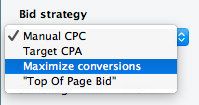
The ‘maximize conversions’ bidding option was released last month on the web version of AdWords, so this is hardly a surprising launch in version 12. Even so, it is still very welcome and provides the option for users to allow Google’s advanced machine learning technology to set bids automatically within real-time bidding auctions. This means advertisers can get as many of their defined ‘conversions’ as possible for their daily budget.

Available at the campaign level within Editor, maximize conversions is found within the ‘Bid strategy’ drop-down list:

Small screenshot of the Bid strategy dropdown list, with Manual CPC ticked at the top and Maximize conversions highlighted further down.

Custom rules:

AdWords Editor now includes a host of custom rules, designed to ensure advertisers follow Google’s lengthy list of best practices. Editor will now let users know if their campaigns fall below Google’s standard before they are uploaded to AdWords. This is a pretty handy insight into what Google expects and wants to see from ad campaigns.

A list of the rules included are listed in the screenshot below and, as the name suggests, there is plenty of room for customization.

New fields for responsive ads:

A slew of new, editable fields have been added for responsive ads, including logos, promotion text, price prefixes, and CTA text.

Increased multimedia UAC support:

Universal App Campaigns make great use of Google’s machine learning technology. Advertisers can upload their creative assets and Google automatically generates the most appropriate video or image to promote the app to users across its range of products, including the Google Display Network, Search, and YouTube. Support is now provided for up to 20 videos or images within AdWords Editor 12, a significant upgrade.

We can expect to see version 12.1 sometime very soon, so we should really view this as the beginning of a process rather than a finished product.

Evolution, not revolution

That said, there is still a sense that, for all its launch has been heralded, version 12.0 hasn’t delivered the newsworthy, paradigm-shifting features of its predecessor.

There are commonalities across the updates in Editor 12, nonetheless, and they are representative of Google’s wider business strategy.

The phrase “machine learning” invariably crops up in any Google update now and it appears in abundance in relation to the newest AdWords Editor. The application provides more control to advanced users, no doubt, with its customizable fields and filters.

This sense of control for account managers becomes evermore illusory, however, as the essential workings of the machine reside on Google’s side of the fence.

Universal App Campaigns and Maximize Conversions serve as ideal harbingers of a new, AI-led approach to bidding, targeting, and personalization. Google provides access to these features, for a price, which levels the playing field for a wider group of advertisers. The differentiating factor between these campaigns will likely come down to the human element, often led by the meticulous work done in AdWords Editor.

In that sense, this update is a very significant marker of where the industry stands in 2017. The opportunities to gain a competitive advantage through old-fashioned PPC expertise are more valuable than ever, as machine learning tightens its grip over all aspects of paid search, from account structure to creative delivery.

AdWords Editor 12 may not have introduced these notions, but it certainly serves to solidify them.


source https://searchenginewatch.com/2017/07/11/adwords-editor-12-everything-you-need-to-know/

Monday, 10 July 2017

Here’s how RankBrain does (and doesn’t) impact SEO

In the past couple of weeks there has been a reinvigorated fervor surrounding artificial intelligence, with “AIO” (Artificial Intelligence Optimization) rearing its head on agency websites and blogs.

HTTPS and mobile first seem to be cooling as topics, so attention is turning to RankBrain.

The reality of this however is that artificial intelligence optimization is seemingly a paradoxical notion. If we imagine that Google is a child, when the child goes to school and reads a book, we want the child to learn and understand the information in that book. If the book isn’t “optimized” for the child to learn – structured information, images, engaging, positive user experience etc. – then the child won’t learn or understand the content.

Optimizing for RankBrain isn’t something new, or complicated. The tweet above from Google’s Gary Illyes on June 27 2017 echoes this. So why is there this need to turn RankBrain optimization into a product of its own, when the practices aren’t anything new?

In this post I’m going to explore exactly what RankBrain, and isn’t, as well as how the pre-existing concepts and practices of good SEO (as outlined by Google’s guidelines) apply to RankBrain.

What is RankBrain?

RankBrain uses a form of machine learning and is used by Google to process unfathomable amounts of qualitative data (written content) into quantitative data (mathematical entities), vectors that the algorithm and other computers can understand.

15% of all queries that Google processes are new, so it’s common for RankBrain to encounter a query or phrase it hasn’t seen before. Using previously processed data in vectors and shards, RankBrain looks to make an intelligent guess based on similar queries, and similar meanings.

The number of new queries has reduced from 25% in 2007, but volume has increased exponentially thanks to the rise of smartphones and increased internet penetration rates globally.

Simply put, RankBrain:

  • Interprets the user query
  • Determines search intent
  • Selects results (items) from the databases

What is machine learning?

Machine learning is a computer science and was defined in 1959 by Arthur Samuel as follows: “Machine learning gives computers the ability to learn without being explicitly programmed”. Samuel conducted the initial research into this field, which evolved from pattern recognition studies and computational learning theory.

Machine learning in essence explores the construction of algorithms and makes predictions based on data and statistical frequencies. Machine learning has been used in a number of software applications prior to Rank Brain, including spam email filtering, network threat and intruder detection and optical character recognition (OCR).

While this is a form of artificial intelligence, it’s not a high functioning form.

Association rule learning

ARL (association rule learning) is a method of machine learning for discovering relationships between variables in large databases using predetermined measures of interestingness.

This has previously been used by supermarkets to determine consumer buyer behaviour, and is used to produce loyalty coupons and other educated outreach methods. For instance, through store loyalty/points cards, a store can gather data that when analyzed can predict buying patterns and behaviors.

ARL can also be used to predict associations, for example if a user buys cheese slices and onions, it could be assumed they are also going to buy burger meat. RankBrain uses this principle in providing intelligent search results, especially when a phrase can have multiple meanings.

An example of this is an English slang term “dench”. If a user searches for dench it can have three meanings; the slang term, a line of clothing, or the actress Judi Dench. The term can also be associated with individuals, such as professional athlete Emmanuel Frimpong and rapper Lethal Bizzle.

As the query is ambiguous, Google’s own search quality evaluator guidelines explain that the search engine will show as many variations as deemed possible in order to satisfy the users search intent as best they can.

Concepts of association rule learning

The main concepts and rules of ARL are Support, Confidence, Lift and Conviction, but for the purposes of RankBrain I’m going to focus on Support and Confidence.

Support

Support in ARL is the measure of how frequently the item in question appears in the database. This is not the same as keyword density, or the number of times keyword variants appear.

Confidence

Confidence of ARL is a measure of how often the rule has been found to be true. This is based on associative terms, i.e. if a user searches for “POTUS”, then there is an X% chance that they may also search for, or find, Donald Trump a satisfactory result. They may also find Barack Obama, George Bush or Abraham Lincoln satisfactory results.

Confidence can often be confused with probabilities, as the two principles with regards to organic search are quite similar (if a user searches for X, then Y and Z can also be valid).

RankBrain uses association rules to satisfy user specified minimum support, and user specified minimum confidence at the same time, and both support and confidence are generally split into two individual processes:

  1. Minimum support threshold is established and applied to all frequent items in the database.
  2. Minimum confidence constraints are applied to the frequent items, in order to form rules.

Using these rules, RankBrain helps Google prioritize which ranking signals are most relevant to the user query, and how to weight those signals.

RankBrain and SEO

RankBrain was launched in a dozen or so languages (as confirmed by Gary Illyes on Twitter in June 2017) ranging from English to Hindi, and its sole purpose is to help Google provide more accurate results and an overall better search experience for users, satisfying their queries.

The main difference between the pre and post RankBrain world is that before RB, Google’s team of software engineers would amend and alter the mathematical algorithm(s) that determine search results and rankings, and this algorithm would remain constant until an update was made. However Rank Brain is a part of the core algorithm and is used by Google for all searches (as of 2016), meaning that there is constant change and fluctuation.

This means that search results are now reactive to real world events, as well as a lot more volatile outside of the big algorithm update announcements.

“Optimizing” for RankBrain

Given how RankBrain interacts with the core algorithm and other ranking signals, there may be a need to change strategic focus (especially if the strategy is built on backlinks). But RankBrain is not a “classic algorithm” like Panda and Penguin.

With the classic algorithms, we knew how to avoid Penguin penalties and thanks to guidelines, we know how to satisfy Panda. RankBrain on the other hand is an interpretation model that can’t be optimised for specifically. There are however a number of standard SEO practices that are now more relevant than ever.

Doorway pages are dead

The idea of writing content with a “focus keyword” and producing one page for one keyword are outdated. The Hummingbird updated killed this in 2013, and RankBrain has taken this one step further.

I’ve seen this practice still being used in a number of sectors. When creating content and URL structures, both user experience and keyword matrices should be used, with the focus being on creating high value and resourceful pages.

Different queries = different weighting factors

Because of the way RankBrain has changed how certain variables and ranking factors are weighted for different queries, it’s no longer a practical approach to take a one size fits all approach with queries (and query categories).

Taking queries that trigger Venice results and the map pack out of the equation, some queries may demand high velocities of fresh content, shorter content, longer content, lots of links… The new weighting model that RankBrain presents means that there will need to be deviations from the standard best practice.

Internal linking structures

We know from Google’s search quality evaluation guidelines that Google considers main and supplemental content when ranking a page; this extends to pages within a URL subdirectory and pages linked to from the main content.

It’s standard to optimize internal linking structures so that link equity is passed to key pages on the site (as well as deeper pages), but it’s also important to include a good number of internal links to improve the user experience.

What does the future hold?

When RankBrain was first launched in 2015 it only handled around 15% of queries, but by the same time 2016 Google’s confidence in the algorithm had grown, and it let RankBrain loose on all queries. This will have been a phased rollout and responsible for a number of changes we saw in 2016.

As RankBrain learns on the job, it will only get better at understanding semantic and concepts, and relationships between topics and queries. This will benefit voice search results accuracy as well as traditional search results pages and now cards.

In summary

In conclusion, a number of leading figures in the SEO community (including Gary Illyes and Rand Fishkin) have come out in various ways highlighting that RankBrain isn’t something that can’t be specifically optimized for.

That being said, understanding how the RankBrain algorithm works is important to understanding the ranking volatility in your (or your client’s) verticals.


source https://searchenginewatch.com/2017/07/10/heres-how-rankbrain-does-and-doesnt-impact-seo/