Friday, 22 March 2019

Social listening 101: Six crucial keywords to track

Social listening is a tactic that’s not unheard of. Quite a number of brands use it these days and even more consider trying it out in the near future. However, for many, the step-by-step process of social listening remains unclear.

This article aims to answer the most burning questions about social listening:

  • What is a keyword?
  • Which keywords should you monitor?
  • How do you get relevant and comprehensive results instead of all the noise that the Internet is filled with?

What is a keyword?

As we know, social listening is a process that requires a social media listening/social media monitoring tool (e.g., Awario, Mention, Brandwatch). The first thing you do when you open the app is entering keywords to monitor.

Keywords are the words that describe best what you want to find on social media platforms and the web. A keyword can be one word (e.g. “Philips”), two words (e.g. “Aleh Barysevich”), four words (e.g. “search engine optimization tool”), etc. Each one of these examples presents one keyword. After you typed in your keyword(s), the tool will search for mentions of these keywords and collect them in a single place.

Screenshot of mentions for a specific keyword

Which keywords should you monitor?

You can monitor absolutely anything. You can monitor the keywords “Brexit” or “let’s dance” or “hello, is it me you’re looking for”. However, in terms of marketing purposes, there are six main types of keywords that you are most likely to monitor. They are:

1. Brand/company
2. Competitors
3. Person
4. Campaign
5. Industry
6. URL

Now let’s go through each type together to make sure you understand the goals behind monitoring these keywords and how to get the most out of them.

1. Brand/Company

Monitoring your brand/your company is essential in most cases. While the goals of social listening can be very diverse (reputation management, brand awareness, influencer marketing, customer service), most of these goals require listening to what people say about your brand.

To make sure you don’t miss any valuable mentions, include common misspellings and abbreviations of your brand name as well.

In case your brand name is a common word (e.g. “Apple” or “Orange”) make sure to choose a tool that gives you an option to introduce “negative” keywords. These would be keywords such as “apple tree”, “apple juice”, “apple pie”. Excluding them from your search will help get mentions of Apple the brand only. Any tool that has a boolean search option will also save you from tons of such irrelevant mentions.

2. Competitors

Pick a couple of your main competitors (or even just one), and enter their brand/company name as a separate project. There’s a good reason for that: Questions and complaints directed at your competitors can be replied by your social media manager first. They could explain why your brand is better/doesn’t have specific problems that your competitor does. This is social selling, a process of finding hot leads on social media.

Most social media monitoring tools also let you compare how your brand is doing on social media against your competitor’s brand. This can be useful for tracking your progress and discovering new ideas.

For example, knowing which social networks, which locations, and what time slots get your competitor more attention could help you upgrade your social media strategy. Knowing how their campaigns, social media posts, and product releases perform could help you improve your own plans, and avoid some mishaps.

3. Person

The CEO of your company might not necessarily be the company’s face or even a public persona at all. However, if reputation management is one of your goals, monitoring mentions of the CEO are important. Their actions on social media could easily attract attention and cause a social media crisis. Also, you’ll know straight away about any publications that mention your company’s CEO.

Same, of course, goes for any other people in the company.

4. Campaign

It’s crucial to monitor marketing (and other) campaigns as well as product launches. Reactions on social media happen very quickly. Only by monitoring such events in real time, you’ll know straight away if it’s going well or not, if it’s working at all, and if there are problems that you might’ve not noticed while creating the campaign. The earlier you know how the reality is unfolding, the better. To monitor a campaign, enter its name if it has one, its slogan, and/or its hashtag as a keyword.
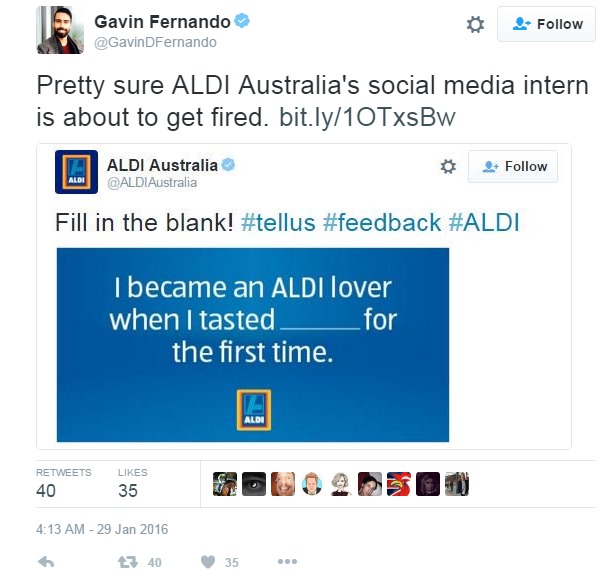
Example of how social media activities could go wrong

It’s important to understand that there are loads of marketing campaigns that have caused serious problems for the companies. Something that could’ve been avoided with social media monitoring.

5. Industry

Not in every industry can you monitor the so-called “industry keywords”. However, if you can, these are the source of endless opportunities. Most of these are in the realms of social selling, brand awareness, and influencer marketing.

For example, if your product is a productivity app, this would be your keyword “productivity app”. Include a couple of synonyms and words such as “looking for”, or “can anyone recommend” and you’ll get mentions from people that look for a product like yours. Specify the language and the location to get more relevant results.

With a social media monitoring tool that finds influencers, you can go to the list of influencers that is built around your industry keywords and choose the ones to work with.
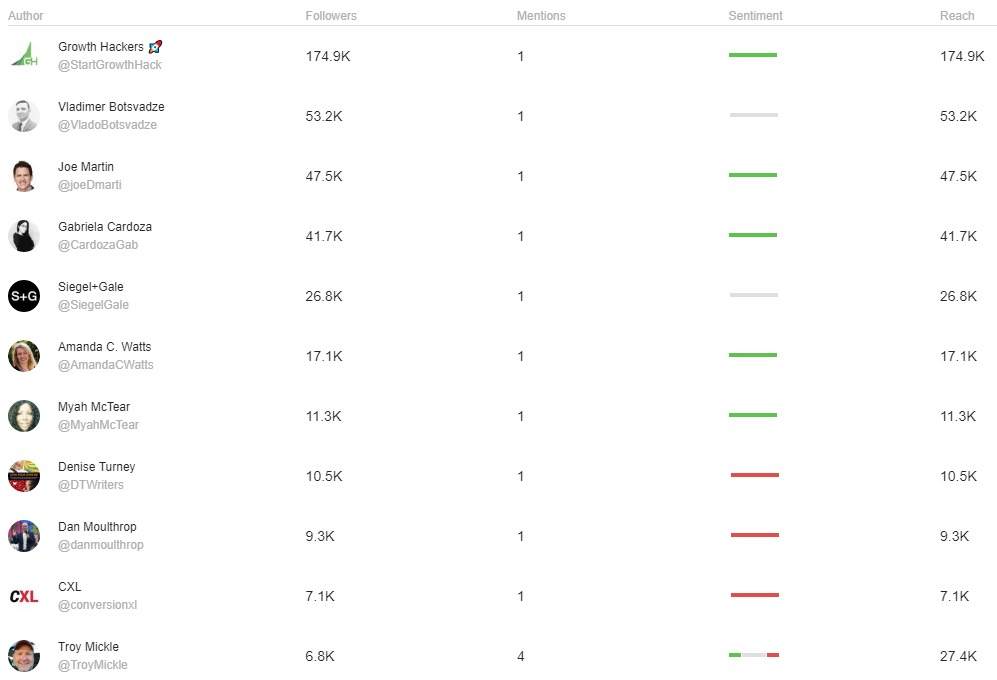
Example of finding influencers using social listening keywords

6. URL

Monitoring your brand by excluding your brand’s URL (which is possible with a social media monitoring tool) is important for SEO purposes. It’s a big part of link-building. All you have to do is find mentions of your brand that don’t link to your brand, reach out to the author, and ask for a link. In most cases, the authors wouldn’t mind adding the link to your site.

Besides, you can monitor competitors’ URLs. This will give you a list of sources where they get links from. It’s only logical that if the author is interested in the niche and is willing to write about your competitor, they probably wouldn’t mind reviewing your product as well.

Conclusion

There’s a lot you can do with social media monitoring. All you have to do is start. Starting is the hardest part. Then, appetite, ideas, and knowledge come with eating. Hopefully, this article gave you a clear idea of where to start.

Aleh is the Founder and CMO at SEO PowerSuite and Awario. He can be found on Twitter at @ab80.

The post Social listening 101: Six crucial keywords to track appeared first on Search Engine Watch.


source https://searchenginewatch.com/2019/03/12/social-listening-101-six-crucial-keywords-to-track/

Thursday, 21 March 2019

Robots.txt best practice guide + examples

The robots.txt file is an often overlooked and sometimes forgotten part of a website and SEO.

But nonetheless, a robots.txt file is an important part of any SEO’s toolset, whether or not you are just starting out in the industry or you are a chiseled SEO veteran.

What is a robots.txt file?

A robots.txt file can be used for for a variety of things, from letting search engines know where to go to locate your sites sitemap to telling them which pages to crawl and not crawl as well as being a great tool for managing your sites crawl budget.

You might be asking yourself “wait a minute, what is crawl budget?” Well crawl budget is what what Google uses to effectively crawl and index your sites pages. As big a Google is, they still only have a limited number of resources available to be able to crawl and index your sites content.

If your site only has a few hundred URLs then Google should be able to easily crawl and index your site’s pages.

However, if your site is big, like an ecommerce site for example and you have thousands of pages with lots of auto-generated URLs, then Google might not crawl all of those pages and you will be missing on lots of potential traffic and visibility.

This is where the importance of prioritizing what, when and how much to crawl becomes important.

Google have stated that “having many low-value-add URLs can negatively affect a site’s crawling and indexing.” This is where having a robots.txt file can help with the factors affecting your sites crawl budget.

You can use the file to help manage your sites crawl budget, by making sure that search engines are spending their time on your site as efficiently (especially if you have a large site) as possible and crawling only the important pages and not wasting time on pages such as login, signup or thank you pages.

Why do you need robots.txt?

Before a robot such as Googlebot, Bingbot, etc. crawls a webpage, it will first check to see if there is in fact a robots.txt file and, if one exists, they will usually follow and respect the directions found within that file.

A robots.txt file can be a powerful tool in any SEO’s arsenal as it’s a great way to control how search engine crawlers/bots access certain areas of your site. Keep in mind that you need to be sure you understand how the robots.txt file works or you will find yourself accidentally disallowing Googlebot or any other bot from crawling your entire site and not having it be found in the search results!

But when done properly you can control such things as:

  1. Blocking access to entire sections of your site (dev and staging environment etc.)
  2. Keeping your sites internal search results pages from being crawled, indexed or showing up in search results.
  3. Specifying the location of your sitemap or sitemaps
  4. Optimizing crawl budget by blocking access to low value pages (login, thank you, shopping carts etc..)
  5. Preventing certain files on your website (images, PDFs, etc.) from being indexed

Robots.txt Examples

Below are a few examples of how you can use the robots.txt file on your own site.

Allowing all web crawlers/robots access to all your sites content:

User-agent: *
Disallow:

Blocking all web crawlers/bots from all your sites content:

User-agent: *
Disallow: /

You can see how easy it is to make a mistake when creating your sites robots.txt as the difference from blocking your entire site from being seen is a simple forward slash in the disallow directive (Disallow: /).

Blocking a specific web crawlers/bots from a specific folder:

User-agent: Googlebot
Disallow: /

Blocking a web crawlers/bots from a specific page on your site:

User-agent: 
Disallow: /thankyou.html

Exclude all robots from part of the server:

User-agent: *
Disallow: /cgi-bin/
Disallow: /tmp/
Disallow: /junk/

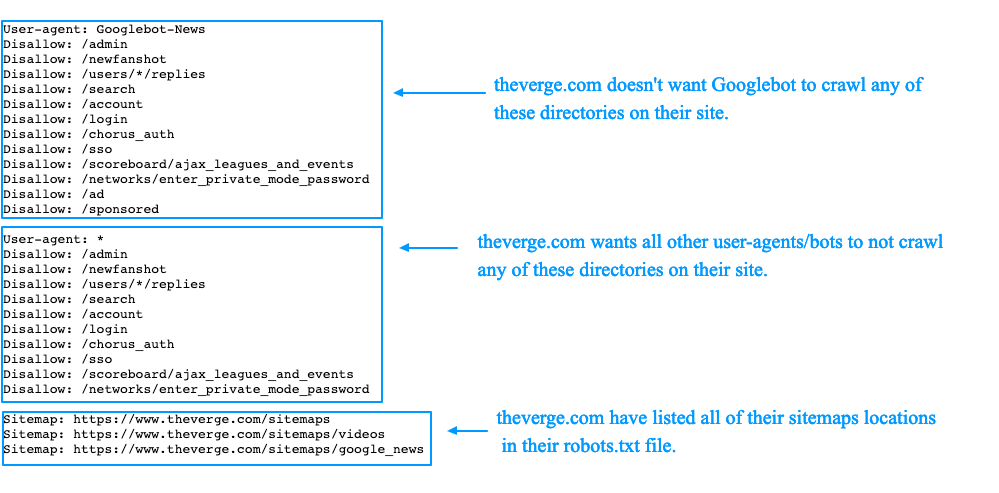
This is example of what the robots.txt file on the theverge.com’s website looks like:

The example file can be viewed here: www.theverge.com/robots.txt

You can see how The Verge use their robots.txt file to specifically call out Google’s news bot “Googlebot-News” to make sure that it doesn’t crawl those directories on the site.

It’s important to remember that if you want to make sure that a bot doesn’t crawl certain pages or directories on your site, that you call out those pages and or directories in the in “Disallow” declarations in your robots.txt file, like in the above examples.

You can review how Google handles the robots.txt file in their robots.txt specifications guide, Google has a current maximum file size limit for the robots.txt file, the maximum size for Google is set at 500KB, so it’s important to be mindful of the size of your sites robots.txt file.

How to create a robots.txt file

Creating a robots.txt file for your site is a fairly simple process, but it’s also easy to make a mistake. Don’t let that discourage you from creating or modifying a robots file for your site. This article from Google walks you through the robots.txt file creation process and should help you get comfortable creating your very own robots.txt file.

Once you are comfortable with creating or modify your site’s robots file, Google has another great article that explains how to test your sites robots.txt file to see if it is setup correctly.

Checking if you have a robots.txt file

If you are new to the robots.txt file or are not sure if your site even has one, you can do a quick check to see. All you need to do to check is go to your sites root domain and then add /robots.txt to the end of the URL. Example: www.yoursite.com/robots.txt

If nothing shows up, then you do not have a robots.txt file for you site. Now would be the perfect time to jump in and test out creating one for your site.

Best Practices:

  1. Make sure all important pages are crawlable, and content that won’t provide any real value if found in search are blocked.
  2. Don’t block your sites JavaScript and CSS files
  3. Always do a quick check of your file to make sure nothing has changed by accident
  4. Proper capitalization of directory, subdirectory and file names
  5. Place the robots.txt file in your websites root directory for it to be found
  6. Robots.txt file is case sensitive,  the file must be named “robots.txt” (no other variations)
  7. Don’t use the robots.txt file to hide private user information as it will still be visible
  8. Add your sitemaps location to your robots.txt file.
  9. Make sure that you are not blocking any content or sections of your website you want crawled.

Things to keep in mind:

If you have a subdomain or multiple subdomains on your site, then you you will need to have a robots.txt file on each subdomain as well as on the main root domain. This would look something like this store.yoursite.com/robots.txt and yoursite.com/robots.txt.

Like mentioned above in the “best practices section” it’s important to remember not to use the robots.txt file to prevent sensitive data, such as private user information from being crawled and appearing in the search results.

The reason for this, is that it’s possible that other pages might be linking to that information and if there’s a direct link back it will bypass the robots.txt rules and that content may still get indexed. If you need to block your pages from truly being indexed in the search results, use should use different method like adding password protection or by adding a noindex meta tag to those pages. Google can not login to a password protected site/page, so they will not be able to crawl or index those pages.

Conclusion

While you might be a little nervous if you have never worked on robots.txt file before, rest assured it is fairly simple to use and set up. Once you get comfortable with the ins and outs of the robots file, you’ll be able to enhance your site’s SEO as well as help your site’s visitors and search engine bots.

By setting up your robots.txt file the right way, you will be helping search engine bots spend their crawl budgets wisely and help ensure that they aren’t wasting their time and resources crawling pages that don’t need to be crawled. This will help them in organizing and displaying your sites content in the SERPs in the best way possible, which in turn means you’ll have more visibility.

Keep in mind that it doesn’t necessarily take a whole lot of time and effort to setup your robots.txt file. For the most part, it’s a one-time setup, that you can then make little tweaks and changes to help better sculpt your site.

I hope the practices, tips and suggestions described in this article will help give you the confidence to go out and create/tweak your sites robots.txt file and at the same time help guide you smoothly through the process.

Michael McManus is Earned Media (SEO) Practice Lead at iProspect.

The post Robots.txt best practice guide + examples appeared first on Search Engine Watch.


source https://searchenginewatch.com/2019/03/12/robots-txt-best-practice-guide-and-examples/
How to increase conversions: Ideas, tools, examples

Historically digital marketers are more concerned about attracting traffic to the site than boosting on-site conversions.

This is unfortunate because conversion optimization usually requires smaller investments and provides faster results than growing your traffic.

Here are eight ways to increase your ecommerce conversions quickly by providing better usability and smoother user experience.

1. Make your checkout process simpler

The name of the game is convenience. Don’t make it difficult for the consumer to finish a purchase. The more barriers your site throws up, the more likely it is your customers will leave the cart without completing the purchase.

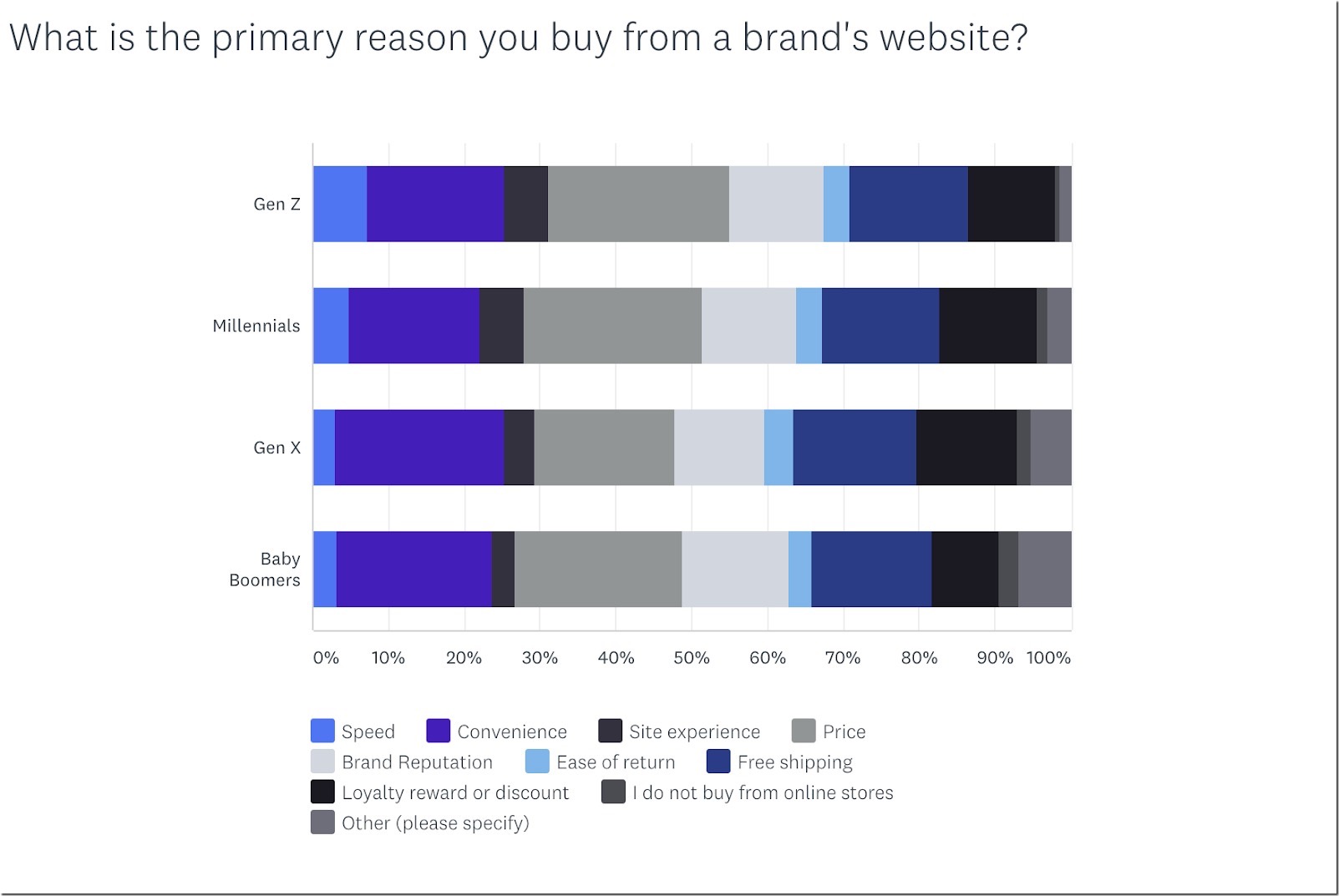
According to BigCommerce’s 2019 Omni-Channel Retail Report, convenience is among the top 3 reasons U.S.  consumers across all generations chose to buy from an online store. When shopping online, millennials have become used to speed and convenience while younger generations have never known shopping without these.

graph showing "what is the primary reason you buy from a brand's website"

You should have a simple checkout process because that’s what is expected from your site these days (and often the primary reason why they shop online anyway). For example, sites that force you to sign up before you can check out are frustrating, and many users are not willing to spend time creating an account. Remove the forced signup and provide an option to checkout out as “guest.”

Every section of your checkout process is another opportunity for the consumer to quit and walk away. Consider whether any given section is worth the chance of losing sales and if you can safely remove it. Or, if it can’t be removed, find a way to streamline the entire process. For example, include a duplicating button that allows users to make their delivery address their billing address, without entering the same information twice.

Create easy cart navigation and decrease the number of steps needed to complete the purchase. This will increase sales and profits as well as customer satisfaction.

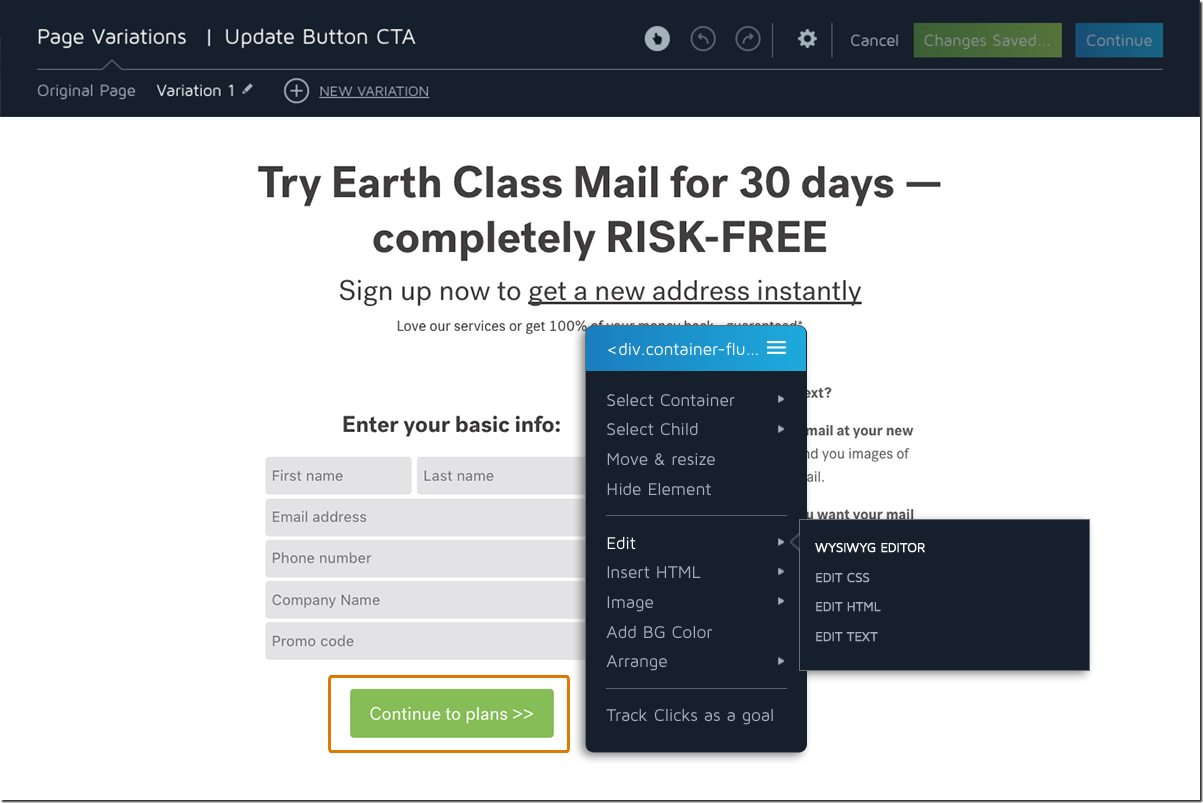
Featured tool: Convert.com allows to easily A/B your site shopping experience to come up with the best solution for your customers. Additionally, for WordPress, here’s a detailed A/B testing tutorial.

convert.com tool for how to increase conversions

2. Provide one-click upsells

According to ConversionXL, it is 25 times more expensive to develop new customers than it is to re-convert your current customers. You need to work to keep re-engaging your existing customers continually.

They are more valuable to you than a new visitor. Studies have shown that if you can increase your customer retention by 5%, you can increase your profits by up to 25%.

You can keep these consumers through a one-click upsell option. It convinces customers to complete an additional, unplanned-for transaction. It’s exactly how impulse shopping works in brick-and-mortar stores. They place enticing items by the register to convince you to add them to your purchase while you stand in line.

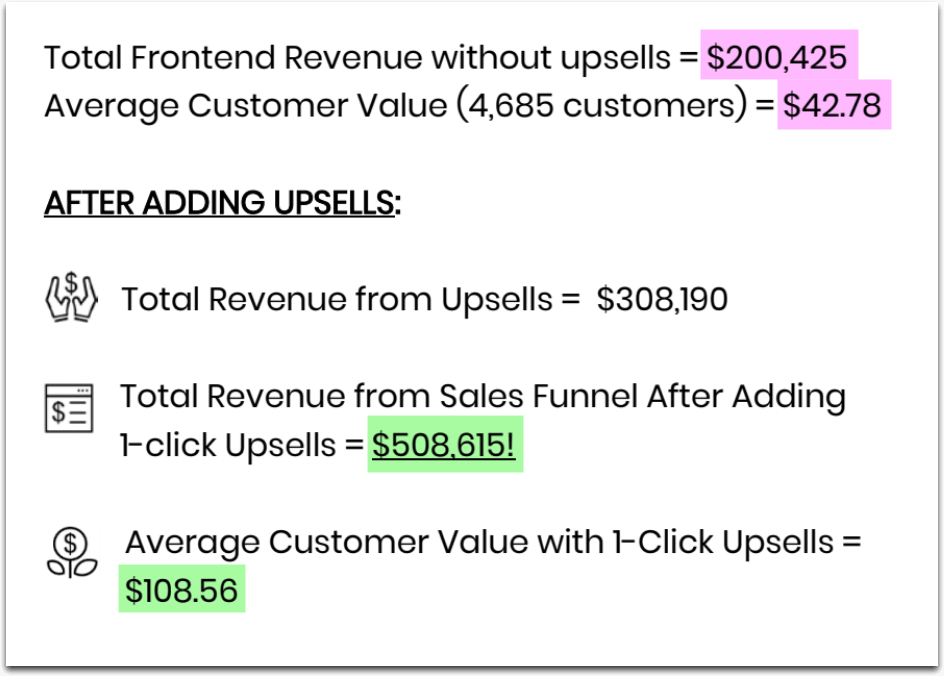
PayKickstart users have demonstrated powerful proof of concept: Many of them have seen both their average customer value and the total revenue more than double after they implemented one-click upsells:

paykickstart showing benefits of increased conversions after adding upsells

3. Make your shopping experience mobile-friendly

Mobile shopping is continually growing. More people are using their mobile device or tablet to shop on ecommerce sites than ever before, and with the fast adoption of smartphones worldwide, the numbers will continue to go up.

Users are more likely to abandon a cart and navigate away from your site if it’s difficult to browse on a smartphone. You don’t always need to develop an expensive app, but you do need to make your website easy to read and use on a smartphone.

One powerful way to make your shopping experience mobile friendly without investing into a standalone app is to use web design platforms that support progressive web apps (PWAs) which act like native mobile apps but don’t need to be installed by your customers. According to Google, PWAs are “a new way to deliver amazing user experiences on the web.”

PWAs also support many app-like functionalities that most mobile-optimized websites do not, such as push notifications, which can be especially useful for omnichannel retailers.

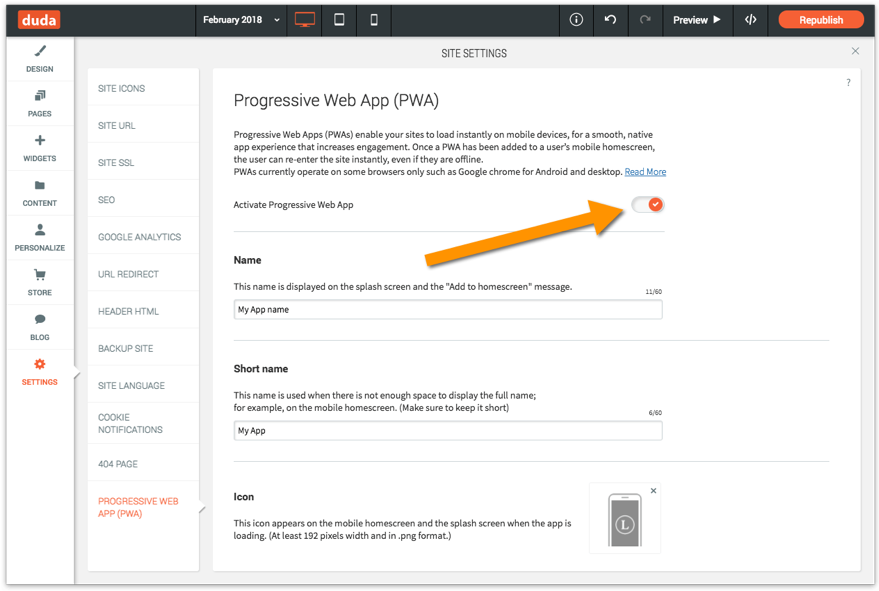
Duda allows agency professionals to roll out progressive web app versions of their clients’ sites with one click of a button:

duda platform showing progressive web apps (PWAs)

4. Provide personalized shopping experience

Several studies found personalized experience is a growing ecommerce trend that shouldn’t be neglected:

  • 59% of e-commerce shoppers find it easier and more engaging to shop on sites that are personalized.
  • 56% of shoppers are increasingly more likely to return to a site that recommends products to them.
  •  53% of shoppers believe that e-commerce retailers that offer personalized shopping provide a valuable service.

With Amazon leading the digital marketing industry, most of US consumers already expect to receive personalized treatment whenever they shop online.

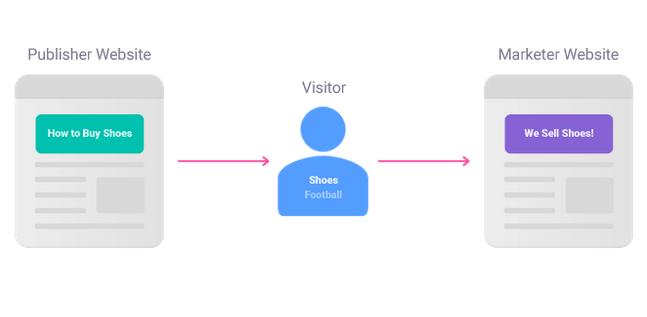
Alter helps you set-up personalized shopping experience without the need to invest into an in-house solution. It works as follows:

  • Visitors read content or research products like they normally would on their favorite websites and blogs
  • Alter anonymously determines non-personal visitor interests based on the web pages they’re viewing (e.g. shoes, cars).
  • Visitors see personalized content based on those interests to help save time on websites they visit later (marketer websites).

image of how to provide personalized experiences

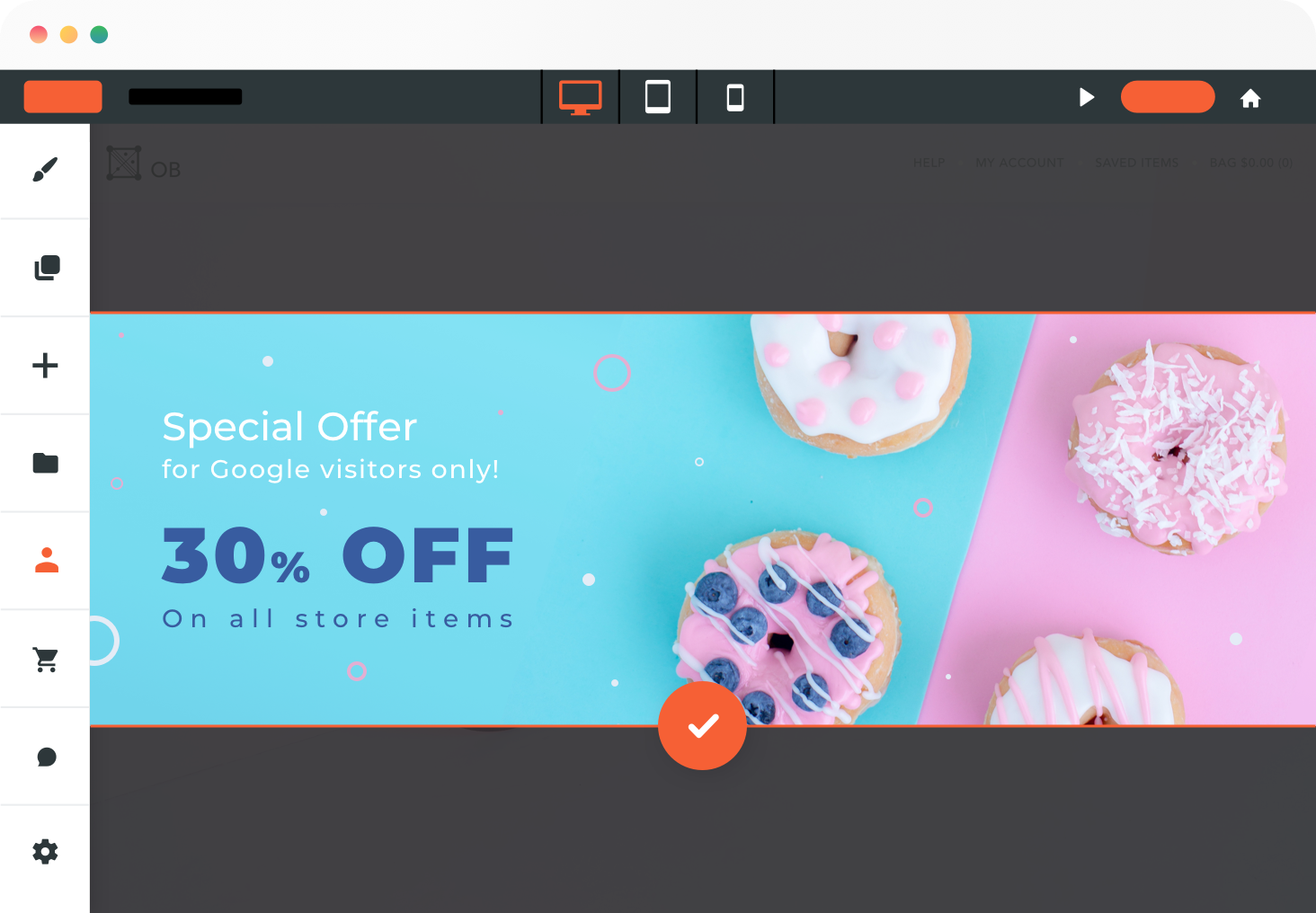
Some content management systems also provide for solid personalization options (which would be even easier to implement). For example, Duda allows you to personalize CTAs and special offers based on time of day, geolocation, number of visits and more:

duda platform for how to edit special offers

5. Match your customers’ expectations

Many of your customers discover your products through Google search. Are your landing pages doing a good-enough job matching their expectations?

Search intent optimization is often overlooked. Yet, it’s what often determines your users’ on-page engagement. Whether they will instantly see what they expected to see determines whether they will want to stay and give your landing page a chance to convert them into buyers.

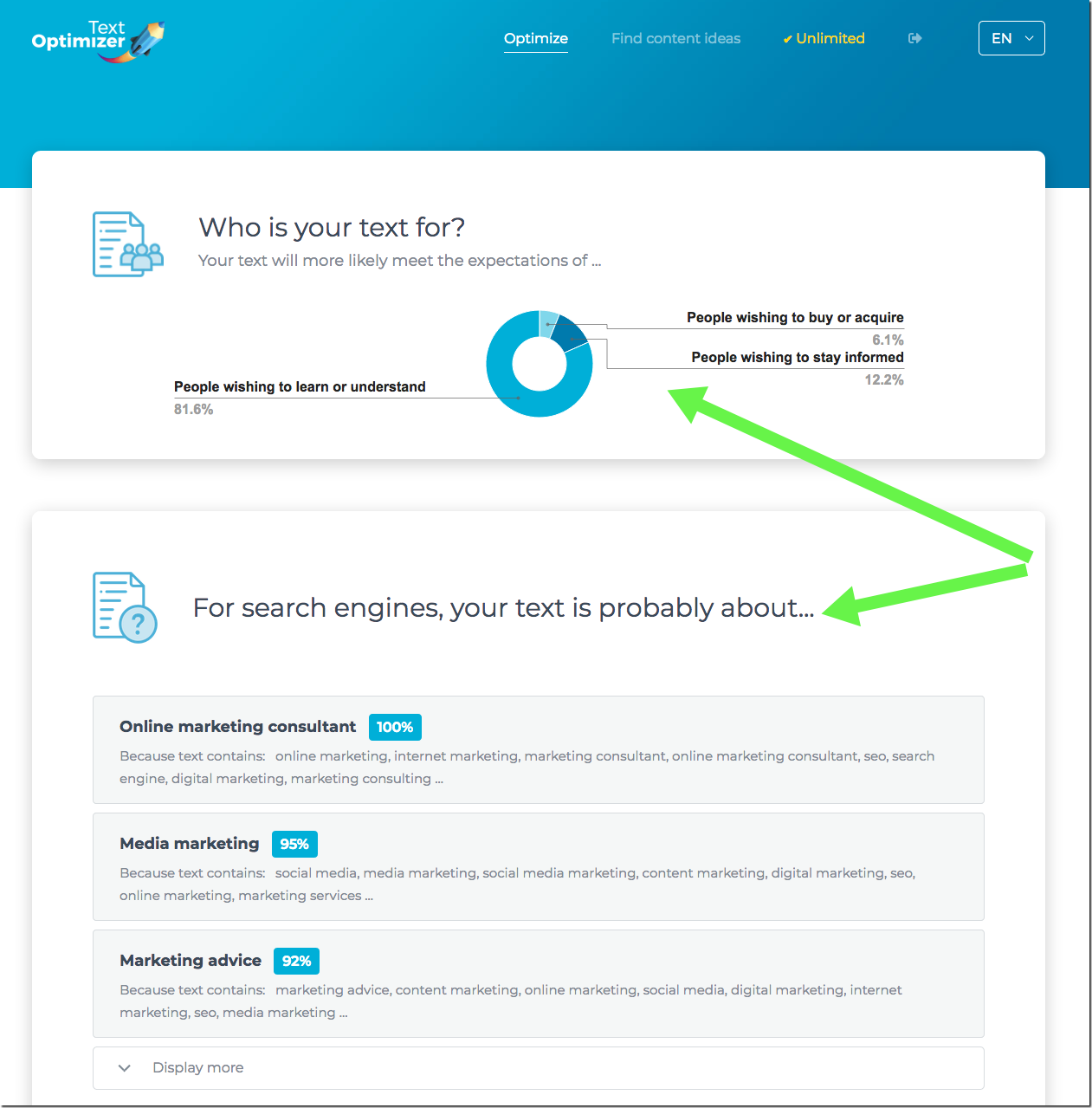
Text Optimizer is a great way to optimize your landing page copy to meet Google’s and its users’ expectations. It uses semantic analysis to extract important concepts from Google’s search results. Use these terms when crafting your landing page copy to optimize it better and engage more of your site visitors:

TextOptimizer tool for how to improve copy for increased conversions

6. Add a sense urgency

Have you ever had a case of FOMO or fear of missing out? You’re not alone. The fear of missing out on something amazing or special or even extremely ordinary is a powerful psychological force that you can tap into.

Add a sense of urgency to your shopping cart page to develop FOMO in your costumer. This can give hesitant customers the extra push they need to complete the purchase.

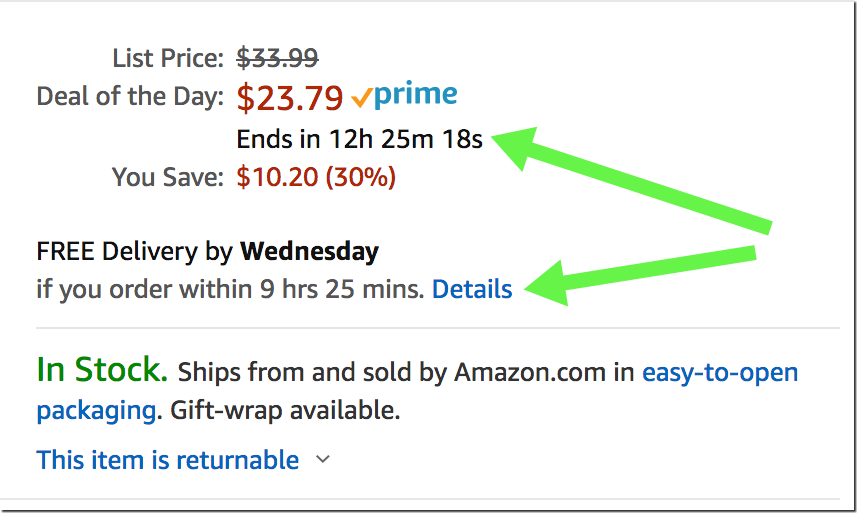
Amazon uses FOMO extremely well by adding a countdown timer tied into your shipping. It tells you to buy the product in the next XX minutes to qualify for one-day shipping.

image of amazon example of adding urgency for how to increase conversions

You can use this tactic by adding a timer to your cart page, or a countdown clock to the end of a sale (here’s how). You could even go simply by writing “checkout now” instead of only “checkout.”

7. Add breadcrumbs

Site navigation can be tricky. If you’ve never been on a particular website, you might struggle to find your way around after you move from the landing page.

This is especially troublesome for e-commerce sites. You need to implement clear site navigation for both SEO and  usability.

Setting up breadcrumbs throughout your pages is a simple way to help your users feel confident at each step of their journey. Make it obvious where the consumer should go and what they should click next, and you are likely to see your conversions go up.

Conversion optimization may seem overwhelming. Luckily there are tools and solutions that can make it quite doable. Before investing in attracting more traffic to your site, try implementing the tips above to get the most of those visitors you already have.

Ann Smarty is the blogger and community manager at Internet Marketing Ninjas. She can be found on twitter @seosmarty

The post How to increase conversions: Ideas, tools, examples appeared first on Search Engine Watch.


source https://searchenginewatch.com/2019/03/12/how-to-increase-conversions-ideas-tools-examples/

Wednesday, 20 March 2019

Eight tools you need for backlink generation

So you’ve created your website, following all the recommended SEO best practices.

That means you’ve included valuable, relevant keywords on your pages, made it mobile friendly and even started a blog that you’re updating frequently with original, relevant content.

But despite your best efforts, you’re not seeing as much traffic as you’d like, and your site is still ranking too low on Google’s Search Engine Results Page (SERP). It could be that your site is missing just one thing: backlinks.

Backlinks are links from another website that point to your website. Getting backlinks from websites with high domain authority that are relevant to your niche will help you rank higher on Google searches and grab your audience’s attention.

Why is there such an emphasis on backlinks? Google’s Search Engine Results Page (SERP) uses them to discover new pages, confirm pages are legitimate and determine the popularity of these pages. After all, Google doesn’t want to risk its own reputation by ranking subpar sites high on the SERP. According to a study by Backlinko, the number of domains linking to a webpage “correlated with rankings more than any other factor”.

Backlink generation isn’t easy, especially for new businesses or businesses just starting to build their web presence. However, with time, effort and the right tools, you can make sure you’re ranking high and receiving the views you deserve.

If you’re a business owner and want to boost your backlinks, here are eight tools to get you started.

1. MozBarScreenshot of MozBar

MozBar is a free SEO toolbar you download onto your web browser. It shows you the domain authority (DA) of a certain website, which gives you an indication of whether or not you should reach out for a backlink. If you do earn a backlink from a website with a DA, this will positively affect your own site’s authority.

In terms of DA, it ranges from 1 to 100, and the higher, the better. There’s no ideal number to look for, but generally, try finding sites with excellent content that relate to your field. If the DA is, say, a 35, that won’t help you as much as a site with a 75, but it won’t hurt, either. Research sites thoroughly and makes sure they aren’t spammy before pursuing them.

2. SEMrushScreenshot of SEMrush

SEMrush, which helps with all types of marketing strategies, shows users a few key tools for backlink generation. When logged into the paid version, you can navigate to the mentions section and find which websites are mentioning you but not linking to you. Once you discover these mentions, you can reach out and ask for a link to your site (as long as the site is relevant and has a high DA), which will boost your rankings.

Another tactic is to go into the backlink audit and see who’s currently linking to your website. Check to see if the link appears underneath the proper SEO-rich keyword and if the site is legitimate and relevant. (If the site is not legitimate, you may want to reach out and ask them to take it down, since that backlink can potentially hurt your ranking.)

While on SEMrush, try the backlink gap tool, which shows you which backlink opportunities your competitors are not taking advantage of. Then, you can reach out and ask for those valuable backlinks instead.

3. PitchboxScreenshot of Pitchbox

Pitchbox is a platform to find websites that may want to spread the news about your business or backlink to your pages or content. You simply sign up for Pitchbox, log in, paste the link to the page/content you’re doing backlink generation for and add in some specific keywords you’re looking to target. Then, in a minute or two, Pitchbox will come up with (usually) hundreds of websites you can reach out to.

You can filter for or delete any websites with low domain authority, and go through the sites one by one to see which are valuable. You can reach out to these websites using a Pitchbox email template. Pitchbox will show you the contacts for that site (or allow you to manually input them), automatically place in the person’s name and their website name, and send as many follow-up emails as you’d like.

When using Pitchbox, double check the contacts to make sure they’re current. Another best practice is to email a maximum of two people at the website since you don’t want to spam numerous people within an organization. If you’re having trouble with backlink generation, consider offering a backlink exchange. Just make sure, again, that the site you’re promising to link to relevant to yours and not spammy.

4. AhrefsScreenshot of Ahrefs

Ahrefs is similar to SEMrush and allows you to use the platform’s backlinks checker to view your current backlinks. Since they’ve already linked to your content before, you can ask these sites to link back to your other pages as well. Ahrefs also allows you to disavow toxic backlinks that might hurt your ranking.

Another helpful backlink generation tool is the Ahrefs Site Explorer. By entering the name of your competitor, you can see all of their referring backlinks. Using that information, you can reach out to the same sites that are linking to your competitors and see if they want to link to a valuable piece of content from your site.

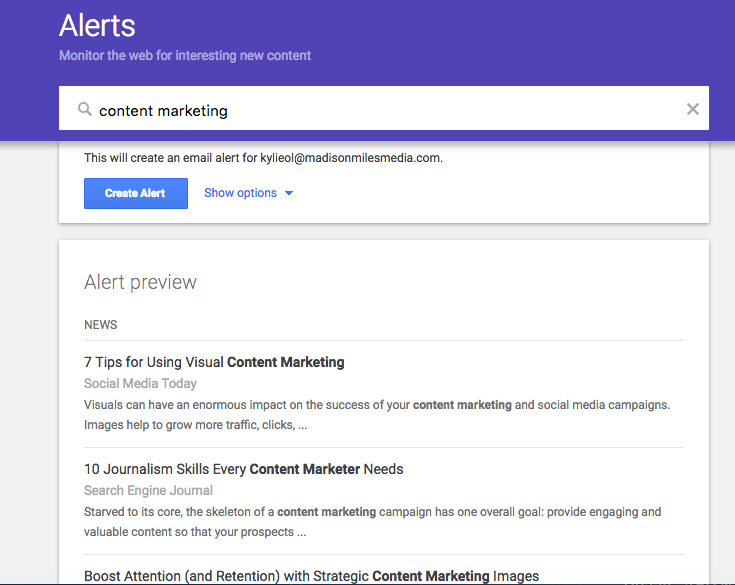
5. Google AlertsScreenshot of Google Alerts

Let’s say you don’t have time to log onto SEMrush or Ahrefs every day and go through your mentions and backlinks. Instead, sign up for Google Alerts, which will email you when you’re mentioned somewhere. Visit the websites that mention you and try to find the contact information for someone you can reach out to there. If you can’t find them, log onto Hunter.io, which is a free tool for finding email addresses using only a domain name.

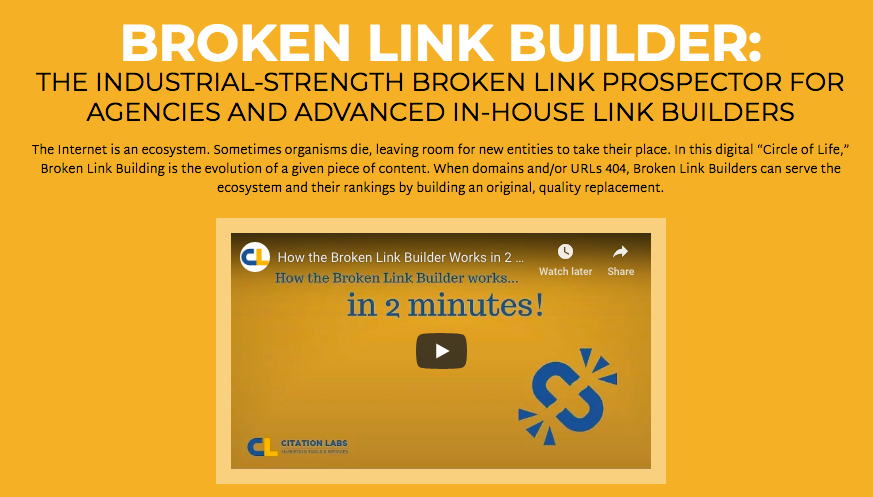
6. Broken Link Builder

Screenshot of Broken Link Builder

Somebody’s broken link can be your backlinking opportunity with Broken Link Builder. With this tool, you can find dead websites and their respective backlinks, and then offer up similar content to the website that was linking to the dead link. It’s a white-hat SEO tactic that benefits both webmasters and backlink seekers. Broken Link Builder only takes 30 to 60 minutes to generate a report for you to find valuable backlinking opportunities.

7. Majestic

Screenshot of Majestic

Majestic is a backlinking tool, like SEMrush and Ahrefs, that examines all the backlinks for your website, as well as your competitors, and allows you to perform very specific searches. You can search and filter backlinks however you choose, including by crawl or discovery dates, anchor text, link type, URL snippet or merchant ID. Majestic also claims to have the largest index out of any other service.

8. Linkody

Screenshot of Linkody

Linkody is another platform for tracking and performing research on backlinks. It tells you when you lose or gain links, and you can disavow bad links. You’re able to see your competitors’ backlinks and analyze your own link profile. You can choose to receive daily notifications in your inbox, view which links point to your landing pages and connect your Linkody and Google Analytics accounts for more backlink information. If you don’t want to pay for the service, you can use Linkody’s Free Backlink Checker to check two unique domains per week.

Tracking backlinks

With backlink generation, you need to track your efforts. A good place to do this is within a Google Sheet. Create a spreadsheet and share it with your team working on backlinks. They should input information like the date the backlink was pursued, the DA of the website, the URL of the website, the target URL of your content or page, the date the backlink was added, the contact’s email address and any notes about the process. Then, when you’re doing another round of backlink generation, you can refer to your Google sheet and reach out to the same people to see if they’d like to link to something else of yours.

Backlinks will always be part of Google’s ranking requirements. Understanding their importance and learning how to use these tools empowers you to do effective backlink generation that can increase your rankings and bring in more visitors to your site.

Mario Medina is a content strategist. He can be found on Twitter @mariovmedina.

The post Eight tools you need for backlink generation appeared first on Search Engine Watch.


source https://searchenginewatch.com/2019/03/20/eight-backlink-generation-tools/

How I got 80% open rate in my email outreach campaign

The suggestion that you could have 80% of your outreach read by recipients sounds like a pipedream — an astronomical figure designed to keep people plugging away on their outbox. 

With such a small canvas of visible information in a recipient’s inbox to work with, it can feel like enticing four out of every five targets to open your email is impossible.

But if you incorporate the right approaches, then it can very much become a reality. Just to give you the heads up, here’re some results we’ve managed to get in our recent outreach campaign:

In the following article, I’ve explored the ingredients needed to get 80% of your outreach messages viewed. So perhaps you’d like to pour yourself a coffee and brace yourself for an awful lot more audience interaction in the near future — the caffeine might come in handy.

Identify your targets

There are five key factors behind achieving a high open rate in your email outreach, and the first and most important is through identifying the right recipients.

A common mistake among many outreachers is their shotgun approach to distributing emails. While scattering mail across the internet into as many inboxes that can be sourced may seem like a good, time-saving and quantitative technique, it actually wastes more time that could be better invested in finding quality recipients.

Before a successful outreach campaign, you’ll need to dedicate some time to the preparation stage. Identify who your ideal responder would be, whether it’s a client, customer, consumer or collaborator, and work on devising a list of the perfect targets that fit the description.

Through the use of opt-ins and calls-to-action, you can have an interested recipient base come to you with minimal fuss and is a sure-fire approach to sending marketing emails to those most likely to view your content. By inviting your website’s visitors to subscribe to your mailing list via an effective call-to-action placed on your homepage, you get to save time on research and effortlessly come into possession of hundreds of emails – a great outreach method for websites that are in a position to offer a product or service to thousands of people.

For outreach emails with more link-building intentions sourcing becomes more difficult. If you’ve decided to target industry professionals and influencers, then tools like Email Hunter and Voila Norbert could be the answer — these services scour the internet for the relevant email addresses behind just about any active website and can help you hit the bulls-eye when it comes to finding the right people to get in contact with.

domain search for emails for search engine watch

Mastering the subject line

According to a poll conducted via Litmus, 34% of recipients believe that an email subject line is the most important factor in helping them to decide to open their mail. This means that over 1/3 of your targets for outreach will be waiting for a perfect heading before clicking on your message.

These stats illustrate how important it is to get your subject line right, and there are many schools of thought behind what’s most effective and what isn’t.

Of course, each subject line will vary depending on the type of outreach you conduct, but the best practice is to appeal to people’s curiosity, to make them believe they’ll be gaining something if they read your email – which of course they will if your campaign has been constructed well enough.

screenshot of how email outreach goes to "other" mailbox

A winning subject line needs to be short, personal wherever possible, and relevant to the topics covered by your email. Sometimes being upfront can be effective, especially when it comes to outreaching savvy marketers and bloggers.

There are a few other factors that can make all the difference in making your email stand out too. Incorporating emojis into your heading may risk your content appearing puerile, but with the vast catalogue of emojis that are more serious than a winking yellow circle with a tongue sticking out, you can really add some standout imagery and colour to your title. For example, travel companies have been using holiday-themed emojis like aeroplanes and city skylines to great effect in capturing the imagination of recipients — if you can find something relevant that appeals to the aesthetics of your email, then it could be a key addition to make.

With so many individuals checking their inboxes via their smartphones, keeping your subject lines short and punchy has never been more important — make sure you get your message across in less than 50 characters.

By adding an element of urgency to your headline, recipients will feel more compelled to check its contents. You can exercise this by adding a sense of limited-time opportunity to your subject, or by inviting them to respond before a deadline — the chances are that they’ll be curious as to what’s caused the urgency and read on.

Don’t be afraid to ask questions in your subject line too — this can be seen as a way of cutting to the chase and getting your message across immediately.

Making use of your preview snippets

Many inboxes have menus that not only feature an unread email’s subject line but a snippet of text from the beginning of a message. It’s important not to neglect the opening lines of your email because this could be a key factor in whether or not it gets read or moved to the ‘junk’ folder.

Litmus has stated that 24% of recipients check the text previews of emails, so it’s worth dedicating time to.

The most important part of nailing your email opening is personalization. Make sure it begins with ‘Dear, [Name]’ or ‘Hi [Name],’ where possible – any less than this will give off the strong impression that you’re simply using templates to scatter across the web (which may well be the case, but we don’t want them to know that).

An effective use of the preview snippet is to treat it like a secondary subject line, or to summarize the email in the first line – doing so could be the deciding factor while your target’s hovering over your message in their inbox. If you’re using an email marketing software, make sure to use these two rules in every template.

Keeping your sender reputation in check

You could have compiled the best list of targeted recipients, the best subject line and opening text, all for it to be undone by a sender score that’s so low that your email drops straight into the junk folder never to be seen again.

Email providers are designed to give their users the best experience. And part of that is through whittling down any perceived junk automatically by filtering out any messages from users with a low sender score.

A sender score is calculated by prior interactions, and how many users generally open your emails. A great website to check if your current email address passes most servers’ junk filters is to consult Senderscore.org, which will let you know how your email is faring, and whether or not your messages will make it to the inboxes of your recipients.

sender score metrics for search engine watch

Effective follow-ups

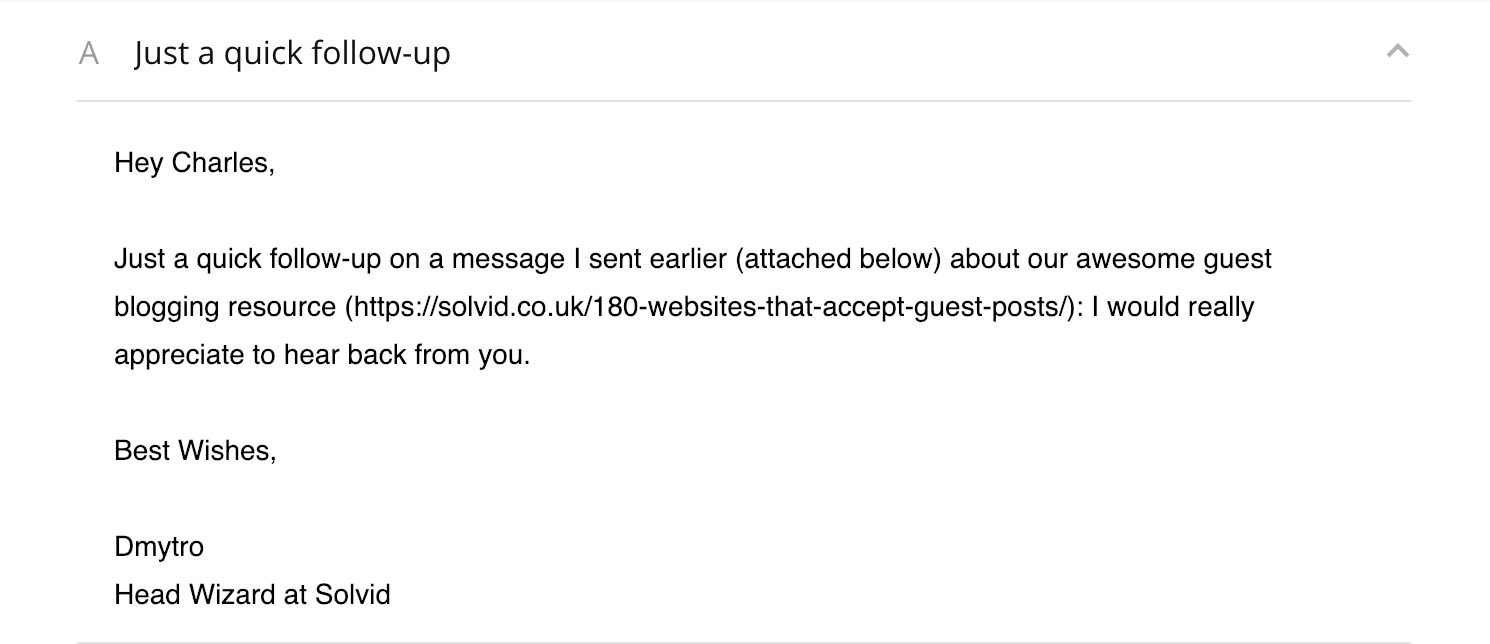
Don’t be afraid to follow up on your emails. It can be easy to perceive the use of follow-ups as a nuisance or spammy, but in reality, a second email tends to work wonders in getting your content noticed.

example of a follow up email for email outreach

There are many reasons why recipients don’t read emails the first time around; it could’ve been received at a busy time in their day, or deleted by accident, or simply missed. Here, a follow-up offers your target a second chance to see your content and acknowledge your outreach.

Be sure to specify that your email is a follow-up – this shows that you’ve been in touch prior and clearly value the recipient’s attention. Also be sure to note when you sent your initial email for ease of reference.

While it’s worth sending more than one follow-up email to maximize your recipient’s chances to respond, we advise against mailing more than two chasers in order to limit the risk of being considered spam, or worse, being blacklisted.

Dmytro Spilka is Head Wiz at Solvid Digital. He can be found on Twitter at @spilkadi.

The post How I got 80% open rate in my email outreach campaign appeared first on Search Engine Watch.


source https://searchenginewatch.com/2019/02/16/how-I-got-80-open-rate-in-my-email-outreach-campaign/

Tuesday, 19 March 2019

Why bother with user experience: UX tips for SEO experts and business owners

The times when ranking high in search results as the final goal have passed.

As search algorithms are improving and there’s no place for keyword stuffing anymore, SEO experts should adopt for trends coming and replacing each other too fast.

Today SEO involves loads of practices including link building, technical optimization, proper keyword research, and more. Although the process of boosting websites’ rankings is challenging enough, it isn’t the only task SEO specialists should cope with. To help businesses engage their target audience and make them convert is the problem falling to SEO practitioners as well.

Here comes the need for UX optimization, which is impossible not knowing what matters most of all for the target audience coming to the specific website. In this article, I’ll tell you about the most important steps to focus on for your customers and how to improve the user experience.

The debate rages: How much does UX count?

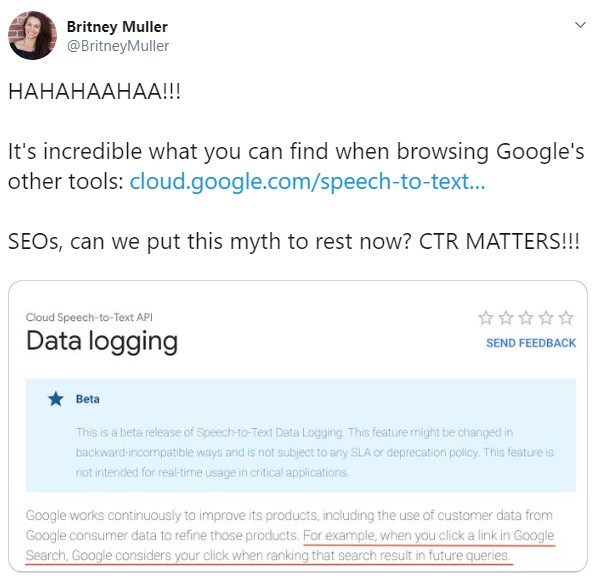
UX = CTR in some way. The debate about CTR among SEOs is evergreen, really. Everyone tries to defend his or her point of view despite Google’s statements on this issue. And recently, a new wave of discussion sparked up after the tweet of Moz SEO, Britney Muller. She tweeted about a new Google document that implies CTR matters for ranking.

Screenshot of Britney Muller's tweet

Different SEO specialists expressed their opinions and tried to confirm or deny this fact, as several weeks before that Google also said CTR for ranking is made up.

For example, Barry Schwartz said that this new doc is “Confusing. Google did write “when you click a link in Google Search, Google considers your click when ranking that search result in future queries.” They should clarify that it is used for personalized search.”

Also read: Google RankBrain: Clearing up the myths and misconceptions

Regardless of all these debates, CTR and UX itself is a great practice. Even if it doesn’t improve your rankings, it’ll make your site more understandable, comfortable, and informative for visitors.

Why should SEO pros bother with user experience?

It may seem that being number one on Google search results is key to an engaging audience and driving conversions. It’s not quite so. Every improvement of search algorithms Google brought in recent years is focused on providing user-friendly results. Of course, domain authority and quality links are still important, but if the website ranked top has poor user experience, it may lose its positions soon.

How does it happen? Well, let’s assume your website is technically optimized, has a perfect content-to-keywords balance, and has links even from .edu domains. All these factors are most likely to result in high rankings.

But if the site is not fulfilling users’ expectations, it may take a dip as quickly as it’s rocketed. Once people that clicked through your website aren’t satisfied with the result, they’ll leave it quickly. The next time Google updates search results, it’ll see that your page’s bounce rate is too high.

The numbers will point to the fact your site isn’t relevant to the query, and it shouldn’t rank that high.

Bounce rate isn’t the only factor search engines consider when analyzing user experience. There are also such signals as pages per session, dwell-time, and organic CTR. As you see, the tasks of an experienced SEO specialist are much broader than it used to be several years ago. But the results cost the effort.

Best practices for UX improvement

The good news is that you already know these practices. The only difference is that using them now, you should concentrate not on the search engines’ requirements but on meeting the needs of your visitors.

Let me take you through the user’s journey point by point and emphasize on crucial aspects influencing his or her decisions. Here we go.

Search query

Where does the search journey start? Right, everything starts from the query. Once users have questions, they go to search engines and ask them. That’s why knowing what your potential customers are likely to look for is half-way to success.

The knowledge of queries your target audience conducts helps you come up not only with content ideas but also with key phrases your page should rank for. There are several questions you should answer to make your keyword research user-focused:

1. Do you consider user intent?

The thing is that every user conducting a search query has a certain intent. In other words, there’s always the reason why a person searches for something. If I search for “iPhone price”, there’s a 90 percent probability that I want to buy the smartphone. In this case, Google will provide me with various online stores. Searching for “Apple or Samsung”, it’s most likely I want to read the articles where authors compare devices produced by these two companies. And again, the search engine will get it.

Therefore, it’s essential to denote the intent of the content you provide. If you own an online shop, you should mark transactional intent on your page. Add “buy”, “price”, “purchase”, “on sale”, and other related keywords. If you run a blog, use the phrases with “how to”, “what is”, “best tips”, and more. Denoting intent not only helps search engines rank your website for the relevant queries but also provides users with a better understanding of what they’ll see on your page.

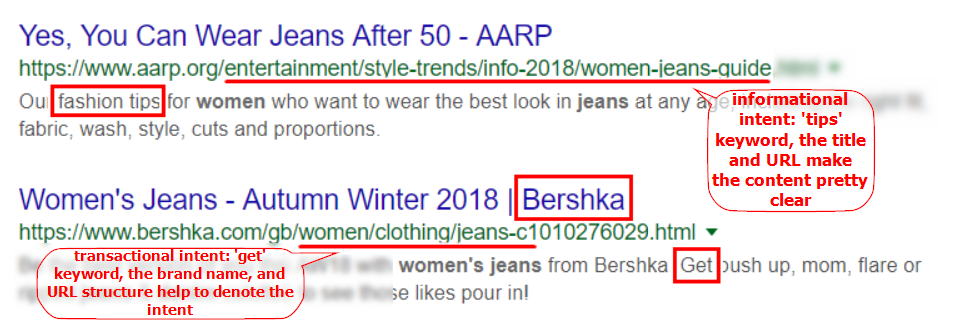
Moreover, users quite often don’t mark their intent in their search queries. One can type “women jeans”, and the machine won’t be 100 percent sure whether a person wants to get some fashion tips or purchase jeans. In this case, the search results will contain both informational and transactional websites. To help your prospects understand if they should click through your site, you’d better denote what type of service you provide.

Example of using transactional meta content in the SERP

2. What queries do your prospects conduct?

Even if you think you understand what kind of information concerning your product your target audience may be interested in, don’t jump to conclusions. Working in a niche is pretty different from being a consumer. The words you use to describe what you do may be absolutely unknown for people searching for your product at first.

As we concluded it’s important to know what kind of search queries your potential customer’s conduct. I’ll show you the quickest ways to identify these queries.

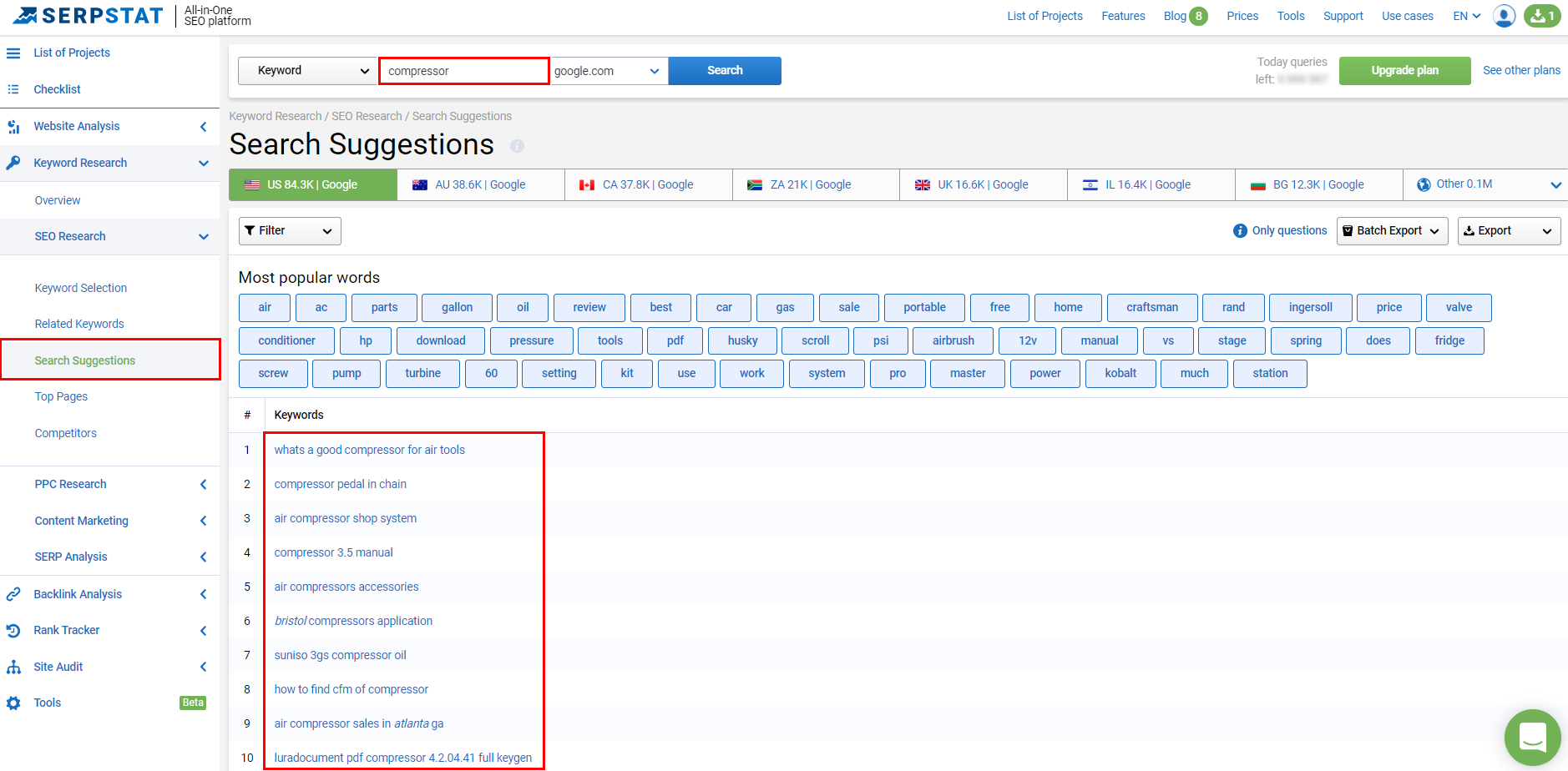
  • Serpstat Search Suggestions: Providing the opportunity to research keywords, analyze competitors’ websites, and conduct SEO audit, this tool also provides you with search suggestions related to the researched keyword. These are the queries usually popping up when you start typing your keyword in the search field. Instead of collecting all these variations of queries by yourself, you can go with this tool.

Examples of search suggestions in SERPSTAT

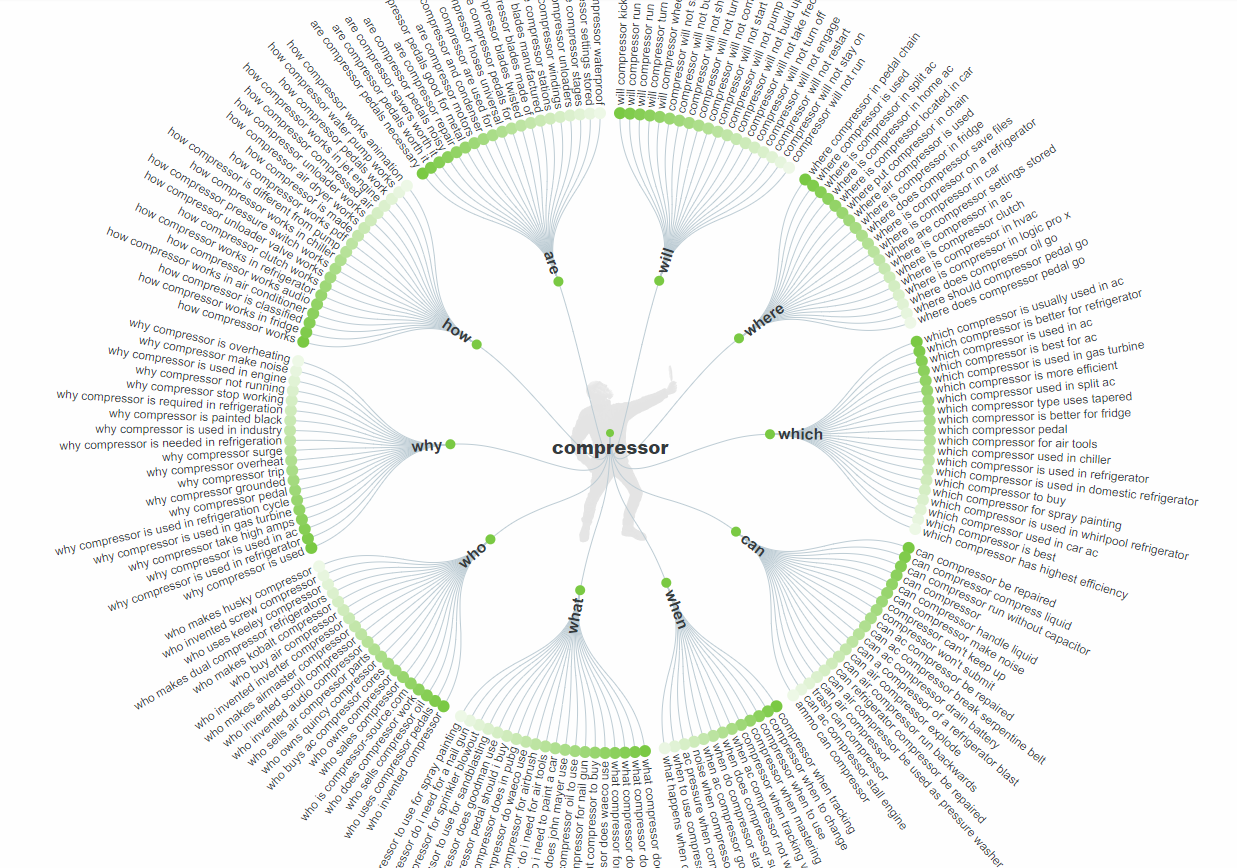
  • Answer The Public: This tool specializes in content ideas and keyword research. Enter your main keyword in the search field, and you’ll see the list of questions users ask on the subject.

Screenshot of search queries in Answer The Public

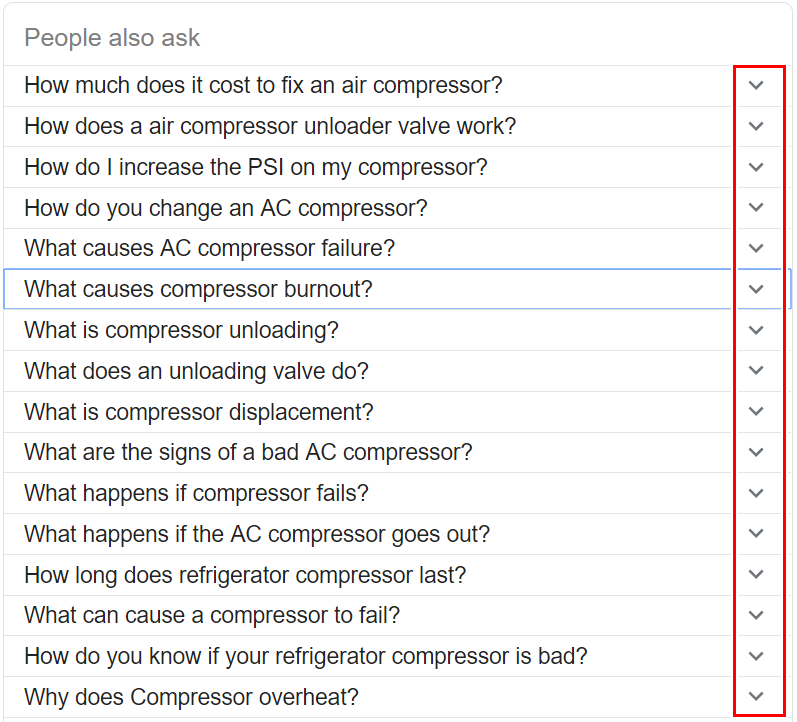
  • People also ask: I mean the box in SERP appearing among the search results engines provides to your query. If you pay attention to it, you may find lots of relevant suggestions for you to use in the future. Tap on the arrow near the questions, and you’ll see even more variations.

Example of People also ask in Google SERP

Snippets

The next step users undertake after entering the search query is choosing which website from all the search results provides the most comprehensive information. And how do they make a decision? Right, they judge by what they see in the snippet.

The website may contain high-quality and relevant content, but failing to denote it in the snippet, decreases its chances to get high traffic dramatically. In fact, there are two pieces of metadata influencing how your snippet may look.

1. Title tag & meta description

Of course, creating a catchy and intriguing title and description is essential in case you want to attract the audience’s attention. But you should be careful. In the way, a boring title will bring you little profit, the too promising one will also do you no good.

You may say: “There are loads of posts on the subject, I should make my page stand out.” I agree. Partly. You should stand out. But with unique and quality content, not with false promises in your snippets.

Once you promised something that you don’t provide on your page, it’ll increase your bounce rate and hurt user experience.

So, when creating a title tag and meta description, make sure you:

  • Provide the main idea of your content in the title
  • Emphasize on your competitive advantage in your description
  • Denote user intent
  • Don’t spam with keyword stuffing
  • Don’t make false promises

2. Page speed

After your audience clicked through your website, there’s one more thing they’ll face before seeing the page itself. Page speed is the factor considered not only by search robots but also by users.

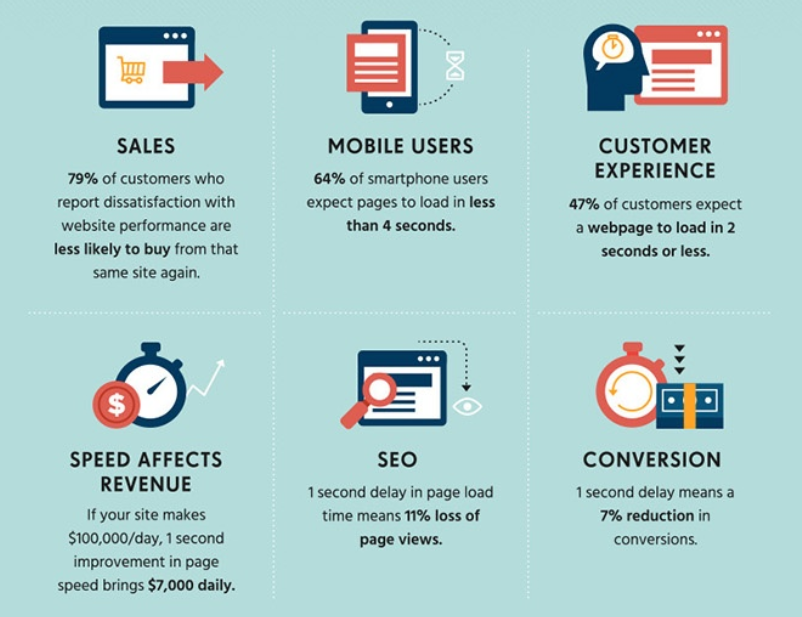
If a person (especially a mobile user) should wait for more than several seconds for your server to answer, the chances he or she will return to search results are quite significant. Here’s an infographic by HubSpot.

Infographic on page speed stats and facts

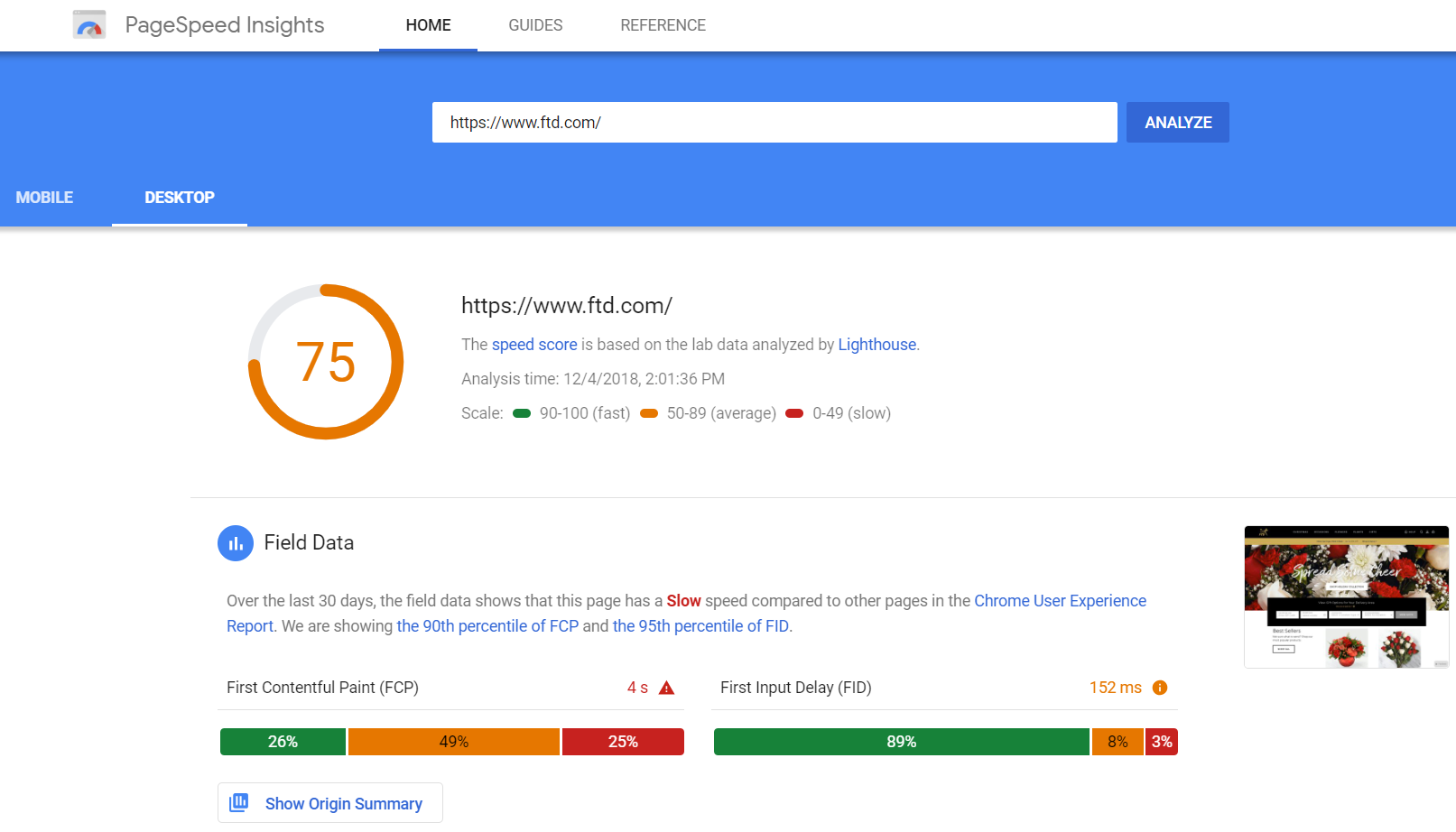
There are services, such as PageSpeed Insights, Serpstat, and Moz, which analyze web pages’ loading speed and generate suggestions to make them faster.

Screenshot of PageSpeed Insights - desktop

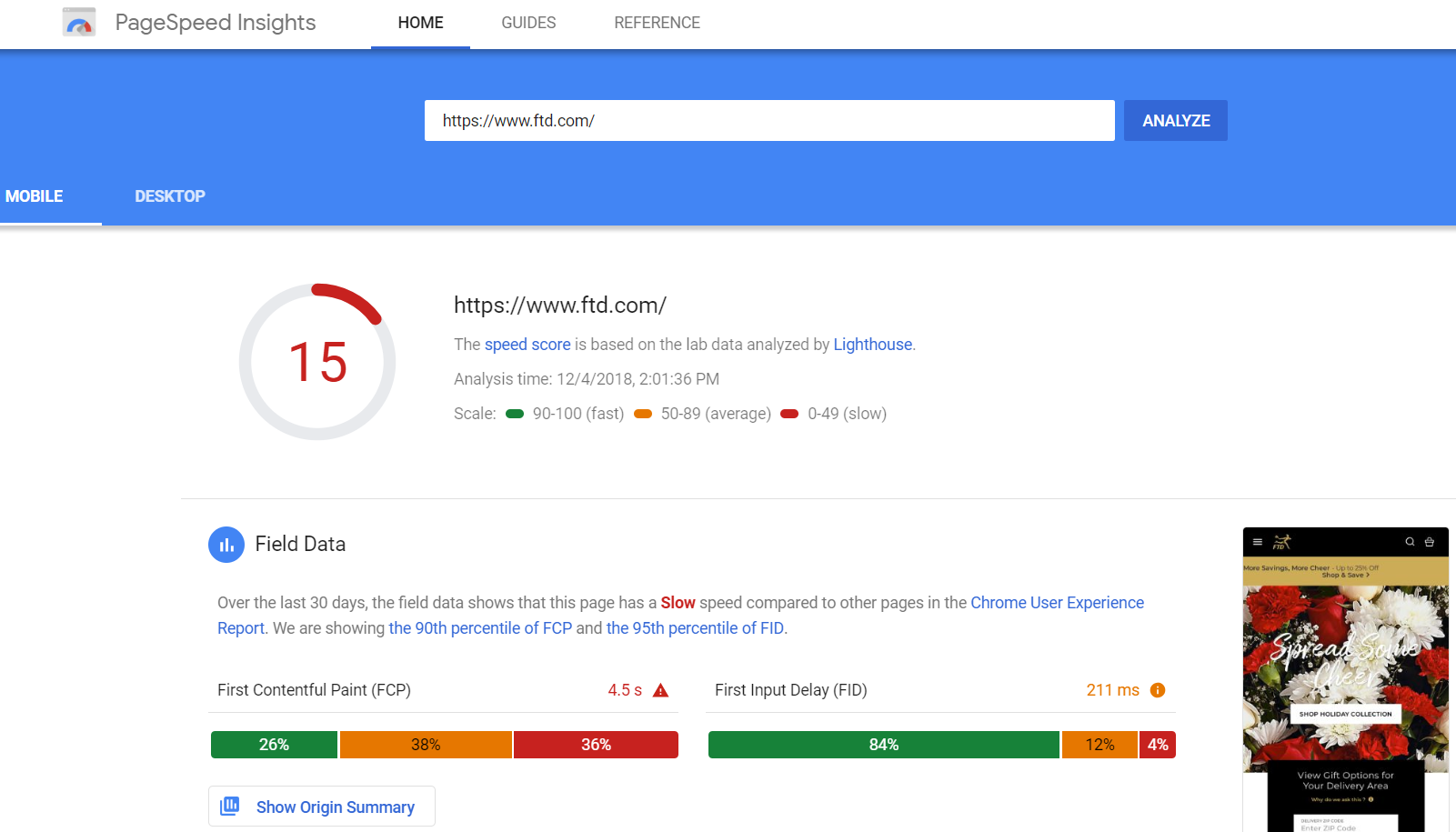
Never forget that 48.2 percent of web page views worldwide account for mobile device users. So, if you don’t want to damage the user experience, it’s worth checking whether your website is mobile-friendly or not. Click on “mobile” to see the analysis of your mobile version. You may be surprised to see that these two versions differ a lot.

Screenshot of PageSpeed Insights - mobile

Design & content structure

When people have already chosen your website, clicked through it, and waited for it to get loaded, they see your page. What’s the first thing catching the visitor’s eye? The way it looks. Your content may be incredibly authoritative and trustworthy, but once users see it’s impossible to draw the essential data quickly, they might decide the content is too complicated.

I’ve circled out a few tips for you to follow when elaborating your content structure and design:

  • The more minimalistic your website looks, the better. It’s pretty easy to overdo when it comes to design. Concentrate not on unusual fonts but on readability of your content.
  • Provide a clear structure for your texts. Your visitors should see compelling questions or topics you cover in the headings. It’ll denote they’ll get the answers in the paragraphs below.

Example of a well-structured, minimalist page.

  • If your article is long enough, add internal tags to your content in the beginning. It’ll help users navigate if they want to find something specific.

Content outline for navigation and better user experience

Navigation

Mind that lots of visitors don’t come to your website from your home page. Make sure your website is easy to navigate for users to visit different pages of your website. Remember that the more time people spend on your site, the better the user experience it causes.

First of all, your menu button (or hamburger button) should always be handy. It would be the most convenient to create a fixed header for your web pages. Due to such a header, visitors won’t have to scroll the page after they’ve read your content.

Example of the usage of the menu button for good user experiences

Moreover, when unrolled, the menu shouldn’t overlap the page content. Talking of overlapping, try to avoid pop-ups. All the advertisements overtaking the article every minute cause extremely poor user experience.

Don’t forget to provide clearly labeled categories on the menu. Everything should be organized logically. To make your website even more convenient in the usage, add a search box. If visitors aren’t sure which category contains the necessary information, this box will help a lot.

Never stop testing

Here were the basic tips which may help you improve UX for your website. Following them is the start, not the finish line. UX tendencies are changing almost as often as search algorithms do.

Always look for ways of improving your strategies. Track users’ reactions to your new posts. ask yourself, “Did the conversions improve when you applied a new design?” Analyze all the changes whether they’re good or not and discover how you can develop user experience.

Inna Yatsyna is a Brand and Community Development Specialist at Serpstat. She can be found on Twitter @erin_yat.

The post Why bother with user experience: UX tips for SEO experts and business owners appeared first on Search Engine Watch.


source https://searchenginewatch.com/2019/03/25/why-bother-with-user-experience-ux-tips-for-seo-experts-business-owners/

Five proven content formats to maximize link acquisition with digital PR

When it comes to link building using digital PR, it’s important that you start with the story.

A great story can be told in many different ways. However, you’ll struggle to gain traction when there’s either a lack of it or a poor story regardless of what format you choose.

That means, almost ignoring the end format of your asset (infographic, interactive, and the others) until you’ve got a solid concept with strong headlines.

That said, there’s a lot to be said for spending the time to let yourself be inspired and to understand which formats are working for other brands.

Here, I’ll showcase five proven formats which help maximize link acquisition in a digital PR campaign, placing a focus upon specific campaign types as opposed to simply the visual delivery.

I’ll look at why each format is often successful at earning links and share campaign examples (to note; these aren’t all campaigns which I’ve been involved in, but ones which I love and have been inspired myself by).

(To note: All linking root domain statistics have been taken from ahrefs using the “Historical” figure. Correct as of 13th February 2019.)

1. Maps

Maps are a great format to use when running a digital PR campaign for two main reasons:

  • Due to the nature of the format, they make it possible to take campaigns out to multiple regions; thus hooking in angles to journalists at publications who focus on a specific geographical region as well as either national or international ones.
  • They’re a simple but effective way to display data or simple stats and are generally easy to embed by publishers.

When choosing a map as the most suitable format for your campaign, you need to be thinking of simplicity to avoid a design which looks too busy and need to have a comparable thing to compare either across regions or countries.

Whether you opt for a map which showcases regional differences across a country (think city vs city or state vs state), within a continent (think European countries or cities compared) or global; you need to ensure that the data is available as the format can fall down with too many gaps.

Ready to be inspired? Here’s three totally different, but equally great, map-based campaigns:

Veygo – The world’s most desired motors

The world's most desired motors

Linking Root Domains: 114

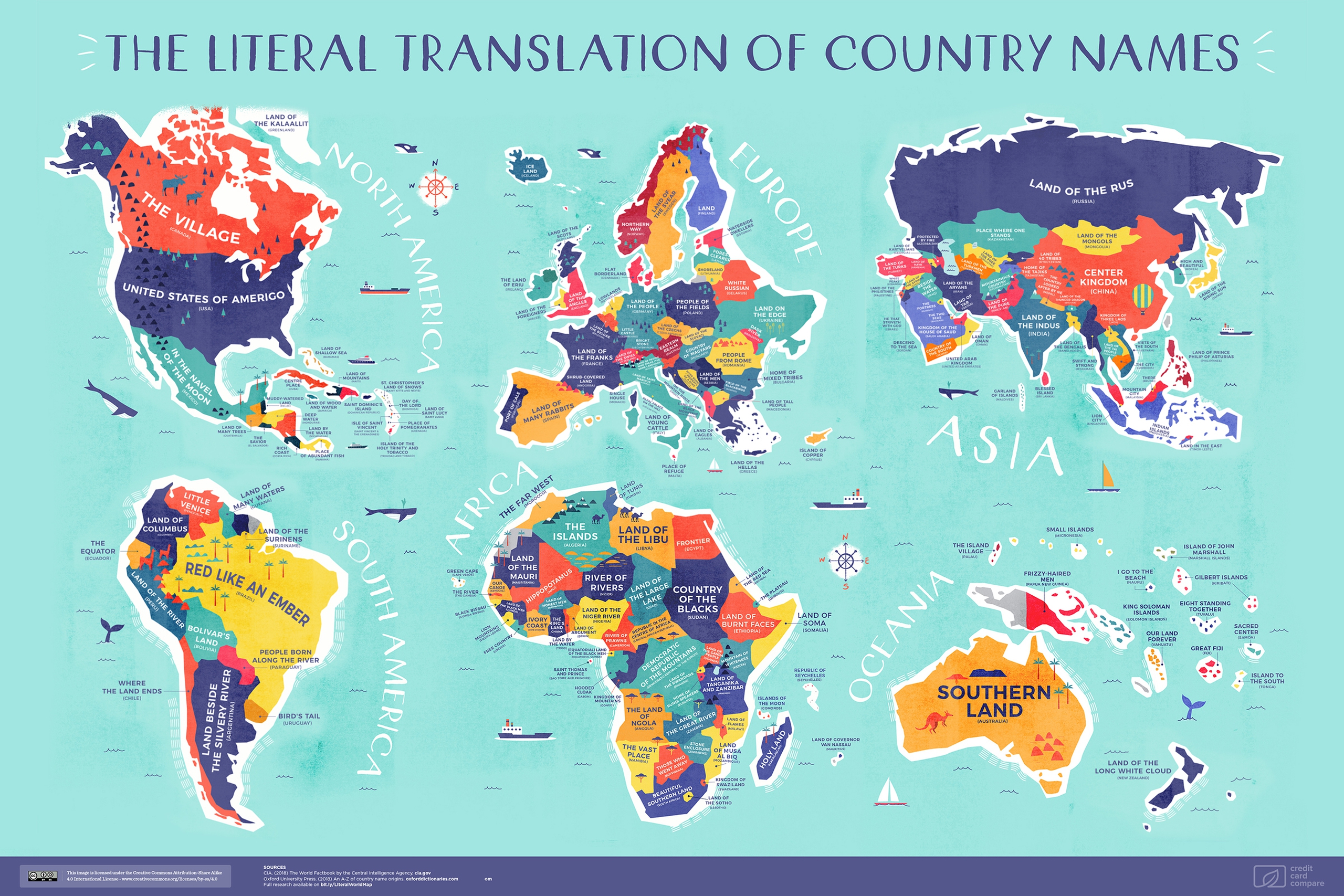
Credit Card Compare – The literal translation of country names

Map examples of Credit Card Compare's literal translation of country names

Linking Root Domains: 277

Expedia – Mythical creatures and where to find them

Map of Expedia on Mythical creatures and where to find them

Linking Root Domains: 90

2. Calculators & tools

Calculators and tools are a fantastic way to earn links. Why? For the simple reason that a link becomes a vital part of a journalist’s story. It’d make no sense for them to mention a new tool or calculator (which users can interact with) without linking out to it. It’s common user experience but the main consideration here is that the link adds value to the article. It helps the user to navigate to an asset which they’re being told to try out.

It’s only human nature that we want to find things out and working an element of personalization into a campaign is a great way to drive engagement and help to create a connection with a campaign.

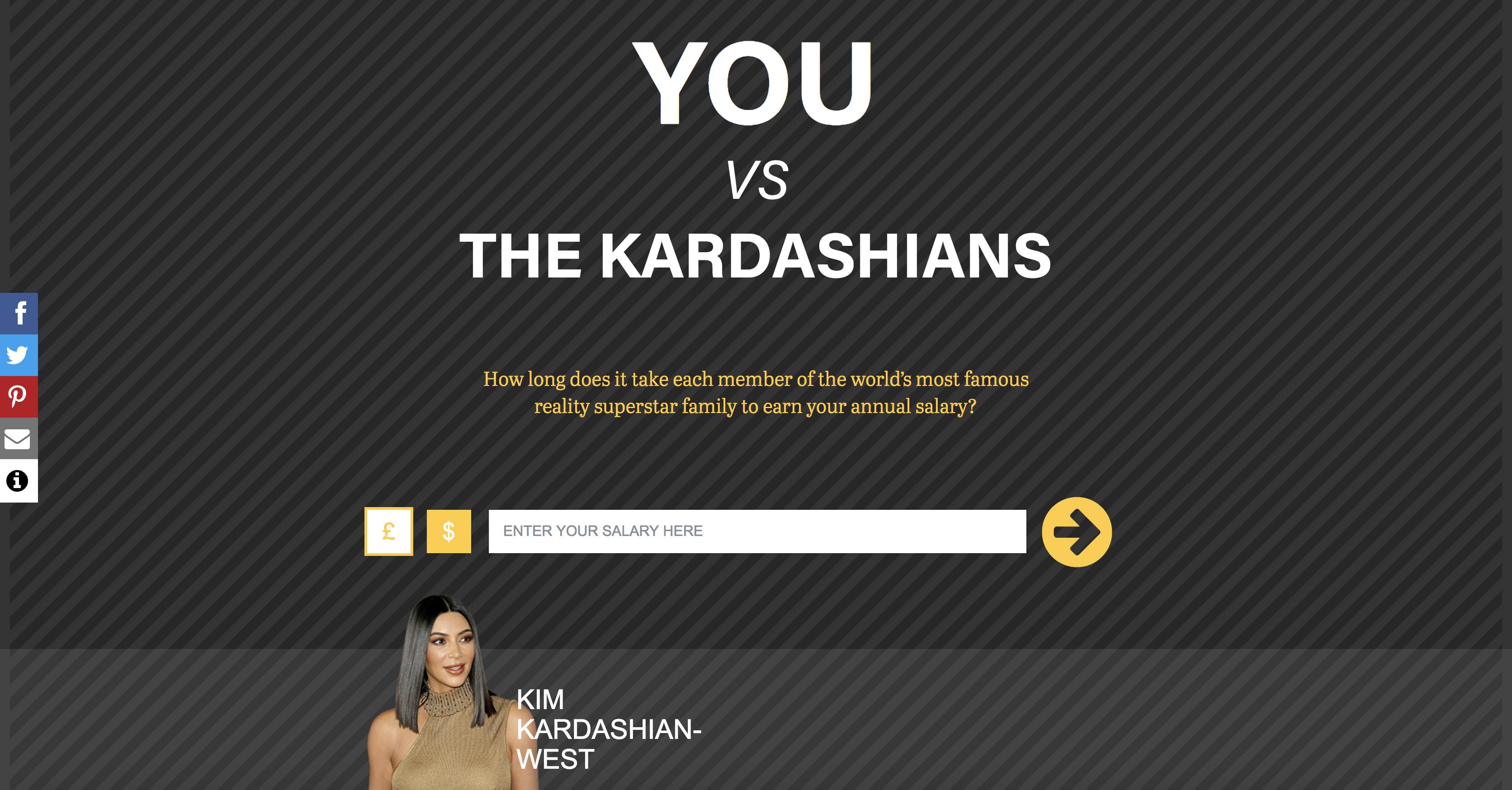
Think about it this way, if you saw an article which mentioned a calculator which could showcase how quickly Kim Kardashian would earn your annual salary (hint: She earns the average annual UK Salary in 6 and a half hours), you’d want to try it out? Wouldn’t you?

Similarly, what if you heard about a tool which allowed you to enter your Instagram handle and be told how much you could be earning from brand collaborations?

Take a look at three very different examples of calculator-led campaigns to feel inspired and start to think of what you could create:

Missy Empire – You vs The Kardashians

Use of calculators by Missy Empire

Linking Root Domains: 219

Inkifi – How much are your Instagram posts worth?

Example of how Inkifi uses calculators to engage audiences

Linking Root Domains: 347

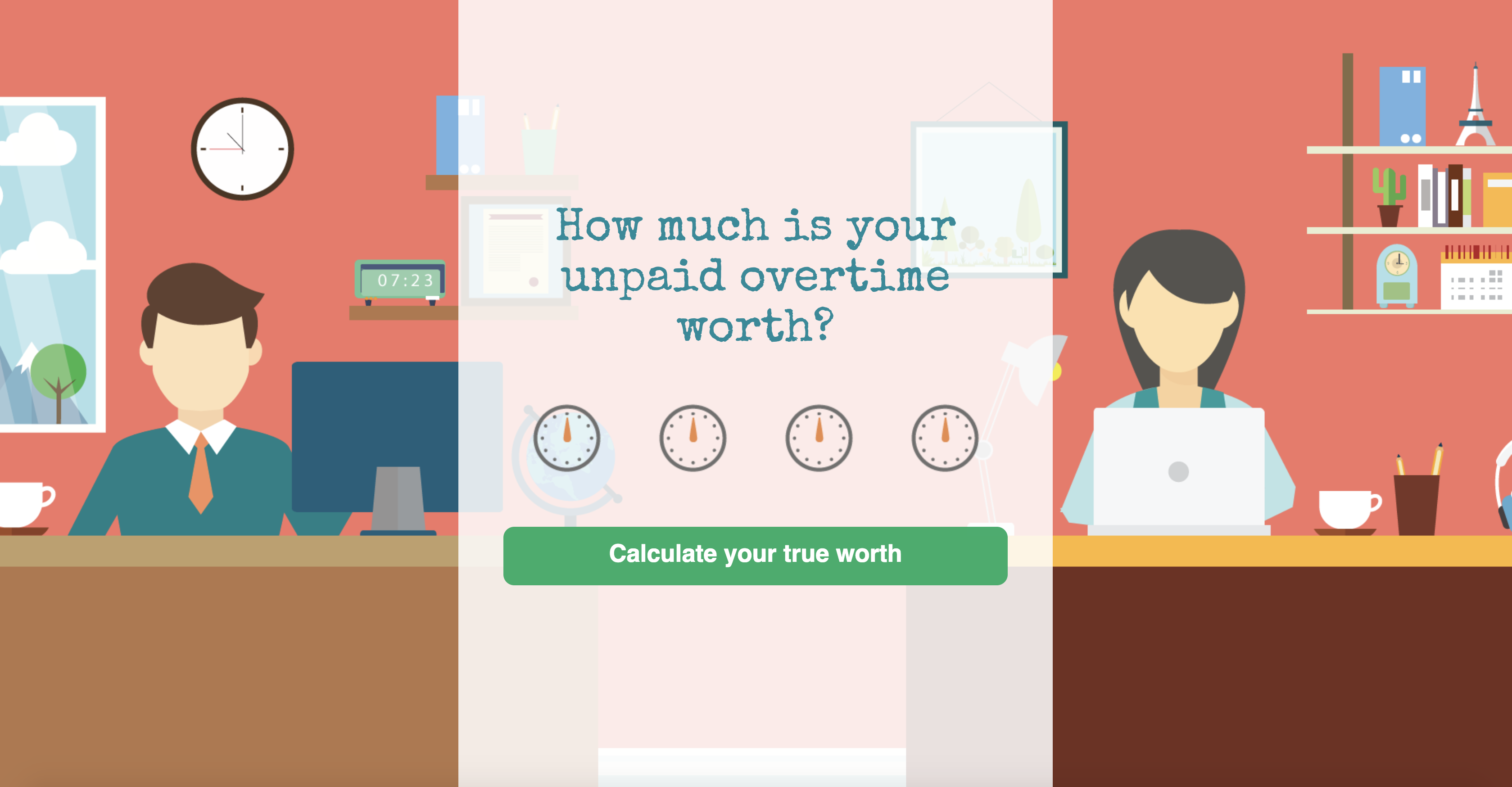
Totally Money – How much is your unpaid overtime worth?

Example of how Totally Money uses calculators to engage audiences

Linking Root Domains: 41

3. Indexes

We love to compare both ourselves and our lifestyles to others and that’s why an index format works so well for content campaigns.

Often used to compare cities or countries, but also seen comparing the popularity of brands, products or similar, indexes are a format which rarely struggles to earn links when backed by strong data.

Think about it this way; if you’re looking at running a campaign which looks at revealing “the best cities in the world for foodie tourists” you’ve got the opportunity to pitch this out to niche food and travel publications and blogs, regional publications (how the local city ranks on the list), national publications (where cities from the country rank), and global publications (to showcase the overall findings).

There are literally so many ways to hook into different sectors of the press with an index-led format and the data behind often reveals some interesting stories. Just be sure your sources are credible.

The challenge with this format is typically what to rank but the beauty is that they can be presented in so many different ways depending on the budget and resources.

Working to a low budget? Show the data and ranking as a table on a blog post. Have a little more resources? Why not design as an infographic? Looking for something even more stunning? Develop an interactive asset where data columns of the index are sortable.

Here are three great examples of campaigns which use this format.

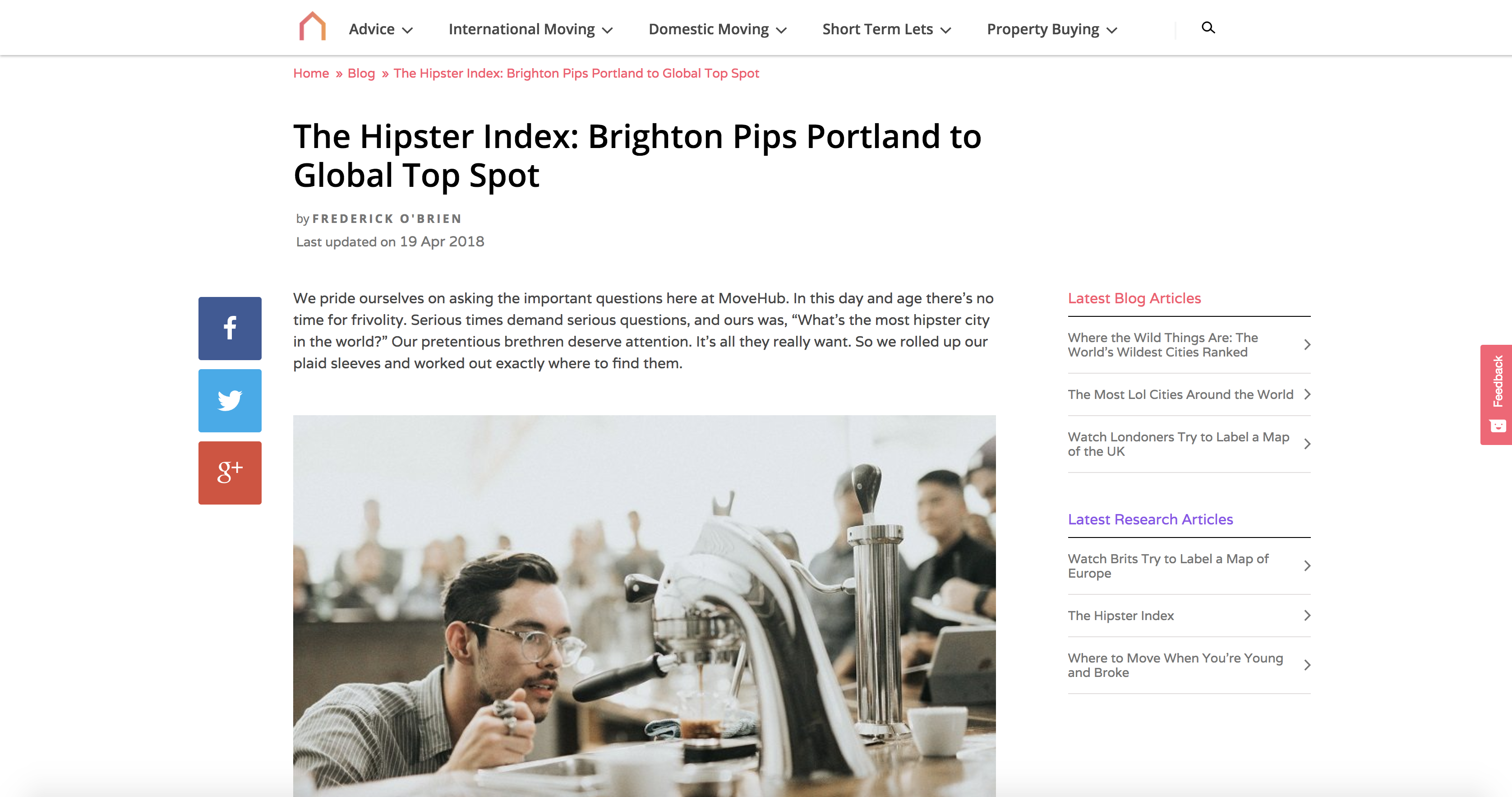
Movehub – The hipster index

Example of Movehub's hipster index

Linking Root Domains: 271

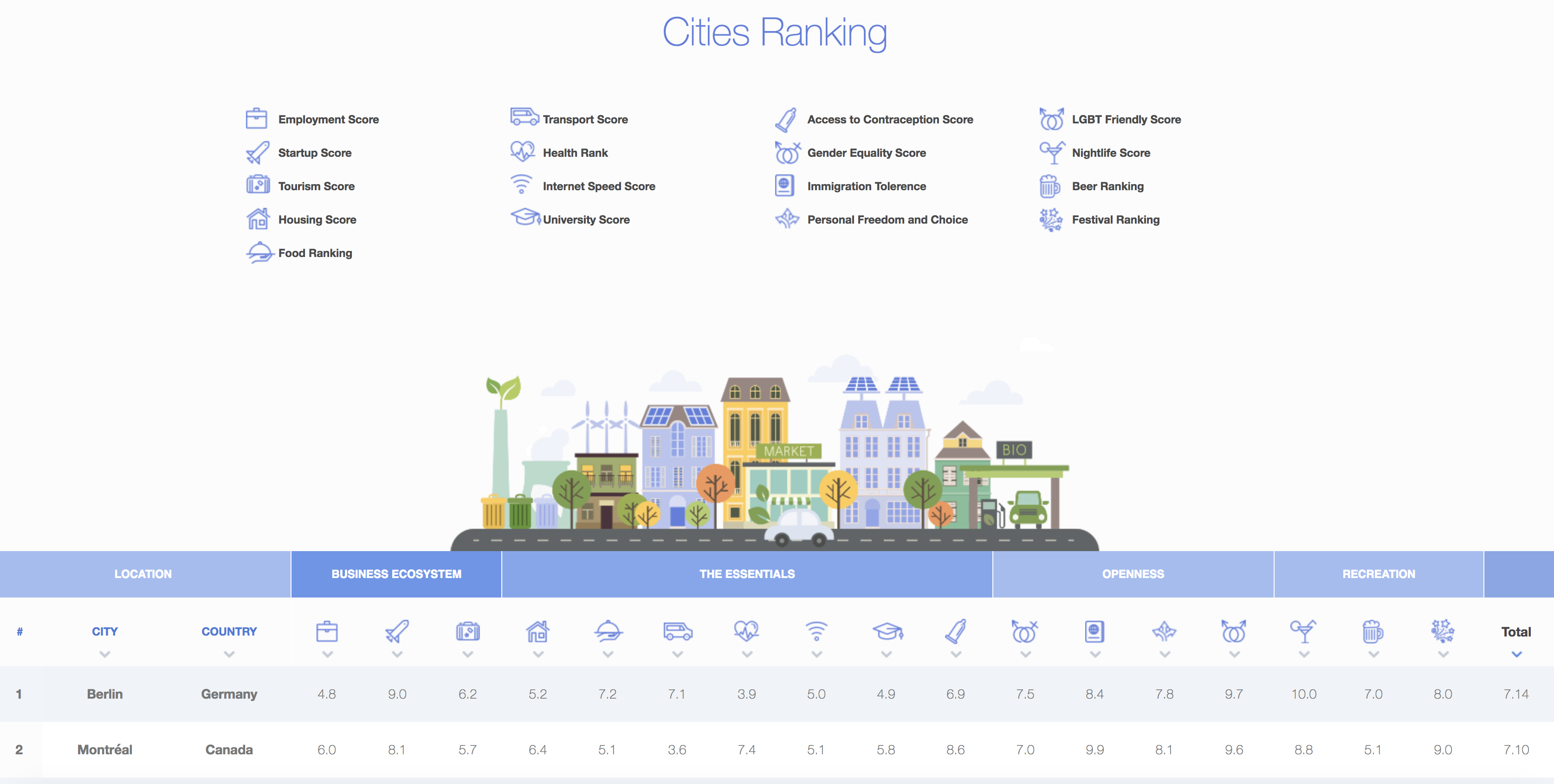
Nestpick – The 2018 millennial cities index

Example of Nestpick's 2018 millennial cities index

Linking Root Domains: 330

Zalando – The world’s most elegant cities

Example of Zalando's most elegant cities

Linking Root Domains: 162

4. Social stat rankings

If you’re looking for a simple but effective campaign format; have you considered conducting a study into the social stats behind a concept?

From the most hashtagged sneakers to the most Instagrammed beaches, there’s plenty of fantastic examples of campaigns of this nature which have earned significant volumes of links yet have been able to be executed in a resource-friendly way.

At the most basic level, to launch a campaign utilizing social statistics, you simply need to find something comparable and collect the hashtag data. There’s also the potential to replicate a similar format utilizing follower-counts of celebrities in a sector or the like.

Are you ready to feel inspired? Here are a few of my favorite social stat campaigns from the past 12 months.

Forward2me – The world’s most Instagrammed sneakers

Forward2me's world's most Instagrammed sneakers campaign

Linking Root Domains: 120

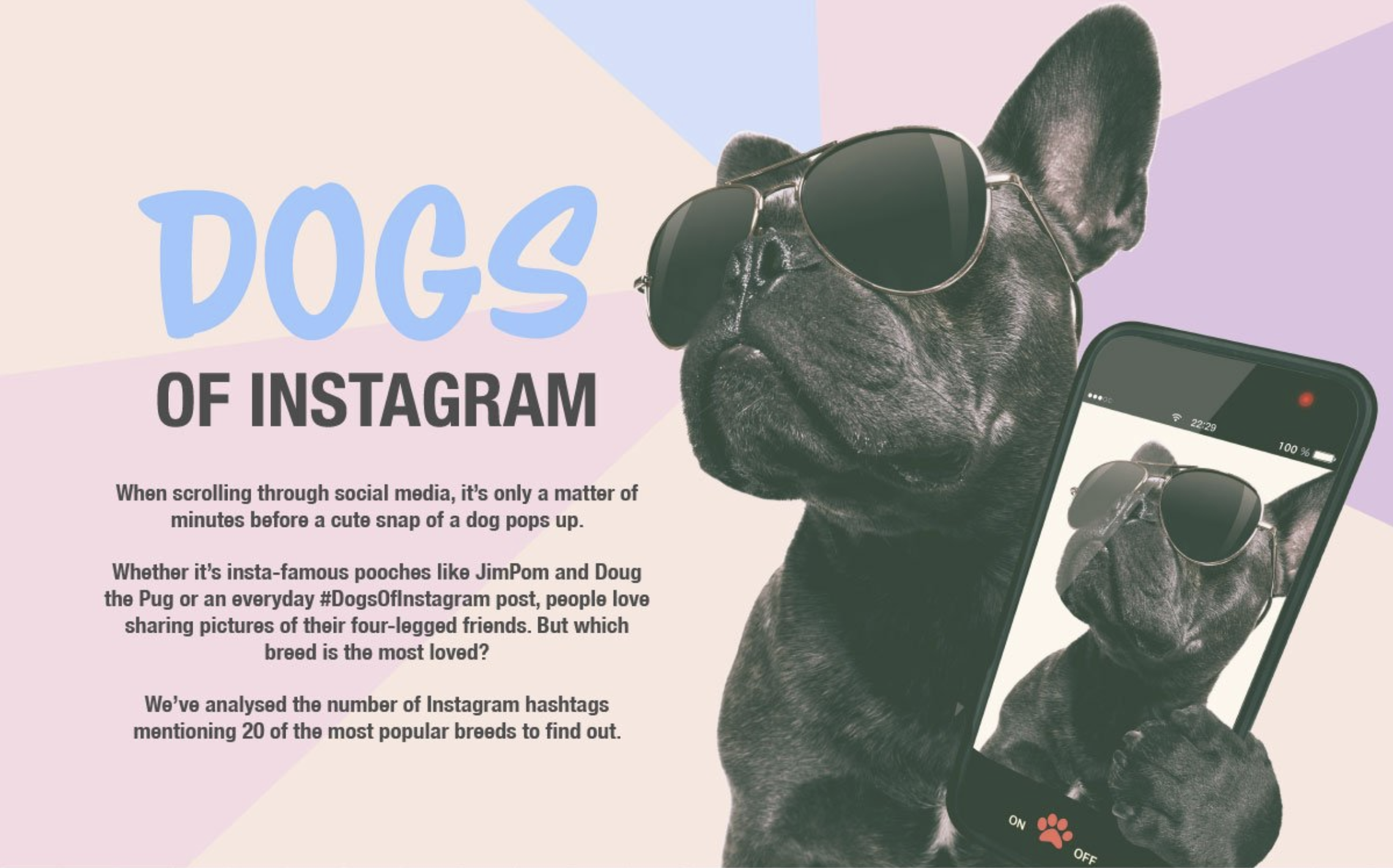
MyVoucherCodes – Dogs of Instagram

MyVoucherCodes' Dogs of Instagram campaign

Linking Root Domains: 42

TravelSupermarket – The best beaches in the world according to Instagram

TravelSupermarket's best beaches in the world campaign

Linking Root Domains: 41

5. Brainteasers

Have you started to notice a trend here?

The campaign examples which I’ve shared aren’t all highly complex data studies or interactive assets and this may come as a surprise.

It’s important to understand when launching a content marketing campaign that simplicity is often the key to success and this last format certainly falls into that category.

Brainteasers have been used by marketers over the past couple of years, often to great success due to their shareable nature and the challenge which they present to users.

So long as you’ve got a great design resource and an imagination, the opportunities are endless with this format and are always fun to work on as well.

Here are a few examples to get your creativity flowing.

Lenstore – Can you spot it?

Lenstore's can you spot it brainteaser campaign

Linking Root Domains: 126

Bloom & Wild – Can you spot the Christmas robin?

Bloom & Wild's Christmas robin brainteaser campaign

Linking Root Domains: 26

Takeaway

When it comes to launching a digital PR campaign where the focus is on earning links, the story always needs to be the priority. However, by taking the time to understand what formats are working for others, you can start to think about ideas in a different way.

If a format is working, it makes sense to learn from this and understand why the stories which go alongside such campaigns resonate so well with publishers.

It’s all about understanding why some formats perform better than others when it comes to earning links and what it is that makes them attractive to publishers. Hopefully the above has given some inspiration for your own campaigns and left you thinking up ideas for what you could launch yourself.

James Brockbank is the Managing Director of Digitaloft, a multi-award winning SEO, PPC & Content Marketing agency. He can be found on Twitter @BrockbankJames.

The post Five proven content formats to maximize link acquisition with digital PR appeared first on Search Engine Watch.


source https://searchenginewatch.com/2019/03/19/content-formats-to-maximize-link-acquisition-with-digital-pr/